---
title: "AI job applications: Workday wants an account by step 3"
description: "What an AI agent meets when it applies to jobs: we opened real postings on Greenhouse, Lever, Workday, LinkedIn, Indeed and Upwork and counted every step."
canonical: "https://scalebrowser.net/blog/ai-job-applications"
last_modified: "2026-10-13"
published: "2026-10-13"
author: "elias"
category: "use-cases"
---
> ## Documentation Index
> Fetch the complete documentation index at: https://scalebrowser.net/llms.txt
> Use this file to discover all available pages before exploring further.
# AI job applications: Workday wants an account by step 3
> What an AI agent meets when it applies to jobs: we opened real postings on Greenhouse, Lever, Workday, LinkedIn, Indeed and Upwork and counted every step.
It's Sunday evening and you have 30 postings saved in a folder. Every one is a different company's form asking the same few things again: your name, your CV, whether you need a visa. An agent can turn that folder into a short list of answers you approve once and a browser that does the typing.
## What is an AI job application agent?
An AI job application agent is an AI that opens an employer's application form in a browser, fills it from your CV and your approved answers, and stops for your go-ahead before it submits. The tools people call by that name come in three kinds:
- **An autofill extension** fills fields on pages you open yourself, and you click through and submit.
- **An auto-apply service** takes your CV and your filters and applies from its own servers.
- **An agent in your own browser** works in a profile that is signed in as you, opens the postings from your list, reads each form as it finds it and hands you the questions it can't answer from your CV.
This article is about the third kind, because it's the one that meets the accounts.
## Which job portals can an agent apply on?
An agent can apply on every portal whose form a visitor can open in a browser, and on 11 October 2026 we opened one posting each on six of them to see where each one asks for an account.
**LinkedIn.** Logged out, LinkedIn showed us the job list and a full posting, and Apply sent us to a "Join LinkedIn now" sign-up page, 4 steps in. Applying takes a signed-in member, so this is where the agent works in your profile.
**Indeed.** The results page and the job details were readable without an account, and "Apply on company site" opened Indeed's sign-in in a new tab after 2 steps.
**Workday.** Workday says it's [used by more than 60 percent of the Fortune 500](https://blog.workday.com/en-us/workday-hits-new-milestone-conversation-with-carl-eschenbach.html). Each employer runs its own Workday site, and on the one we opened the application starts at step 1 of 6, "Create Account/Sign In", after 3 steps.
**Greenhouse and Lever.** Both showed their whole form to a visitor with no account, 2 steps in, with 13 and 10 required fields.
**Upwork.** A public job page was readable, and Apply sent us to the login after 3 steps.
### Why are Workday applications the slowest?
Workday applications are the slowest because the account comes first: our browser needed 17.6 to 20.6 seconds to reach and read Workday's account step, against 5.4 to 8.1 seconds for a whole Greenhouse form and 8.4 to 9.6 for a Lever one. The sign-in page offered Google, LinkedIn or email, and creating an account asked for an email address, a password twice and one consent box. The create-account page names the employer as the one that stores the information, so a second employer on Workday means a second account.
That is the case in [an account for every portal](/blog/ai-agent-login): the profile keeps the sign-in between runs, and the password is typed by the layer below the agent, never by the model. If an employer's Workday site verifies the address by email, the code goes to the agent's own inbox, and Scalebrowser's `read_inbox` waits up to 60 seconds for it and returns up to 25 candidates, as the [inbox documentation](/docs/inboxes) describes. We stopped before creating an account, so no code was sent in these runs.
### What happens at the captcha before submit?
We never met a challenge, because we stopped before Submit on all three postings. We did see that the Greenhouse form ends with a notice that it's protected by reCAPTCHA, and the Lever form carries a widget labelled "Verify" above its Submit button. Scalebrowser has solved 18 challenge types on live widgets with real site keys, and [the captcha before you submit](/blog/captcha-solving) lists the outcomes.
## What does one application run look like?
One run to the first wall takes 5 to 21 seconds of browser time per posting, and it ends before anything is submitted. We filled in nothing and created no account. The timings below are browser time from a script, with no model reading in between: open the posting, find Apply, click, wait until the page settles, read the form.
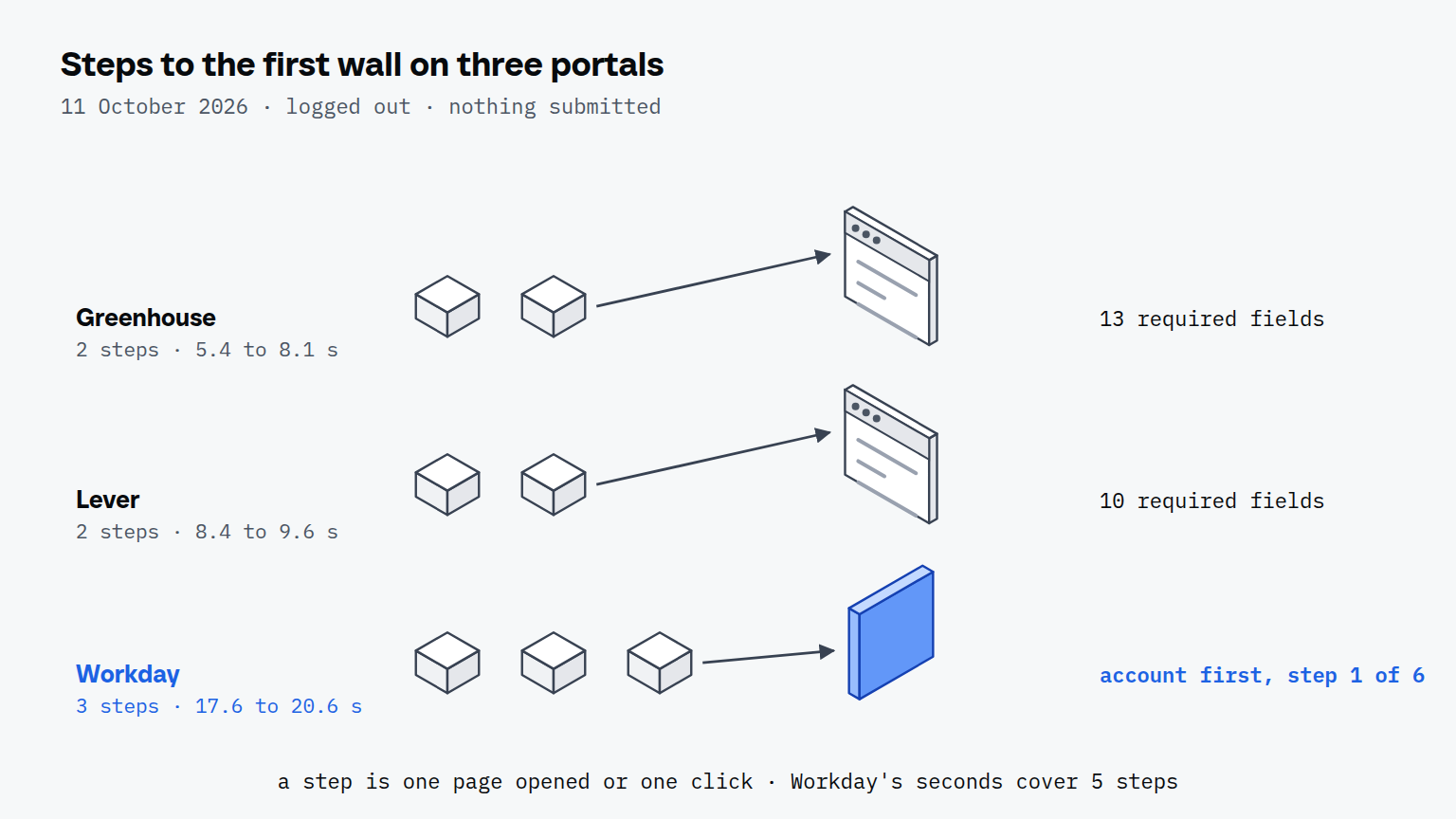
| Portal | Steps to the first wall | What stood there | Required fields seen | Seconds, 3 runs |
| --- | --- | --- | --- | --- |
| Greenhouse | 2 | nothing, the whole form is open | 13 | 5.4 to 8.1 |
| Lever | 2 | nothing, the whole form is open | 10 | 8.4 to 9.6 |
| Workday | 3 | sign in or create an account, step 1 of 6 | 3, plus 1 consent box, for the account | 17.6 to 20.6 (5 steps) |
| LinkedIn | 4 | sign-up page after Apply | not reached | not timed |
| Indeed | 2 | sign-in page after Apply | not reached | not timed |
| Upwork | 3 | login page after Apply | not reached | not timed |
A step is one page opened or one click. The Workday time covers 5 steps, the 3 to the sign-in page and 2 more to open the create-account form and read what it asks. The Greenhouse posting was a fellowship at a software company, which asks for more than most: 4 identity and CV fields, 5 choices such as policy and arbitration agreements, and 4 free-text answers.
What the agent would ask you is visible in the field list. On the Lever posting, 4 of the 10 required fields were the usual ones: CV, name, email and location. The other 6 were questions your CV doesn't answer: the languages you speak, whether you're authorized to work in the country, whether you'll need visa sponsorship, your university, how you heard about the job and whether you agree to an AI notetaker in interviews. Those six are the short list of answers worth approving once.
### How many applications a day make sense?
The number is set by the answers you're willing to read, not by the browser. Thirty Greenhouse or Lever postings at our medians of 6.1 and 9.0 seconds are 3 to 5 minutes of browser time to reach every form, and thirty Workday postings at 18.3 seconds are about 9 minutes. That covers reaching the forms, not filling them. A day's number is the number of tailored answers you'll read before the agent submits. Directory forms are the same job at another scale: [submitting a product to 100 directories](/blog/directory-submission) took three weeks, because 52 of the 100 forms asked for an account first.
## How is this different from ChatGPT's agent?
The difference is whose browser it is: ChatGPT agent works on [a virtual computer that OpenAI runs](https://openai.com/index/introducing-chatgpt-agent/), and a Scalebrowser agent works in a profile on your own machine.
| | ChatGPT agent | An agent in your own browser |
| --- | --- | --- |
| Whose browser | a virtual computer run by OpenAI | the one on your machine |
| Sign-ins | you take over the browser to sign in | kept in the profile; codes arrive in the agent's own inbox |
| After the run | cookies persist by each site's policy; one click in settings deletes the browsing data | the profile stays on your disk, with its cookies, until you delete it |
ChatGPT agent grew out of Operator, and what Operator handed back to the user is in OpenAI's agent for applications.
### What about LinkedIn specifically?
LinkedIn applications run in your signed-in profile, because Apply led to a sign-up page for a visitor. What LinkedIn lets software read through its own interfaces is a separate question, covered in [LinkedIn through an MCP server](/blog/linkedin-mcp).
### Where does the browser run?
The browser runs on your own machine, in the profile that keeps your portal accounts between runs, which is [a browser for every application](/blog/ai-agent-browser). More jobs like this one are collected in the [overview of use cases](/use-cases), and the one that matters here is [agents that sign in](/use-cases/agents-that-sign-in).