---
title: "Directory submission: 100 sent, 32 live, 9 followed links"
description: "We collected 1,166 directories and lists, dropped 597, and let an AI agent submit 100. Which entries went live, which links count and what it cost."
canonical: "https://scalebrowser.net/blog/directory-submission"
last_modified: "2026-10-13"
published: "2026-10-13"
author: "elias"
category: "use-cases"
---
> ## Documentation Index
> Fetch the complete documentation index at: https://scalebrowser.net/llms.txt
> Use this file to discover all available pages before exploring further.
# Directory submission: 100 sent, 32 live, 9 followed links
> We collected 1,166 directories and lists, dropped 597, and let an AI agent submit 100. Which entries went live, which links count and what it cost.
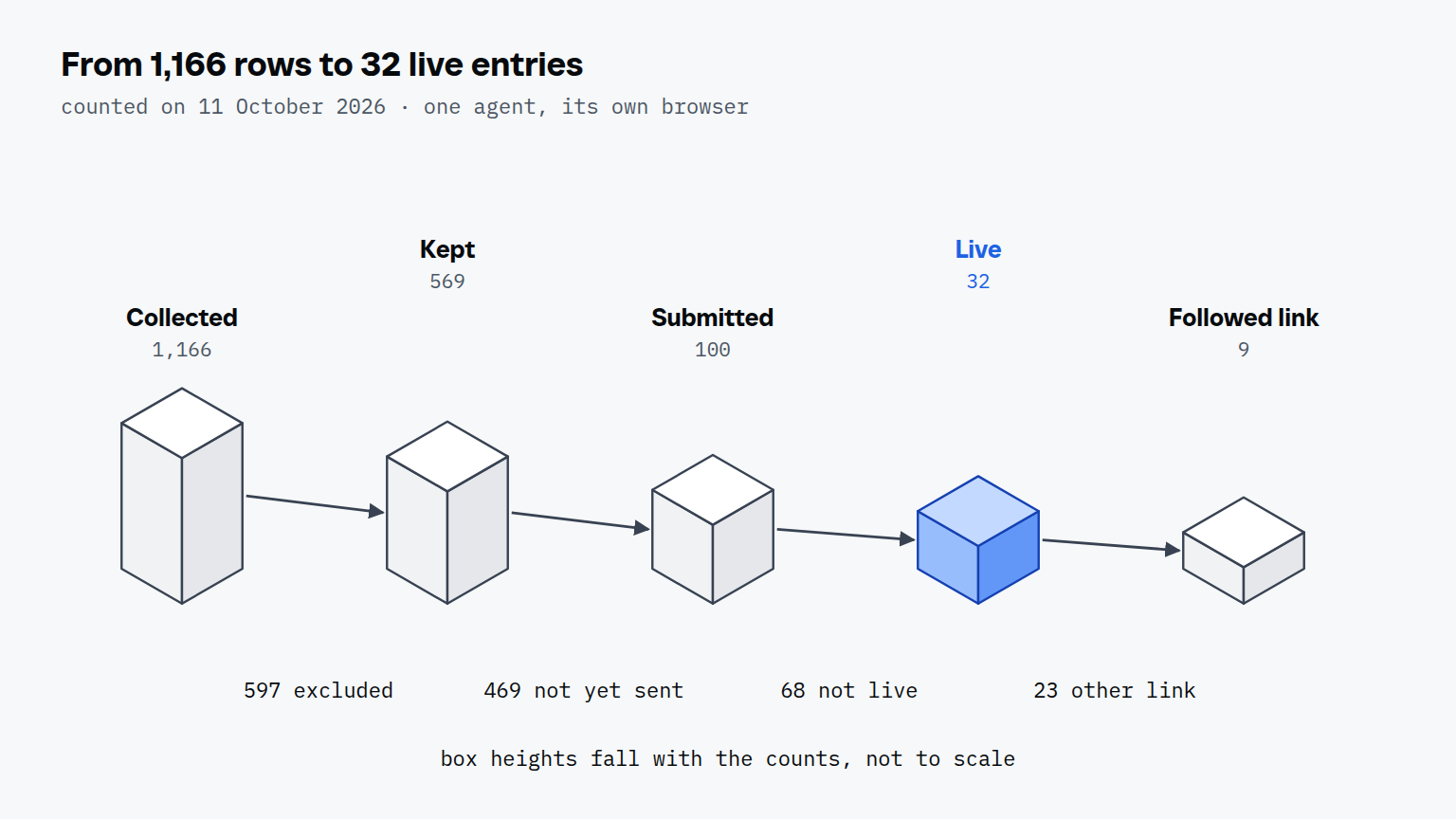
On 16 September the sheet had 1,166 rows and not one listing. Every row was a place where someone might come across Scalebrowser: a directory, a launch site, a review site, a page called "best browser tools for agents". By 11 October an AI agent had submitted 100 of them, and the sheet had a new column that mattered more than all the others: is there a page yet, and does it link to us?
## What is directory submission?
Directory submission is putting a product on a directory, launch site, review site or list so that a page with its name, description and link exists there. In our sheet the 1,166 rows were 502 directories, 337 list articles, 96 launch sites, 77 alternatives pages, 58 review sites, 45 awesome lists on GitHub, 38 marketplaces and 13 we couldn't sort. Collecting them took two days, 16 and 22 September 2026. Submitting took three weeks, 16 September to 7 October, because most forms want an account first.
The agent did the clicking in its own browser. A person did the one thing a form can't check: they approved the listing text, and the agent reused it. Across the 100 submissions the sheet shows 4 versions of that text, used 62, 30, 5 and 3 times.
## Which directories are worth a listing?
Of the 1,166 rows, 569 were worth keeping and 597 were not, and the largest single reason to drop one was a wrong category. A site that has no place for a browser tool can't list one, however good its traffic looks.
| Reason to exclude | Rows |
| --- | --- |
| Wrong category | 229 |
| Dead (the site no longer loads) | 189 |
| Stale (nothing new for a long time) | 40 |
| Link farm | 32 |
| Other: removed by a person (58), off topic (34), duplicate (9), paid with no value (6) | 107 |
| Total excluded | 597 |
Four checks decided each of the 569 that stayed:
1. **Alive.** The site loads today and shows entries from this year.
2. **Right category.** It has a section for browser tools or agent tools.
3. **The entry stays.** It's a permanent page, not a slot that rotates out.
4. **Link type.** The listing links to us, and we know with which mark.
Google's own list of link spam includes [low-quality directory or bookmark site links](https://developers.google.com/search/docs/essentials/spam-policies), which is the case the link-farm row is there for. 27 of the 100 forms also asked for a link back to them, and the same list names excessive link exchanges, so a link request in a form is worth a second look.
How many directories should a new product be on? Our sheet doesn't give a target, it gives a ratio. We sent 100 and 32 were live within 25 days of the first one, so plan on roughly a third of what you send, and a smaller share of that with a link that counts.
## How does an agent submit to a directory?
The agent submits in six steps, and the sign-up is where most forms stop being simple.
1. **Sign up.** 52 of the 100 forms asked for an account. The sheet records 45 accounts the agent created, 19 forms that needed none and 3 sign-ups that stopped it. The other 33 rows don't say.
2. **Confirm the email.** The code or link arrives in the agent's own inbox, as described below.
3. **Fill the form** with the approved text: name, one-line pitch, description, address, category.
4. **Upload what the form asks for.** 8 of the 100 asked for a logo and 2 for screenshots.
5. **Solve the challenge, if there is one.** The notes of only 3 of the 100 entries mention a captcha at all, and one of them says the sign-up had none. Scalebrowser has solved 18 challenge types on live widgets with real site keys, and the outcomes are written up in [the captcha on submission forms](/blog/captcha-solving).
6. **Record the result:** status, date and the address of the new page, in the sheet.
### How does the confirmation email reach the agent?
The confirmation email lands in the inbox of the agent's own profile, and Scalebrowser's `read_inbox` waits up to 60 seconds for it and returns up to 25 candidates, per the [inbox documentation](/docs/inboxes). The agent opens the link or types the code, and the form carries on. The notes of at least 15 entries record an emailed code or a link, the case that confirmation links by email describes in full.
## What did our own submissions show?
Of 100 submissions made between 16 September and 7 October 2026, 32 entries were live on 11 October, and the review sites and marketplaces went live most often.
| Type | Sent | Live |
| --- | --- | --- |
| Directory | 51 | 14 |
| Launch site | 21 | 5 |
| Review site | 15 | 8 |
| Marketplace | 5 | 4 |
| Awesome list | 4 | 0 |
| List article | 3 | 0 |
| Alternatives page | 1 | 1 |
| Total | 100 | 32 |
The live column counts by status, and one live directory was logged without a submission date, so a count of entries that were both sent and live gives 13 directories. The method matters as much as the type. Listings made with an account went live 22 times out of 54, plain forms 10 times out of 38, and the 5 pull requests and 3 emails 0 times out of 8.
The link is the part you can't see from the live page. Of the 32 live entries, 9 carry a followed link, which is a link that search engines count. 10 carry `nofollow` and 1 carries `ugc` (user-generated content), two marks that [Google says](https://developers.google.com/search/docs/crawling-indexing/qualify-outbound-links) it will generally not follow. 4 give no link and 8 haven't been checked yet. 8 of the 9 followed links came from listings made with an account.
Speed depends on how you count. 17 of the 32 were live the same day. 14 took 8 to 20 days, with a median of 11, but those are days until we first saw them live: we checked on 22 to 26 September and again on 6 and 7 October. On 6 and 7 October the median gap between two logged submissions was 14 and 6.5 minutes (14 and 31 entries). That is a pace including sign-up, email code and form, not a stopwatch per form, and the earlier days were logged in batches that can't give one.
None of the 100 cost money; paid slots were skipped, and 6 rows were excluded as paid with no value. 65 entries are still waiting, 3 were rejected, and the slowest live entry took 20 days, so the 32 will grow. In our plan directories come after Reddit, where Reddit's rules on promoting a product set a written condition in 19 of the 27 subreddits we mapped.
### Why not a script or a submission service?
A script or a service fits one form, and the 100 submissions went to 97 different sites, 52 of them wanting an account before anything else. A script has to be written for each form and breaks when one changes; an agent reads the form it finds. Job portals show the same split: in [applications on Workday and Greenhouse](/blog/ai-job-applications) the Workday form began with an account after 3 steps and the Greenhouse form was open after 2. If you want to see where that line falls for other jobs, browser automation for forms covers the three ways to drive a browser.
#### Where does the browser run?
The browser runs on your own machine, in a profile that keeps its sign-ins, so the accounts the agent created stay yours. That is [the browser that fills each form](/blog/ai-agent-browser). More jobs of this kind, one run repeated a hundred times, are collected in the [overview of use cases](/use-cases) and on the page for [repeat work](/use-cases/repeat-work).