---
title: "Geolocation and timezone spoofing: 5 checks behind 1 proxy"
description: "Geolocation and timezone spoofing behind a proxy: the 5 places a location shows, which one anchors the rest, and why an unknown exit is left untouched."
canonical: "https://scalebrowser.net/blog/geolocation-spoofing"
last_modified: "2026-10-25"
published: "2026-10-25"
author: "davide"
category: "proxies"
---
> ## Documentation Index
> Fetch the complete documentation index at: https://scalebrowser.net/llms.txt
> Use this file to discover all available pages before exploring further.
# Geolocation and timezone spoofing: 5 checks behind 1 proxy
> Geolocation and timezone spoofing behind a proxy: the 5 places a location shows, which one anchors the rest, and why an unknown exit is left untouched.
The proxy exits in Chicago, the browser's clock says Berlin, and the page has noticed before the agent clicked anything. On the free path the fix is a pair of options set by hand, a timezone here and a locale there, and they stay correct only until the proxy rotates to another city. A location shows in five places in a browser, and each of them is compared with the address the proxy exits from.
## What is geolocation spoofing?
Geolocation spoofing is making a browser report a location other than the machine's own on every surface a page can read. There are four such surfaces: the timezone of the clock, the locale (the language list and the way dates and numbers are formatted), the Accept-Language header sent with every request, and the Geolocation API. The last one is gated: the W3C specification calls geolocation "a powerful feature that requires express permission from an end-user before any location data is shared". The other three answer without asking.
For an agent behind a proxy, the target location is not a choice. The site already knows where the exit address is, so the job is agreement, not invention: each surface either matches the exit or contradicts it. What the reputation of the exit address does to a run is covered in [IP reputation for browser automation](/blog/ip-reputation).
## Which 5 checks locate a proxy exit?
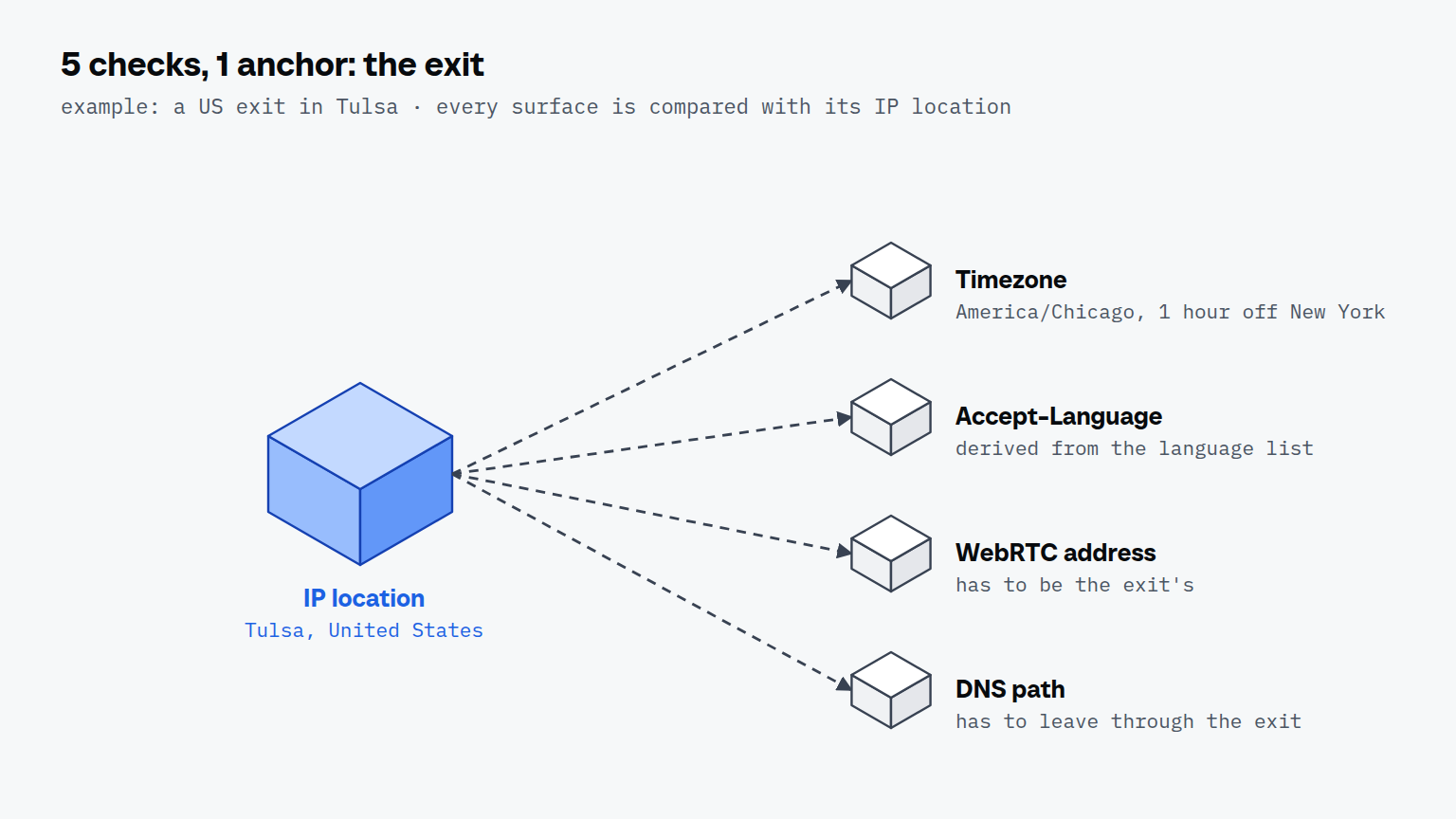
Five checks locate a proxy exit, and the first is the anchor the other four are compared with:
1. **IP location and network.** A geo lookup places the exit address in a country and a city and [names the network that owns it](/check/network). Everything else has to agree with this answer, the Geolocation API included: the [W3C specification](https://www.w3.org/TR/geolocation/) lists "IP address" among the "common sources of location information".
2. **Timezone.** One line of JavaScript [returns the clock's zone](/check/timezone). Within a country the zone follows the address, not the capital: an exit in Tulsa belongs to `America/Chicago`, 1 hour off `America/New_York`.
3. **Language list and Accept-Language.** The header is derived from the language list, and a site compares both with the exit country and with each other.
4. **WebRTC candidate address.** WebRTC can report a public address of its own, which has to be the exit's.
5. **DNS path.** A browser that resolves hostnames itself [sends its lookups from the machine's own network](/check/dns-leak), where the proxy never sees them.
The third check is the one we have a hard number for. Against PayPal, which runs DataDome, two spellings of the same Austrian German language list decided the page, and nothing else changed between the runs.
| Accept-Language variant | What DataDome served | Cookies set | Runs |
| --- | --- | --- | --- |
| A, one tag twice with two quality weights | block page | 3 | 2 |
| B, well-formed, as Chrome derives it | PayPal login page | 19 | 2 |
The spread between runs of the same variant was zero. The block page named the IP address as its reason, which was wrong: a real Chrome on the same line got the login page, and the header was the cause.
On the free path each of these surfaces is a separate option. Playwright's own [emulation guide](https://playwright.dev/docs/emulation) sets them per browser context, and nothing ties them to the proxy.
| Surface | Playwright option | What it covers when unset or set |
| --- | --- | --- |
| Timezone | `timezoneId` | "Defaults to the system timezone" |
| Language and Accept-Language | `locale` | "`navigator.language` value, `Accept-Language` request header value as well as number and date formatting rules" |
| Geolocation API | `geolocation` plus the `geolocation` permission | latitude and longitude, context-wide |
| IP location | `proxy` | the address; the other options do not follow it |
| WebRTC and DNS | none | depends on the proxy type and the browser's defaults |
Scalebrowser ties all five to the exit: the lookup places the address, the locale follows it, and WebRTC and DNS go through the proxy by construction. Under the default geo mode, `follow_exit`, it writes the timezone, the language list and the Accept-Language header as one row out of a table of 62 countries, at creation and again at every launch. The language list is the one real Chrome sends there, and the zone is the one Chrome on Windows reports for the address; the [coherence documentation](/docs/coherence) describes the modes in full.
## What happens when the exit is unknown?
When the exit's country is unknown, Scalebrowser changes nothing and leaves the profile exactly as it was. The same holds for a country outside the 62-country table. A reported zone that belongs to another country is not adopted either; the profile then gets its exit country's canonical zone. A half-aligned identity is louder than an honest mismatch: a timezone from one country beside a language list and date format from another is a contradiction a checker finds with one comparison, while a profile that is merely in the wrong country is at least consistent with itself.
That is the same rule that governs [what a fingerprint reads](/blog/browser-fingerprinting). A checker rarely asks whether one value is suspicious, because real people run every combination of settings. It asks whether two values can both be true of one device, and a half-aligned locale hands it exactly that pair.
Two geo modes handle the unknown case differently, and the choice is per profile:
| Mode | Exit country known | Exit country unknown |
| --- | --- | --- |
| `follow_exit`, the default | timezone and locale follow the exit | the profile stays as it was |
| `strict_expected` | the launch is refused if the country differs from the expected one | the launch is refused, with error `4002` |
| `off` | nothing is enforced | nothing is enforced |
`strict_expected` never rewrites anything. It compares, and an exit that could not be placed counts as a failure, because a verified country and an unverified one are not the same answer.
### Does a WebRTC route give the location away too?
Yes, if WebRTC is not forced through the proxy. WebRTC gathers candidate addresses over UDP, an ordinary proxy carries only TCP, and a browser left at its default reports an address the proxy never saw. Scalebrowser forces WebRTC through the proxy at every proxied launch and refuses a launch where that guard is missing. How to see the route in your own browser is in the article on the WebRTC leak behind a proxy.
## How do you check that a profile follows its exit?
Check the exit first and the profile second. Run the proxy check, which records the exit address and country, then compare what a page reads against it: the zone from `Intl.DateTimeFormat().resolvedOptions().timeZone`, the language list from `navigator.languages`, and the header from a page that echoes request headers back. All three should name the exit's region, and the zone should be the city's, not the country's. The [page on testing your setup](/docs/verify) lists four ways to read what a page sees, and the [proxies page](/docs/proxies) shows the check call itself. How a datacenter proxy is held and refused for browser agents is covered in datacenter proxy for browser agents. The class of an ISP proxy address is covered in ISP proxy.