---
title: "Mobile proxy for AI agents: 4 readings of a Unix TCP stack"
description: "What a mobile proxy changes for an AI agent's browser: 4 TCP readings through a mobile exit, why it covers no mismatch, and what its carrier address does bring."
canonical: "https://scalebrowser.net/blog/mobile-proxy"
last_modified: "2026-10-31"
published: "2026-10-31"
author: "davide"
category: "proxies"
---
> ## Documentation Index
> Fetch the complete documentation index at: https://scalebrowser.net/llms.txt
> Use this file to discover all available pages before exploring further.
# Mobile proxy for AI agents: 4 readings of a Unix TCP stack
> What a mobile proxy changes for an AI agent's browser: 4 TCP readings through a mobile exit, why it covers no mismatch, and what its carrier address does bring.
The claim that comes with a mobile proxy is that sites trust carrier addresses. A stronger version says that a carrier exit covers whatever the browser behind it gives away, a Windows browser over a Linux network stack included. Our own code carried that claim in three places until 8 September 2026, when we read what a mobile exit actually sends. It sends a Unix stack, every time, and what it brings is something else.
## What is a mobile proxy?
A mobile proxy is a proxy whose exit address belongs to a mobile carrier, so a site sees the request arrive from a phone network. Carriers run short of IPv4 addresses and put many subscribers behind each public one with carrier-grade NAT (CGNAT), which maps many private connections onto one shared address. By the address alone, a site cannot tell one subscriber from another, and it cannot block the address without blocking all of them.
The exit is the device on that network where the proxy terminates the connection. From the site's side the TCP connection starts at the exit device; the browser's own connection ends at the proxy.
## What does a mobile exit change in the fingerprint?
A mobile exit changes the TCP layer of the fingerprint and nothing else: the site reads the exit device's first packet, and in all 4 of our readings that packet carried a Unix option order while the browser claimed Windows. We read it on 8 September 2026 through a mobile exit in the US, 2 readings on each of 2 session tags with a different address per tag, and set it beside a Linux control machine and two Windows references.
| Who sent the first packet | Readings | TCP option order | Timestamps | Window scale | Window | MSS |
| --- | --- | --- | --- | --- | --- | --- |
| Mobile exit, 2 session tags | 4 | MSS, SACK, timestamp, NOP, window scale | yes | 6 | 65535 | 1356 or 1388 |
| Linux control machine | 2 | MSS, SACK, timestamp, NOP, window scale | yes | 10 | 64240 | 1360 |
| Windows 11, our series | earlier series | MSS, NOP, window scale, NOP, NOP, SACK | no | 8 | 65535 | not read |
| Windows 10, FoxIO's JA4T table | published | MSS, NOP, window scale, NOP, NOP, SACK | no | 8 | 64240 | 1460 |
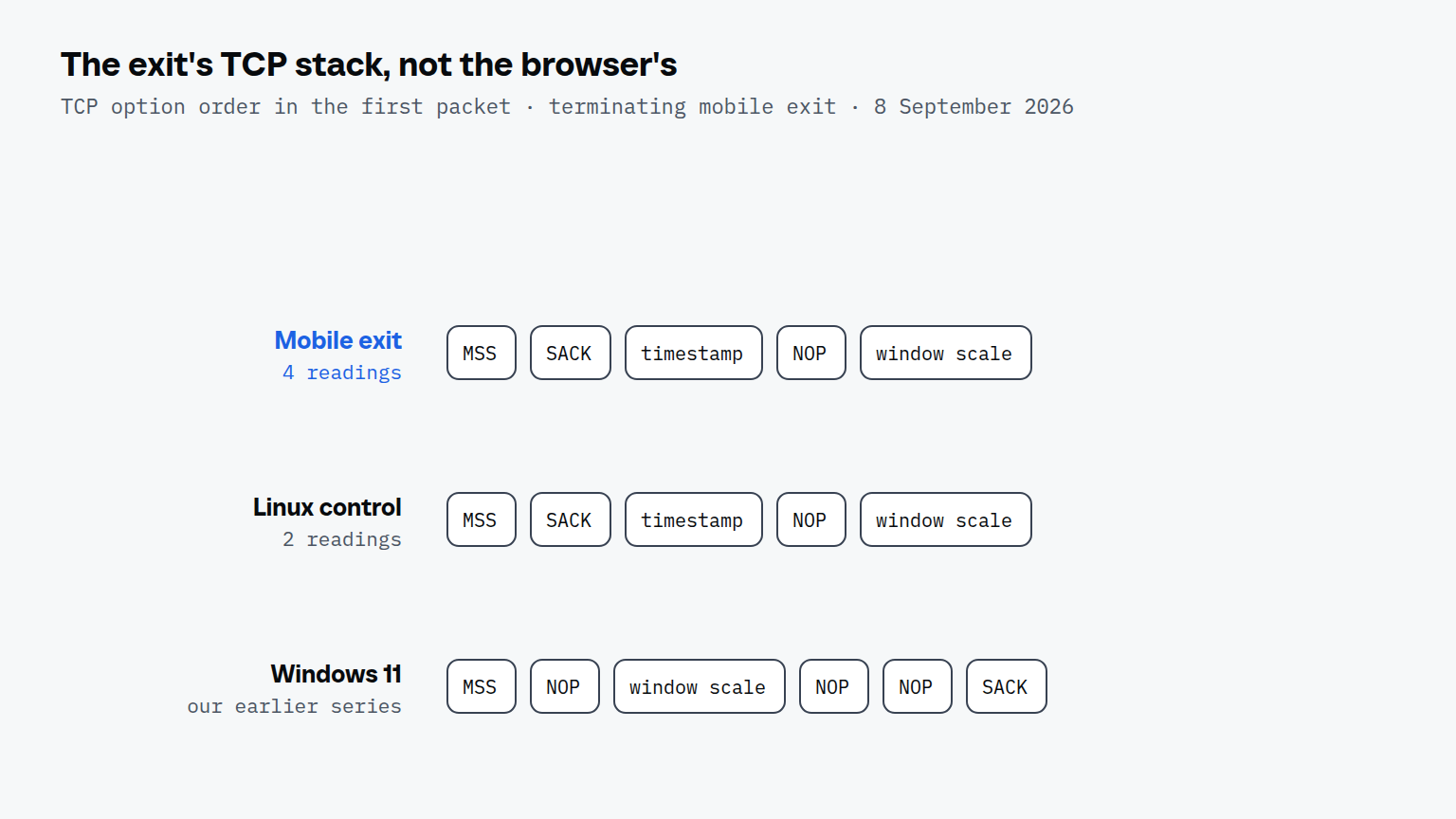
Two readings come out of the table. The exit's option order is the Unix one, identical to the Linux control and different from both Windows rows: FoxIO's [JA4T write-up](https://foxio.io/blog/ja4t-tcp-fingerprinting) calls the same pattern "a Unix-based operating system". And the exit is a device, not a server: a window scale of 6 with a window of 65535 are phone values, where our Linux control sent 10 and 64240. The MSS was below the 1460 of a plain Ethernet path in every row we read ourselves, the control included, so it separates nothing here.
The TLS layer does not change at all. A proxy that terminates TCP but not TLS passes the encrypted connection through, so the site still reads the browser's own TLS handshake, which says Chrome on Windows.
## Does a mobile proxy cover a TLS and TCP mismatch?
No. The mismatch is still there behind a mobile exit: the TLS handshake says Chrome on Windows, the TCP packet says Unix, and a site that compares the two sees both, as it would behind any terminating proxy. FoxIO put it plainly: "When a device is connected through a Proxy, the TCP fingerprint of the proxy is seen on the server side, not the client." Our code lowered the severity of that finding for a carrier exit and called the mismatch covered until 8 September 2026. The lower severity now sets only how loudly it warns, because a renamed mismatch is still a mismatch.
What a mobile exit brings is the reputation of its address, which is a different layer of [how sites detect bots](/blog/bot-detection). Cloudflare measured it from the defending side in a [study of CGNAT addresses](https://blog.cloudflare.com/detecting-cgn-to-reduce-collateral-damage/) published in October 2025: "a single IPv4 address may represent hundreds or even thousands of users", and the mean bot rate on those addresses was 7 percent against 13.1 percent elsewhere. The same study found CGNAT addresses rate limited "three times more often", so shared does not mean untouched.
| Exit | Runs through without a puzzle |
| --- | --- |
| Bought mobile exits, one per profile | 17 of 89 (19 percent) |
| One home line shared by all profiles | 0 of 70 |
On our own bench the carrier address was the difference. Profile maturity, measured in the same series, had no effect (p = 0.60). The home line was one address shared by 13 profiles, not a residential proxy pool, so the table says more about one address against many than about mobile against residential as proxy types. For that reason Scalebrowser places its hard rule on the class of the exit address and treats the TCP comparison as the normal state of every proxied profile: under strict mode a proven datacenter exit refuses to start, while the TCP layer is observed and recorded where a reflector is configured, and a Unix reading behind a Windows browser is never a reason to refuse. Observing it costs one extra request through the exit, about 0.94 seconds over a mobile line, which is why that check runs only in strict mode. The [coherence documentation](/docs/coherence) lists the three strict checks and what each one costs.
### How do rotating and sticky sessions differ?
A rotating mobile exit changes its address per connection, not per request, so one page load that opens several connections can show a site several addresses unless a session tag pins it. A sticky session holds one address, and the tag is how a provider tells the two apart; Scalebrowser writes it for fourteen providers and holds each address for one profile for 3 days on a mobile network, because carriers recycle mobile addresses in days. The comparison of rotating vs sticky proxies shows what one page looks like without a tag.
## How should an agent use a mobile exit?
Give each profile its own sticky address and [check it before the first start](/check/proxy-checker). Two profiles on the same exit are the cheapest link a site has, and a rotating exit under one profile shows the site several addresses in one session. Expect the TCP layer to read as Unix and leave it alone: it will look the same for every visitor behind the same exit. Then judge the exit by what it is for, its address: a reCAPTCHA v2 checkbox run through it takes about 15 seconds and separated the mobile exits from the home line on every round of our series. The [proxies documentation](/docs/proxies) describes the session tags, the ownership terms and the guard that watches an address while a browser runs. How the address of an ISP proxy is classified is covered in ISP proxy.