---
title: "WhatsApp MCP: answer your chats with an AI agent, no API"
description: "Meta's WhatsApp Business Platform is closed to general-purpose AI assistants. How an agent uses your own WhatsApp through WhatsApp Web, with 3 signed-out runs."
canonical: "https://scalebrowser.net/blog/whatsapp-mcp"
last_modified: "2026-10-25"
published: "2026-10-25"
author: "elias"
category: "use-cases"
---
> ## Documentation Index
> Fetch the complete documentation index at: https://scalebrowser.net/llms.txt
> Use this file to discover all available pages before exploring further.
# WhatsApp MCP: answer your chats with an AI agent, no API
> Meta's WhatsApp Business Platform is closed to general-purpose AI assistants. How an agent uses your own WhatsApp through WhatsApp Web, with 3 signed-out runs.
A small shop owner opens WhatsApp on Monday morning and finds 40 unread customer chats: order questions, a few photos, two people asking for the price list. She wants her agent to read them, draft the answers and leave the sending to her. The first thing to settle is how an agent gets into her WhatsApp at all.
## What is a WhatsApp MCP server?
A WhatsApp MCP server is a program that gives an AI agent tools for WhatsApp, such as "list my unread chats" or "draft a reply", through the Model Context Protocol. It reaches WhatsApp in one of three ways:
| Kind | Account it uses | How it links | Where it runs |
| --- | --- | --- | --- |
| Business Platform tool | a business phone number in a WhatsApp Business Account | registered with Meta's platform | Meta's Cloud API |
| WhatsApp Web library | your own number | its own link, imitating WhatsApp Web | code on your machine, usually without a browser |
| Browser with WhatsApp Web | your own number | a QR code, scanned once with your phone | a browser profile on your machine |
The phone stays the primary device in the third kind, and one profile holds one WhatsApp number.
## Why can't Claude use the WhatsApp Business API?
The Business Platform is built for companies messaging their customers, and its terms of 23 September 2026 close it to a general-purpose AI assistant. Meta's [documentation](https://developers.facebook.com/docs/whatsapp/cloud-api/overview) says the platform "enables businesses to communicate with customers at scale" and needs a business phone number and a WhatsApp Business Account. Clause 4.7 of the [terms for the platform](https://www.facebook.com/legal/Meta-Terms-for-WhatsApp-Business-Platform), last updated 23 September 2026, bars providers of general-purpose AI assistants from using it when the assistant is the primary function they offer. A general-purpose assistant therefore cannot be the main function of a Business Platform integration, and what works instead is your own WhatsApp in WhatsApp Web.
## What can an agent do in WhatsApp Web?
An agent in WhatsApp Web reads and writes in your chats the way you do in a browser tab, and [WhatsApp Web through MCP](/blog/browser-mcp) is a browser MCP server opened on web.whatsapp.com. These are prompts you can give it:
- Summarise my 40 unread chats and put the ones that need an answer first.
- Draft answers to the order questions and show them to me before anything is sent.
- Find the address a customer sent me last month.
- Send the price list to these 3 people.
We did not link a number for this article, so every line above is what you can ask, and what we measured is the page before the link.
### How does the linked session survive a restart?
The linked session survives a restart because the profile keeps the browser's storage between runs, and the profile also syncs between your own machines at every stop and every 15 minutes. WhatsApp's page ticks "Stay signed in on this browser" by default; the box was ticked when we looked. A session is more than cookies, and a linked WhatsApp Web session describes the four kinds of state a profile carries. The restart itself is open: it needs a linked number, and we have not run it.
### What about the notification prompt?
A chat app such as WhatsApp Web can ask the browser for permission to show notifications, and the browser draws that question beside the page, where the page map never lists it. Scalebrowser reports the prompt to the agent, and the operator sets a rule for each of 14 kinds of prompt, for the whole account or per profile. Three of the 14 (file system access, automatic downloads and payment) are refused by default instead of left to the agent, and [the notification prompt WhatsApp shows](/blog/permission-prompts) is one of the kinds the article on prompts explains. No prompt appeared in our 3 signed-out runs, because the page showed nothing but the code.
## What does an inbox run look like?
Every inbox run on an unlinked profile starts the same way: the agent opens web.whatsapp.com and the page draws a QR code. The page's own steps, translated from German, are "Scan the QR code with your phone's camera", "Tap the link to open WhatsApp" and "Scan the QR code once more to link it with your account". With a visible window the run waits for you to scan, and the agent can click the page's reload button when a code runs out.
We watched that first stretch 3 times on 11 October 2026, signed out, with a screenshot every 1 to 2 seconds. The code was drawn after about 10 seconds and stayed for about 60 seconds. After that it changed about every 20 seconds, and after about 171 seconds the page replaced it with a reload prompt.
| Run | Code drawn | Code changes (seconds after the request) | Reload prompt |
| --- | --- | --- | --- |
| 1 | 10 to 12 s | at least 3; two seen at 132 s and 150 s, the first ones fell into a gap in the watching | 172 s |
| 2 | 11 s | 5, at 71, 91, 111, 130 and 150 s | 172 s |
| 3 | about 10 s | 5, at about 68, 90, 110, 129 and 149 s | about 170 s |
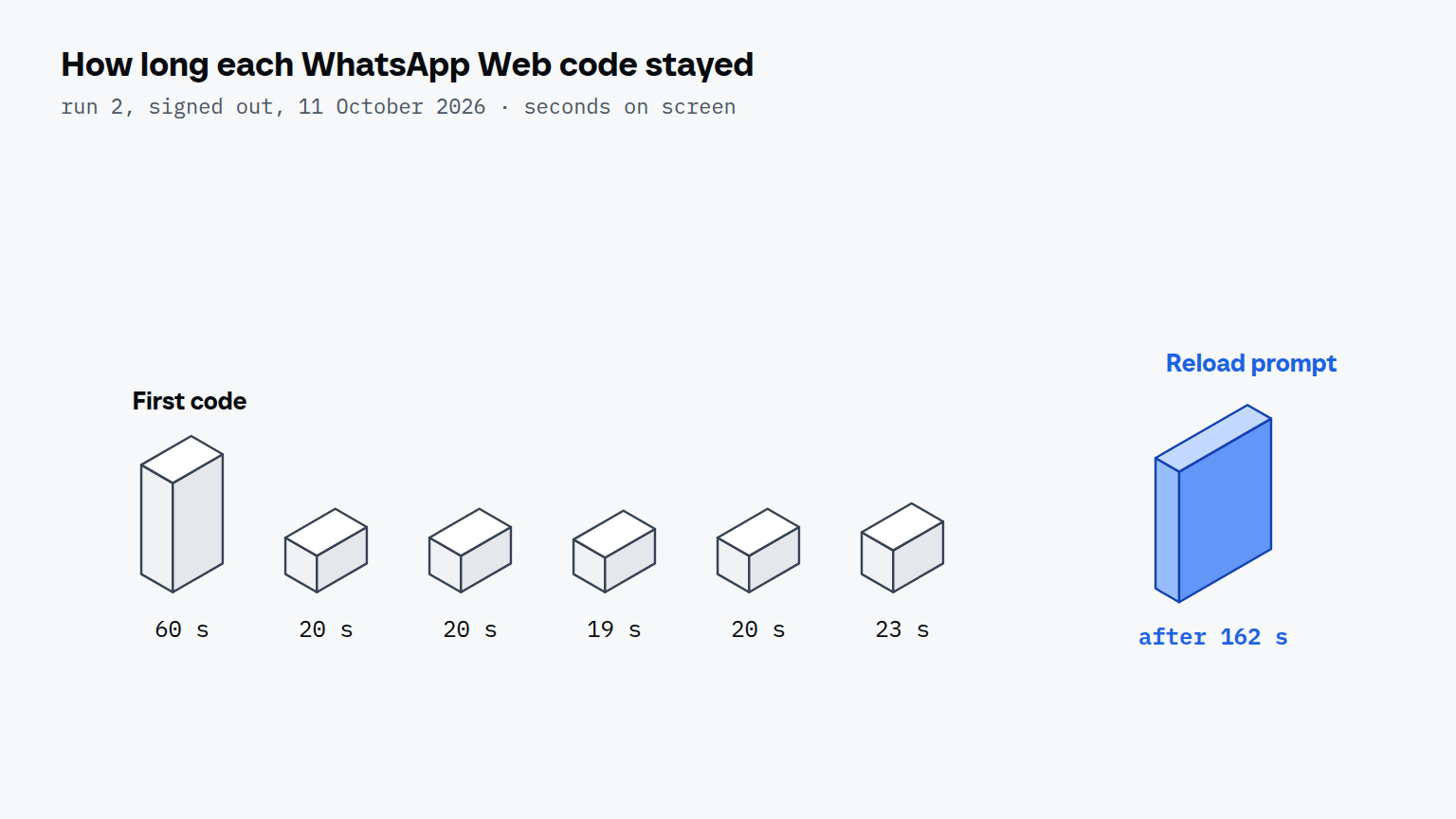
The times are to the nearest second, read from screenshots 1 to 2 seconds apart; run 3's times are worked out from the first and last screenshot, so they carry about 2 seconds of error. Run 1 shows the cost of watching in two series: a gap between them hid the first changes. In every run the reload prompt read, in German, "Select to reload the QR code", and we did not select it.
You have about 2 minutes and 50 seconds per page open to scan, and the profile offers the reload when that runs out. After the scan the inbox half is the list in the section above: read, draft, wait for your yes. That half needs a linked number and is still open on our side.
#### Where does the browser run?
The browser runs on your own machine, so the linked session stays in a profile there; [a browser that holds WhatsApp Web](/blog/ai-agent-browser) is described in the article on browser agents. For the other jobs an agent's own browser takes on, see the [use cases overview](/use-cases) and [agents that sign in](/use-cases/agents-that-sign-in).