
Chrome for Testing vs branded Chrome: 19 voices missing
Chrome for Testing against branded Chrome on one machine: 21 voices instead of 40, the same 187 fonts, no Google Chrome brand and a built-in testing config.

Davide Valli · Founder, Scalebrowser
Published Nov 6, 2026 · 5 min read
Short answer
If your automation runs on Puppeteer or Playwright, the browser it opens is almost certainly Chrome for Testing, downloaded next to the library. It looks like Chrome, carries Chrome's version number and passes every test you write against it. We ran it next to branded Chrome on the same Windows machine in September 2026 and recorded which readings a page gets differently.
What is Chrome for Testing?
Chrome for Testing is a build of Chrome that Google publishes for automated testing, with a fixed version and no auto-update. Google's announcement calls it "a dedicated flavor of Chrome targeting the testing use case, without auto-update, integrated into the Chrome release process, made available for every Chrome release", and adds that it "should only be used to consume trustworthy content". On 26 September 2026 its stable channel stood at 154.0.8037.57.
The automation libraries fetch it for you. Puppeteer's installation guide says it "automatically downloads a recent version of Chrome for Testing", about 280 MB on Windows, and Playwright switched from plain Chromium to Chrome for Testing builds in version 1.57, according to its release notes. The pinned version moves only when the library does: Playwright 1.63 ships Chromium 153.0.8010.12, while Chrome 154 reached stable on 22 September 2026.
What can a page see that differs from branded Chrome?
A page can see at least three differences: the speech voice list, the brand list in the client hints and the set of running experiments. Other readings match. We measured four browsers on one Windows machine on 14 September 2026, each with its own fresh profile and the same launch settings, and read every axis as a page reads it.
| What the page reads | Chrome for Testing 154 | Branded Chrome 153 | Our engine 154 |
|---|---|---|---|
speechSynthesis voices at page load | 0 | 0 | 0 |
Voices after voiceschanged | 21 | 40 | 40 |
| Of those, Google network voices | 0 | 19 | 19 |
| Voices marked as default | 1 | 1 | 1 |
Font families from queryLocalFonts() | 187 | 187 | 187 |
Audio outputLatency | 0.04 s (40 ms) | 0.04 s (40 ms) | 0.04 s (40 ms) |
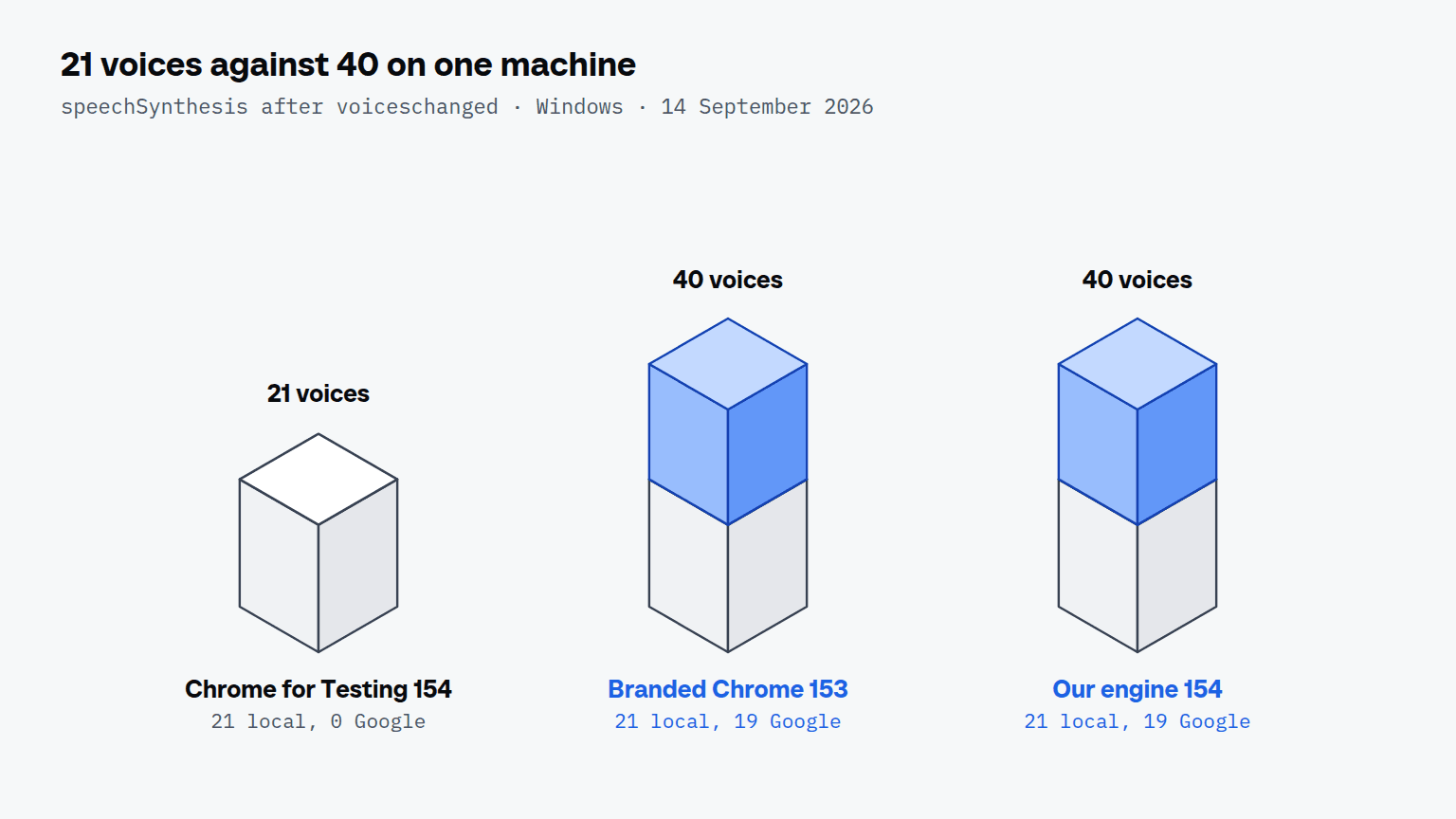
The fonts and the audio latency come from the machine, so every build on it answers the same. The voice list does not. The same split appeared two days earlier with Chrome for Testing 151, which listed 21 voices against branded Chrome's 40, so the gap follows the branding and not one version.
The second difference sits in the request headers. On our header bench in August 2026, Chrome for Testing sent only two brands in Sec-CH-UA and left out "Google Chrome", which every branded Chrome sends. A script sees the same list through navigator.userAgentData.brands.
Why are the 19 Google voices missing?
The 19 Google voices are missing because they belong to Google's branded build, not to Chromium. Branded Chrome on Windows lists the 21 local voices of the operating system plus 19 network voices named "Google …", 40 in total, and Chrome for Testing lists only the 21 local ones. A page reads the list with speechSynthesis.getVoices(), and the reading has to be a time series: every browser we measured returned 0 voices at page load and filled the list after the first voiceschanged event, between 1 and 29 milliseconds later. A probe that reads once at load sees nothing, and a probe that stops at the first event can see half a list. The voices that narrate a demo video, as opposed to the voices a page lists, are covered in AI voice over for product demos.
Does Chrome for Testing run the same experiments as Chrome?
No. Chrome for Testing runs Chrome's field trial testing configuration, a fixed set of experiments compiled into the build, while branded Chrome receives its experiments from Google's variations seed, which switches each one on for a share of users. Chromium's variations documentation says the testing configuration "applies specifically to Chromium developer and Chrome for Testing branded builds".
Experiments can reach below JavaScript. A Chrome 150 started with the testing configuration sent one extra TLS extension, 0xca34, and produced a different JA4 fingerprint than real Chrome 150 in our three runs on 12 August 2026. A Chrome for Testing of the same version is therefore no witness for what real users' Chrome sends: the same version number does not mean the same set of experiments.

Scalebrowser runs real browser profiles on your own PC: your AI agent drives them over MCP and signs in without ever seeing a password.
Download freeWhich Chromium should an agent drive?
An agent should drive a Chromium whose readings match the branded Chrome of the same version, while tests can stay on Chrome for Testing. The choice depends on who is reading the browser.
| Situation | Build | Why |
|---|---|---|
| Reproducible tests in CI | Chrome for Testing | fixed version, no auto-update, matching ChromeDriver |
| A reference for what real users report | branded Chrome of the same version, with its variations seed | the only control for voices, brands and experiments |
| An agent on sites that read the browser | a build that answers like branded Chrome and keeps its version | Chrome for Testing differs on voices, brands and experiments |
Chrome for Testing is a good test target because it holds still, and that is exactly why it is a poor disguise: the version it reports trails the stable channel as soon as the library that pinned it stops moving. Our comparison of the free stealth tools shows which Chromium an agent drives in each of them, and most use the build their automation library downloads. How FlareSolverr drives Chrome is covered in FlareSolverr in 2026. What a page reads from the pointer, rather than from the build, is covered in ghost-cursor and Bezier paths. If you measure your own setup, compare it with branded Chrome on the same machine, and read the voice list as a series, not once.