Accept-Language header: 1 value, block page or login
What the Accept-Language header is, how Chrome builds it from a language list, and the malformed value that got a DataDome captcha instead of a login page.

Davide Valli · Founder, Scalebrowser
Published Nov 1, 2026 · 5 min read
Short answer
Nobody tunes the Accept-Language header on purpose. It sits in every request, it says which languages the visitor reads, and most automation code either leaves it alone or sets it once to match a proxy's country. We set it wrong once, by handing the browser a finished header where it expected a plain list, and a bot defence answered with its captcha page every time. Real Chrome on the same connection got the login page.
What is the Accept-Language header?
The Accept-Language header is the request header in which a browser lists the natural languages it prefers, each with an optional weight. RFC 9110 defines it as #( language-range [ weight ] ), which allows at most one weight per language, and sets the weight between 0 and 1, with 1 as the default when none is given. Its own example, da, en-gb;q=0.8, en;q=0.7, "would mean: 'I prefer Danish, but will accept British English and other types of English'".
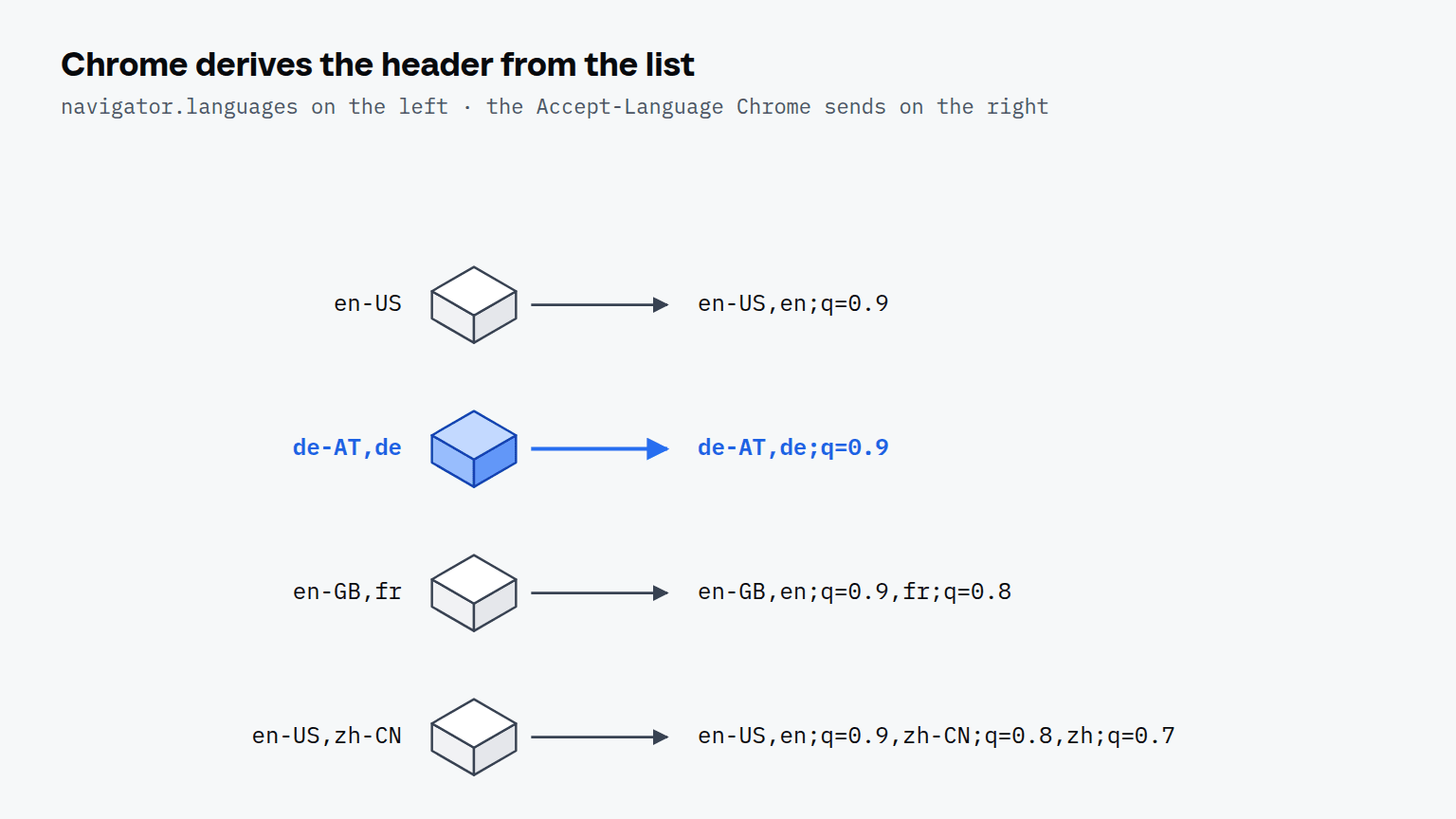
Chrome does not store the header; it builds it from the language list in its settings. Chromium's source adds a language-only tag after each regional one when the next entry is from another language family, then appends weights that fall by 0.1, leaving the first entry without one.
| Language list in Chrome | Accept-Language Chrome sends |
|---|---|
en-US | en-US,en;q=0.9 |
de-AT,de | de-AT,de;q=0.9 |
en-GB,fr | en-GB,en;q=0.9,fr;q=0.8 |
en-US,zh-CN | en-US,en;q=0.9,zh-CN;q=0.8,zh;q=0.7 |
We computed the rows from that source, and the last one is also the example MDN gives for Chrome. The rule matters because the builder trusts its input. In a release build it never checks whether a tag already carries a weight, so a list that contains one comes out with two.
Can the Accept-Language header trigger bot detection?
Yes. The Accept-Language header decided a bot check in our runs, against PayPal's login page, which DataDome protects. On 12 August 2026 we loaded that public page four times, each time from a fresh profile on the same machine and the same connection, in the order A, B, B, A, with no account and no form involved. Only the language list the browser started with changed, and with it the header.
| Accept-Language sent | Allowed by RFC 9110 | What loaded | Cookies after load |
|---|---|---|---|
de-AT,de;q=0.9,de;q=0.9;q=0.8 | no: de twice, two weights on one tag | DataDome's captcha page | 3 |
de-AT,de;q=0.9 | yes | PayPal's login page | 19 |
Each variant gave the same result in both of its runs. The first value came from starting the browser with the list de-AT,de;q=0.9, a finished header, which Chromium's builder expanded into a value no Chrome produces from its own settings. The second is what Chrome derives from de-AT,de, and real Chrome on the same connection got the login page too. We fixed the input on 12 August 2026 and have checked every locale we ship against the derived header since.
DataDome's server reads the header directly: its Protection API has a field AcceptLanguage that carries the raw value, and the block page gave the IP address as its reason, which it was not. That makes the header an example of a header that decides the verdict before a single line of JavaScript runs. No fingerprint test page would have shown it, because the header never reaches the page's script. The Referer header and Sec-Fetch-Site, which show how a tab was opened, are covered in Referer header and Sec-Fetch-Site.
What Accept-Language should an automated browser send?
An automated browser should send the value Chrome derives itself from its own language list, the same list navigator.languages returns. Four properties of that value are easy to break by hand.
- The first entry has no weight. Chrome writes weights from the second entry on, starting at 0.9.
- Each tag has at most one weight. A second weight on the same tag is outside RFC 9110's grammar, and Chrome never produces it from its settings.
- A language-only tag follows a regional one.
en-USalone becomesen-US,en;q=0.9; a header of justen-USis not what Chrome sends. - The whole list is sent. Chrome's proposal to reduce the header to one language "has not been approved to ship in Chrome" as of September 2026, and according to MDN a single language is what Safari always sends and Chrome only in incognito mode.
The free path offers two ways to set the language, and only one keeps the values together. Playwright's locale option "will affect navigator.language value, Accept-Language request header value as well as number and date formatting rules", according to its API documentation. extraHTTPHeaders changes the header alone and leaves everything a script reads where it was.
Does Accept-Language have to match navigator.languages?
Yes. MDN's reference for navigator.languages states that the header "generally lists the same locales as the navigator.languages property, with decreasing q values", and that Chrome and Safari add the language-only fallback tags on top. A server sees the header, a script sees the list, and a checker that has both compares them. A header set by hand to fr-FR next to a script that answers ["en-US"] describes two different users in one visit.
How does the header relate to the exit country?
The header has to fit the country the request comes from, together with the timezone and the date formatting, because a checker reads the exit address and the language side by side. Fitting does not mean carrying the country's tag: Chrome sends the default list of its interface language, which follows the Windows display language, so a user in Vienna sends de-DE,de;q=0.9,en-US;q=0.8,en;q=0.7 exactly like one in Berlin. Scalebrowser treats the four values as one unit: it writes the timezone, navigator.language, the language list and the Accept-Language header together from the exit country, for the 62 countries its locale table covers, and leaves a profile untouched when the exit is outside that table rather than rewriting half of it. The coherence page explains the three modes that decide what happens when the country does not match.
Run it on your own machine
Seven days to try it with your own agents on your own sites. Starting the trial needs a card.
Written by
Davide Valli
Founder, Scalebrowser
Builds Scalebrowser, the browser layer for AI agents that runs on your own machine. Measures every change a web page could observe against a real browser before it ships, and writes up the ones that turned out wrong.
All articles by Davide Valli