
AI agent login: the 4 walls before a signed-in session
How an AI agent signs in to websites and stays signed in: the second factor, the emailed code, the passkey and the lost session, each with what we measured.

Davide Valli · Founder, Scalebrowser
Published Sep 25, 2026 · 5 min read
Short answer

Your agent reached the login page, filled in the password and stopped: a six-digit code on a phone, a link in an inbox it does not have, a passkey prompt, or a session that expired overnight. Each of these is a separate wall, and each has a separate answer. This guide takes them in the order a run meets them and names what we measured on each.
What does an AI agent login involve?
An AI agent login is a sign-in in which the agent decides which field is which and never holds the secret itself. The agent names the username field, the password field and the code field; the layer below it types the stored values into the page. That keeps the password out of the model's context, out of its logs and away from the model provider.
The common alternative is a person. Browserbase's website authentication guide calls it the best practice to "log in manually once using Session Live View" and then reuse the stored state in later sessions. That works until the state expires or a second factor asks again, and then the person is needed again. Some sites ask sooner: a signed-out Facebook Marketplace search showed 18 listings, up to 54 after two scroll steps, and put the sign-in box back on the third, as a Marketplace search without an account records.
Which 4 walls stop an agent at sign-in?
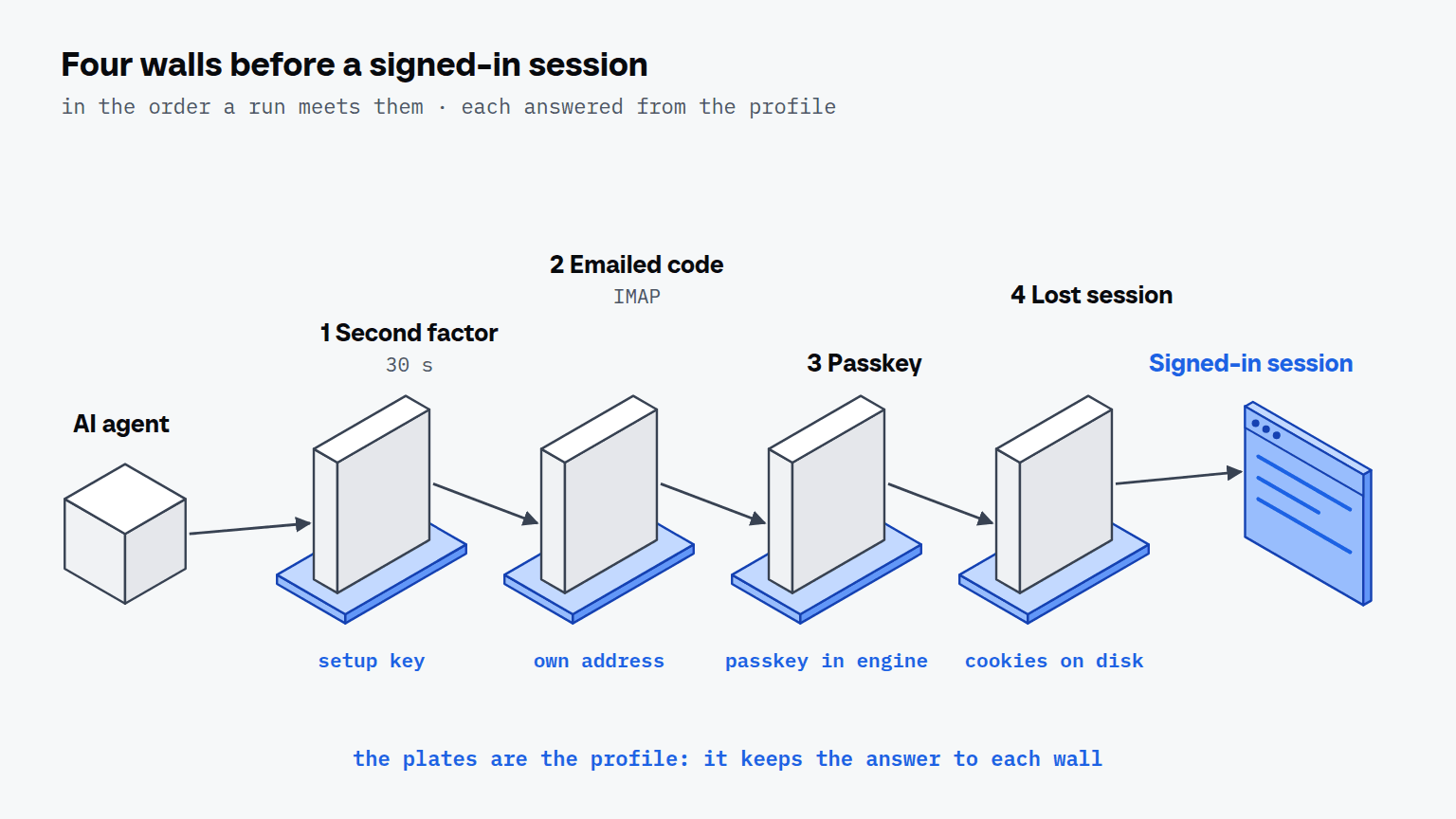
Four walls stop an agent at sign-in, and they appear in this order during a run:
- The second factor. A TOTP code under RFC 6238 changes with a "default value X = 30 seconds", so no code can be stored in advance.
- The emailed or texted code. The code arrives at an address or a number, and the agent needs one of its own that no other profile shares.
- The passkey. The site asks the machine for a platform authenticator, and the browser has to answer the way a real machine answers.
- The lost session. Cookies, passkeys and the device identity have to survive the end of the run, or the next run starts at the login page again.
We tested each wall with an acceptance bench that drives a real engine through the agent's own tools.
| Wall | What the bench checked | Result |
|---|---|---|
| Emailed code | two profiles on one catch-all folder, one mail addressed to the second, 21 Aug 2026 | the first profile received the second profile's code; fixed since |
| Passkey | register, survive a killed engine, withdraw through the agent, on webauthn.io with the Windows engine, 14 and 18 Aug 2026 | 8 of 8 checks passed |
| Lost session | cookies, session export and import through the daemon, 18 Aug 2026 | 26 of 26 checks passed, 5 of them counter-proofs |
The first row is a result that went against us, and it is the one worth reading first. A catch-all folder is every profile's mailbox at once, and the reader did not filter by the address it was bound to. It now asks the mail server for the bound address and checks it again locally.
How does an agent get past each wall?
An agent gets past each wall when the answer is kept in the profile rather than in a person's hands. The four sections below take the walls in the same order.
How does an agent handle 2FA codes?
An agent handles a TOTP code by letting the profile compute it from the stored setup key, the string behind the QR code. The agent names the code field and never sees the seed or the digits. Browserbase's guide describes the alternative for its cloud browser: two-step verification "usually require[s] human intervention in the loop", and its two strategies are "Disable 2FA or create an app password" or handing control back to a person through a live view. Turning off the second factor protects the automation and removes the account's protection.
Where do email verification codes arrive?
Email verification codes arrive at an address that belongs to one profile and to no other. A domain with a catch-all gives each profile its own random address without creating a mail account, and the code is read over IMAP outside the browser, so no second login opens inside the session the site is watching. A sign-in that sends a link instead of a code is covered in magic link login for an AI agent. Substack's sign-in starts that way, and signing in to Substack reads the link from the agent's own inbox, waiting up to 60 seconds for it.
Can an agent use passkeys?
Yes, when the passkey lives in the engine and the machine answers like a real one. The site first asks whether a platform authenticator exists, and that answer describes the machine: Microsoft reported on 1 May 2025 that "more than 99% of people who sign into their Windows devices with their Microsoft account do so using Windows Hello". Browserbase's guide takes the other route for its sessions: "you'll often want to disable or bypass them since the required user interactions aren't supported in automated sessions."
How does the session survive the run?
The session survives when the profile keeps its cookies, passkeys and device identity on disk between runs. A profile that also runs on a second machine travels there encrypted, at every stop and every 15 minutes, and only one machine may hold it at a time, because two machines signing in with the same identity is exactly the pattern a site looks for.

Scalebrowser runs real browser profiles on your own PC: your AI agent drives them over MCP and signs in without ever seeing a password.
Download freeWhat about prompts the browser draws next to the page?
A sign-in can end with a prompt the browser draws beside the page, a permission bubble or a device picker. An ordinary automation tool cannot see these prompts, because they are not part of the page, so the run stops without an error.
Where do you start with your own agent?
Start with the wall your runs hit most often, and keep the secret in an agent's own browser, never in the model. The credentials page of the documentation shows how a login and its setup key are stored against a profile, the inbox page how an address is bound, and the passkeys page how a key survives a browser that dies badly.