
Magic link login for an AI agent: 1 inbox, 60 seconds
How an AI agent completes a magic link login: read its own inbox for up to 60 seconds, open the link in the profile that asked, never see the address.

Davide Valli · Founder, Scalebrowser
Published Nov 16, 2026 · 5 min read
Short answer
Your agent typed an email address, pressed "Continue" and got a page that says "check your inbox". There is no code field and no password field, only a link on its way to an address. A person would open the mail on the same laptop and click. An agent needs the same two things: an inbox that belongs to its profile, and a way to open the link inside that profile without ever holding it.
What is a magic link login?
A magic link login is a passwordless sign-in in which the site mails a one-time address to the account's email, and whoever opens that address is signed in. Ping Identity defines it as "a passwordless login method that verifies a user's identity by sending a unique, one-time-use URL to their email address". It sits beside the emailed code, and the two ask different things of an agent.
| Step | Emailed code | Magic link |
|---|---|---|
| What arrives | a short code in the subject or body | a one-time sign-in address |
| What the agent does | types the code into the page | opens the address in its browser |
| Who ends up signed in | the browser where the code was typed | the browser that opened the link |
The last row is the whole difficulty. A code can be read anywhere and typed in the right place, while a link signs in whatever opens it.
Why must the link open in the same profile?
The link must open in the same profile because sign-in services such as Auth0 tie the sign-in to the browser that asked for it. Auth0's magic link documentation states that with Classic Login "both the initial request and its response must take place in the same browser or the transaction will fail". Opened elsewhere, the link either fails or signs in a browser that is not the agent's profile.
| Provider | What its documentation says |
|---|---|
| Auth0 | request and response "must take place in the same browser" |
| Supabase | a user can request a link "once every 60 seconds", and links "expire after 1 hour" |
| Ping Identity | links "typically have a short expiration window (often 10-15 minutes)" and are "invalidated immediately after use" |
Two practical rules follow from this table. Request the link only once and wait for it, because a second request can invalidate the first and Supabase refuses one within 60 seconds anyway. And open it within minutes, in the profile that requested it.
How does an agent open a magic link from email?
An agent opens a magic link from email with two tool calls: one that waits for the message in its own inbox, and one that opens a link from that message in the profile's own tab.
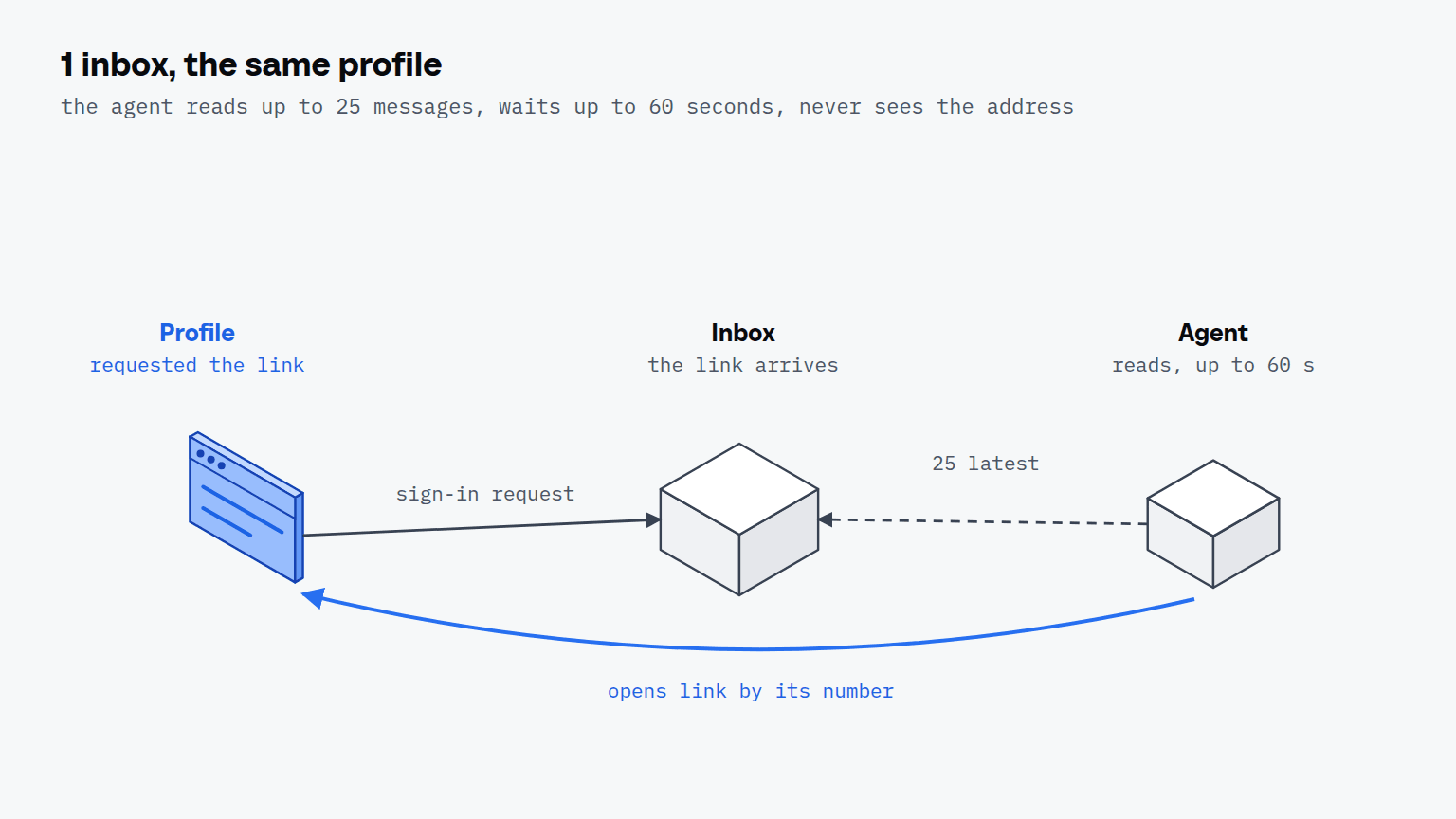
- Bind an address to the profile. Each profile gets its own address, usually minted under a domain with a catch-all, so no other profile's mail arrives in its read.
- Request the link in the profile. The agent enters that address on the site and submits, in the same browser that will open the link.
- Wait for the message.
read_inboxwaits up to 60 seconds and returns up to 25 recent messages, each with its age and the text and host of every link in it. - Open the link by number.
inbox_open_linktakes the message id and the link's number and opens it in the bound tab. - Read the page. The agent takes a snapshot and checks that it is now signed in.
{ "name": "read_inbox", "arguments": { "handle": "h_1", "timeout_ms": 60000, "subject_contains": "sign in" } }
{ "name": "inbox_open_link", "arguments": { "handle": "h_1", "message_id": "m_42", "link": 0 } }
The address itself never reaches the agent. A sign-in link is the account for as long as it is valid, so it is used and not read, and the agent chooses by the link's text and host. The message is looked up again when the link is opened, so a message that has left the time window answers that it is gone instead of opening something stale. The inbox page of the documentation shows how a mailbox is set up and bound.

Scalebrowser runs real browser profiles on your own PC: your AI agent drives them over MCP and signs in without ever seeing a password.
Download freeWhat went wrong the first time?
The first time, our agent could not complete a magic link login at all. On 31 August 2026 a sign-in at claude.ai sent a fresh address nothing but a link, even though the page offered a field for a code. Our inbox reader turned each mail into plain text for code detection and dropped every link address on the way, so the agent received the word on the button and nothing it could open. The run finished only because the message was read by hand on the mail server.
| Date | What happened |
|---|---|
| 31 August 2026 | sign-in sends only a link; the agent receives text without an address |
| 1 September 2026 | release 0.8.0 adds opening a link by its number, address hidden |
At two other sites on the same day a code stood next to the link, which is why the gap had not shown before. The inbox answers two of the walls before a signed-in session, the emailed code and the magic link; the second factor and the passkey are answered from secrets stored in the profile.
What if the site sends a code instead?
If the site sends a code, the same read answers it: read_inbox lists every value that could be the code, strongest first, with the words around it, and the agent types it into the field the page shows. Some sites send both in one mail, as the two others did on 31 August, and the agent takes whichever the page asks for.