

navigator.connection: rtt 0 and a 50 ms grid
What navigator.connection reveals: rtt 0 from a headless build, Chromium's 50 ms grid against the spec's 25, and why rtt 75 matched 0.00 percent of visitors.

Davide Valli · Founder, Scalebrowser
Published Nov 14, 2026 · 7 min read
Short answer
navigator.connection is one of the smaller surfaces of a fingerprint, and one of the easiest to get wrong. It holds three numbers and a flag that describe the network, all of them estimates, all of them rounded before a page sees them. We got the rounding wrong ourselves for months, because we followed the specification instead of the browser. This is what the values mean, what a headless build reports, and what our own data taught us about a grid nobody checks.
What does navigator.connection report?
navigator.connection reports the browser's estimate of the current connection: rtt for the round-trip time in milliseconds, downlink for the bandwidth in megabits per second, effectiveType for a class such as 4g, and saveData for the data saver setting. The WICG Network Information draft defines rtt as the effective round-trip time "rounded to nearest multiple of 25 milliseconds", and MDN's rtt page repeats the 25. Chromium does something else, and the Chromium source, read on 27 September 2026, is the only reference a checker needs.
| Value | What the specification says | What Chromium does |
|---|---|---|
rtt | nearest multiple of 25 milliseconds | multiple of 50 milliseconds |
downlink | nearest multiple of 25 kilobits per second | rounded to a multiple of 50 kilobits per second, capped at 10 megabits per second |
| both | no per-site variation | multiplied by a factor between 0.9 and 1.1 per hostname before rounding |
The spread per hostname exists "to reduce fingerprinting", as the source comments put it. MDN marks the whole API as not Baseline, because "it does not work in some of the most widely-used browsers", so every reading below is a Chromium reading.
Why does a headless browser report rtt 0?
A headless browser reports rtt 0 when its build hands out no round-trip estimate at all, and that depends on the build more than on the headless mode. The project detect-headless, with 308 GitHub stars, lists it as its "Connection Rtt" test: "navigator.connection.rtt, if present, has value 0 on headless browser." On 25 August 2026 we read the value with the same script in three setups, loaded from our own check page as the origin.
| Setup | rtt | User agent says |
|---|---|---|
| Playwright, headless, its bundled Chromium 141 | 0 | HeadlessChrome/141 |
| Playwright, headless, installed Chrome 141 | 100 | HeadlessChrome/141 |
| real Chrome 151 on Windows | 100 | Chrome/151 |
Both Playwright setups ran headless on the same machine in the same minute, and only the bundled build answered 0. A real desktop Chrome that has loaded pages reports a value on the grid, and 100 is the most ordinary one we saw.
Why is rtt 75 impossible in Chrome?
rtt 75 is impossible in Chrome because Chromium rounds rtt to a multiple of 50 milliseconds after it applies the per-hostname factor, so 75, 125, 175 and 225 never reach a page. The specification's 25 millisecond grid makes them look plausible, and that is exactly how they got into our own profile data. Our sampler, our validator and our data all repeated the 25 millisecond rule without anyone reading the browser, and until 30 July 2026, 47 percent of draws produced an rtt of 75, 125, 175 or 225. On that day we compared single values against AmIUnique, one axis per run, with real Chrome 150 as the reference.
| rtt | downlink | Share of AmIUnique visitors with this value |
|---|---|---|
| 50 | 10 | 7.68 percent, the same share as real Chrome 150 |
| 75 | 10 | 0.00 percent |
| 50 | 9 | 0.01 percent |
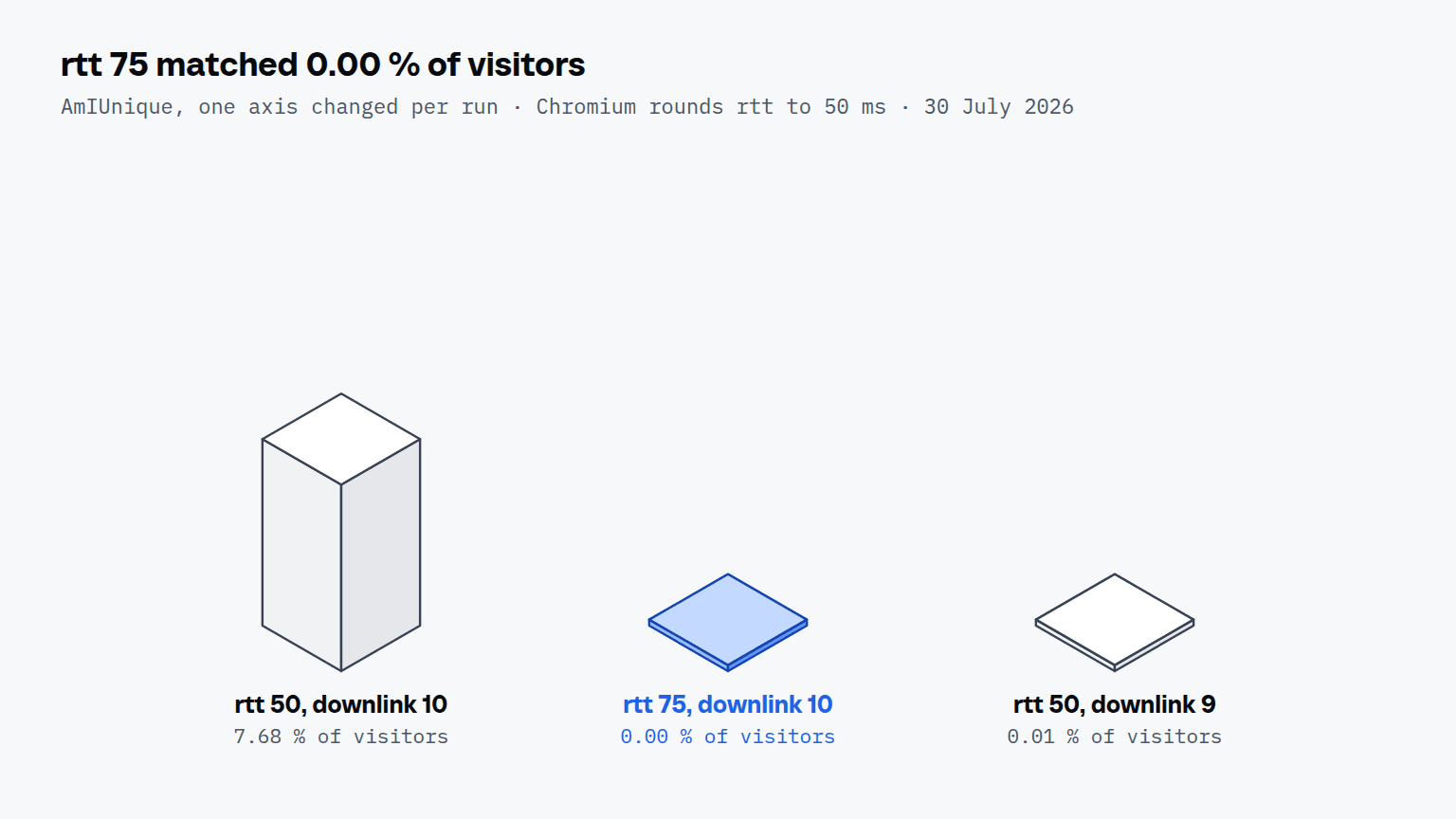
An rtt of 75 is not a rare value that narrows the crowd; it is a value no Chrome produces, and one comparison finds it. The third row shows that downlink matters as well: 9 is on the grid, yet the pair was several hundred times rarer than the one with 10, because a broadband connection runs into the 10 megabit cap. We corrected the data on 30 July 2026, and stored profiles take the corrected value at their next start. These are the values Chromium rounds, and a value that ignores the rounding contradicts the engine that is supposed to have produced it.
Do the connection headers agree with JavaScript?
The connection headers agree with JavaScript inside one renderer, but not between the navigation and the renderer, even in real Chrome. RTT, Downlink, ECT and Save-Data are client hints as well as properties, so a server that asks for them with Accept-CH receives them on the navigation request and on every subresource. On 14 September 2026 we read all three surfaces on one Windows machine with a bench that serves a page over HTTPS and records its request headers.
| Browser | rtt: navigation / subresource / JavaScript | downlink: navigation / subresource / JavaScript |
|---|---|---|
| Chrome for Testing 154.0.8037.9 | 50 / 100 / 100 | 1.5 / 1.35 / 1.35 |
| branded Chrome 153.0.8010.37 | 50 / 100 / 100 | 1.75 / 1.5 / 1.5 |
| our 154 engine, no persona | 50 / 100 / 100 | 1.7 / 1.4 / 1.4 |
| our 154 engine, persona rtt 50, downlink 10 | 50 / 50 / 50 | 10 / 9.8 / 9.8 |
The three control browsers separated the navigation from the renderer in all six of their captures, so a difference between those two is normal. A difference between a subresource header and the script in the same renderer appeared in none of the eight captures. Our own 151 engine did produce one: on 12 September 2026, with a persona, it sent an rtt of 100 in the header and 50 to JavaScript, and a downlink of 1.45 against 9.9. We fixed it on 13 September, and the last row is the reading on the 154 engine.
Why does downlink differ from one site to the next?
Downlink differs from one site to the next because Chromium multiplies the estimate by a factor between 0.9 and 1.1 that depends on the hostname. A broadband connection at the 10 megabit cap therefore reads anywhere from 9.0 to 10.0, depending on the site. An rtt already on the grid stays where it is, because 50 times 0.9 to 1.1 does not leave the 50 millisecond step. Until 30 July 2026 our engine answered a constant 10 to every hostname; since then, measured on 8 hostnames that day, it varies per host the way Chrome does.
What should you check in your own browser?
You should check four things, and each of them is a single comparison a site can make too:
- Read
navigator.connection.rttin the browser your agent uses, and expect a non-zero multiple of 50. - Read
downlink, and expect a step of 0.05 no higher than 10; a broadband desktop usually sits at or just under 10. - Log the
RTTandDownlinkheaders on a server you control after asking for them withAccept-CH, and compare the subresource headers with what JavaScript reported in the same load. - Open two different hostnames and compare downlink; a value identical to the last decimal on every site is more stable than Chrome.
The page on testing your setup lists further ways to read what a site sees, including a check page that runs without an account. How Pixelscan judges a mismatch, including the one real Chrome also gets, is covered in Pixelscan and 'Masking detected'.