Substack API: the official MCP can't publish, an agent can
Substack's official MCP server only reads publication data. What an AI agent can do on Substack in your signed-in browser, and what we measured logged out.

Elias Auer · Researcher, Scalebrowser
Published Oct 25, 2026 · 5 min read
Short answer
Picture a writer who finishes the week's newsletter in Google Docs on Sunday evening and then pastes it into Substack piece by piece: the title, the subtitle, each heading, the image, the send time. Every part is a small click, and none of it needs the writer's judgement. It's the kind of job people hope an API will take over.
Does Substack have an API?
Substack has one official interface for AI assistants, a read-only MCP server, and we found no interface for publishing. MCP is the connector standard that lets an assistant such as Claude or ChatGPT read data from a service. We searched Substack's help center for "API" on 11 October 2026 and got 1 result, the article on how to connect Substack to your AI assistant.
Only an admin of a Bestseller publication can connect the server, at mcp.substack.com/api/v1/mcp. Anyone else who tries sees an error saying the publication isn't eligible.
What can the official Substack MCP do?
The official Substack MCP reads publication data and changes nothing. Substack's own examples of what you can ask once it's connected are these four:
- What's my current subscriber count and revenue?
- How is my paid subscriber retention trending after 6 months?
- Which traffic source drove the most views on my last post?
- How many free subscribers have I gained since January?
The help center names the three things it can't do:
It cannot publish posts, send Notes, or modify your account.
It also can't read profile data or Notes activity. Connecting it in Claude takes 7 steps, from opening Customize to returning to a new chat, and you have to be signed in to Substack as the admin.
What can an agent do on Substack through a browser?
An agent can do on Substack's website what you can do there, as soon as it is signed in as you, and the MCP server can't do any of it. Once signing an agent into Substack is done, these are the prompts the website side opens up:
- Turn this Google Doc into a draft with the right headings.
- Schedule it for Sunday at 8:00.
- Answer the new comments on last week's post.
- Post a Note about it.
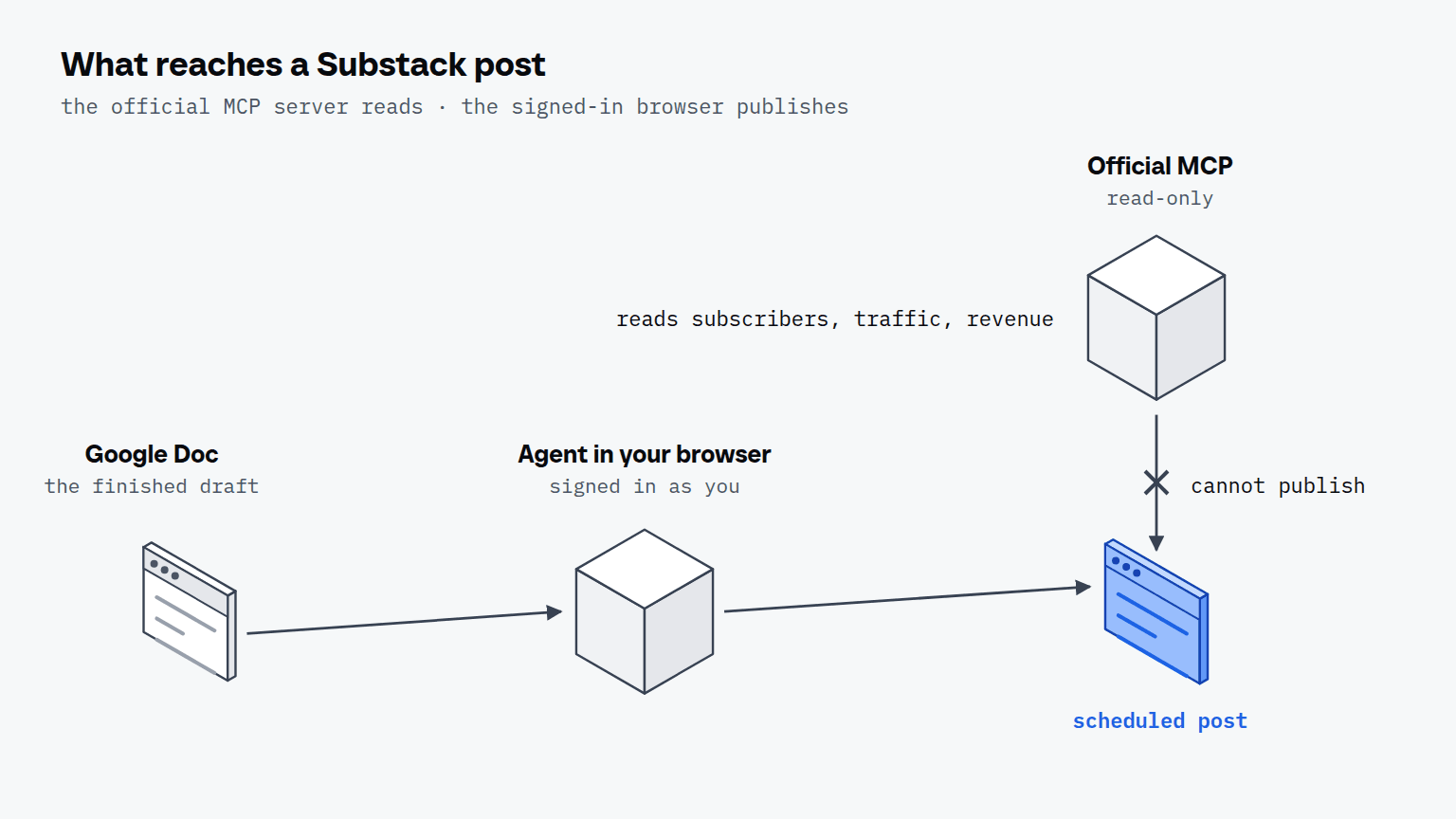
You choose how far it goes. The agent drafts and schedules, and you press publish if you want to be the last click. Replies to comments are website work too, because the MCP server is read-only; the two On Substack posts we opened logged out showed 0 comments, so we have no measurement for reading them yet.
How does the agent use Substack's sign-in link?
Substack's sign-in starts from an email address: its sign-in page asks for the address first and keeps the password as a second option. The link then goes to the agent's own inbox, and Scalebrowser's read_inbox waits up to 60 seconds for it and returns up to 25 candidates. The agent opens the link in the same profile that asked for it, the case Substack's emailed sign-in link describes in full. We didn't submit an address for this article, so no email was sent and the step is described from the inbox documentation, not measured here.
What does a publishing run look like?
A publishing run is the sequence you'd do by hand, in your own signed-in browser: open the draft, check each part, set the time and stop where you said to stop. We measured the half that needs no account, on 11 October 2026, 3 runs each, without signing in or sending anything.
| What we did, logged out | Steps | Seconds, 3 runs | What came back |
|---|---|---|---|
| Searched the help center for "API" and opened the result | 3 | 9.6 to 11.8 | 1 result, the MCP article: 7 connect steps, read-only |
| Opened a public post on On Substack | 1 | 3.4 to 4.0 | the whole post, 8,546 characters of page text, no sign-in needed to read it |
| Opened the sign-in page (1 run) | 1 | not timed | an email field first, a password as the second option |
A step is one page opened, one search typed or one click. The numbers say what the read-only half costs: a public post is readable in a single step, and the help center answer took 3. A publish needs the account, so we have no time for it, and that run isn't part of this article yet.


Scalebrowser gives each agent its own isolated browser with a persistent identity, on your own machine, so a run stays signed in, handles the captcha and finishes without anyone watching it.
See how Scalebrowser does itWhere does the browser run?
The browser runs on your own machine, in a profile that keeps its Substack sign-in between runs, which makes it the browser that publishes the draft. More jobs where a service has no interface for the job, only a website, are collected in the overview of use cases and on the page for tools with no API.
Run it on your own machine
Seven days to try it with your own agents on your own sites. Starting the trial needs a card.
Written by
Elias Auer
Researcher, Scalebrowser
Researcher at Scalebrowser, the browser layer for AI agents that runs on your own machine. Measures what a web page can observe about a browser, compares it with a real Chrome on the same machine and publishes the numbers, including the ones that went against us.
All articles by Elias Auer