AI agent security: what a signed-in agent never gets
How to limit an AI agent that works in a signed-in browser: the 3 prompt kinds it never answers, server-side limits instead of prompt rules, and keys kept out.

Davide Valli · Founder, Scalebrowser
Published Oct 23, 2026 · 8 min read
Short answer
An agent that works in your own browser profile is signed in to whatever that profile is signed in to: the mailbox, the shop account, the admin panel. Every page it reads can carry text written for the model rather than for you. The useful question is not whether the model can be fooled, because the vendors who test for it say it can, but what the browser lets a fooled agent do.
What does AI agent security mean in a browser?
AI agent security in a browser means limiting what an agent can do with the sessions of the profile it drives, on the assumption that the model will sometimes follow text it should have ignored. Brave's security team put the objection in one sentence after an agentic browser was talked into taking over its own user's account:
When an AI assistant follows malicious instructions from untrusted webpage content, traditional protections such as same-origin policy (SOP) or cross-origin resource sharing (CORS) are all effectively useless.
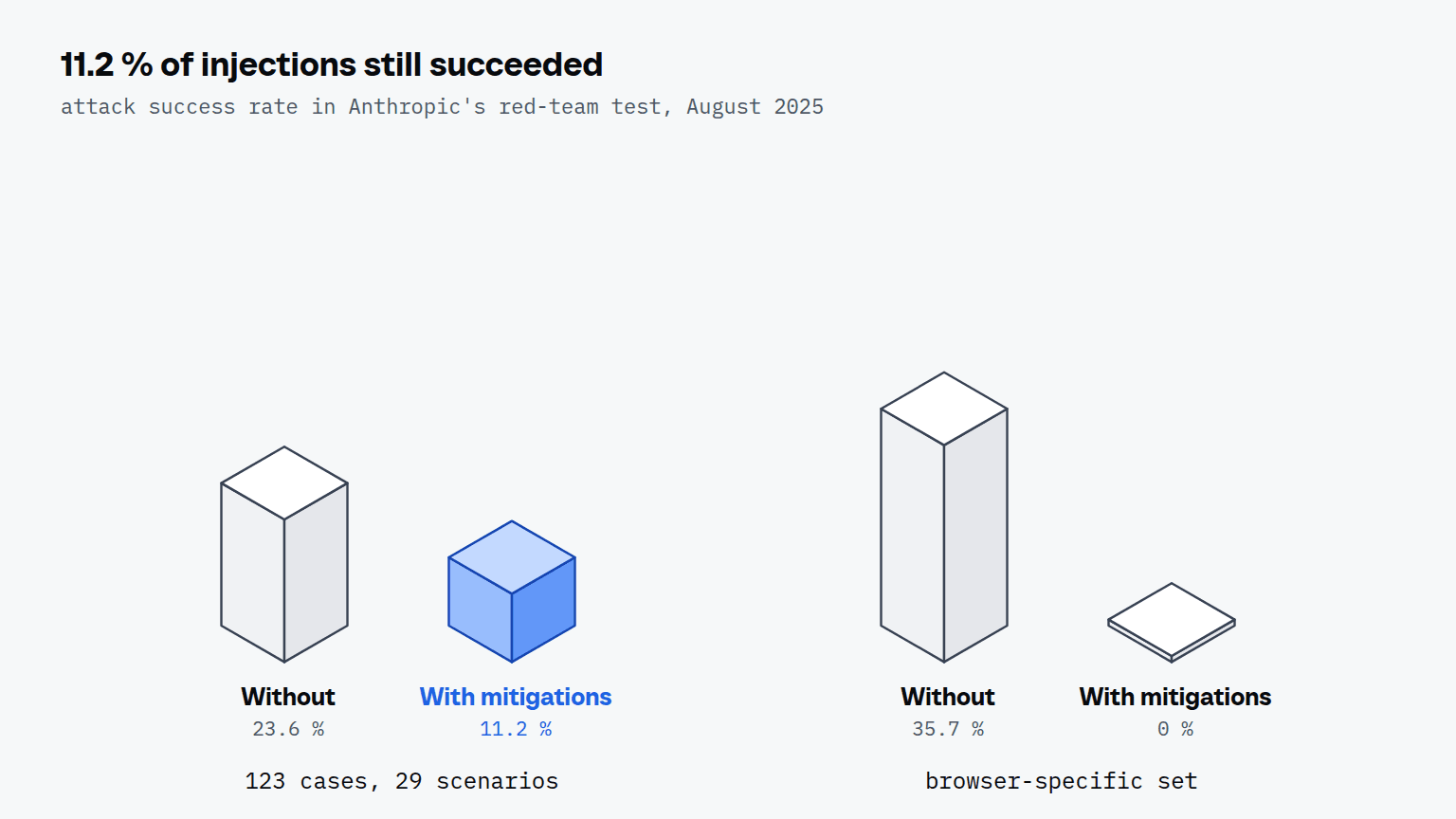
The web's own boundaries separate one site from another. An agent reads every site with the same model, so text on one site can steer what it does on the next. Anthropic measured how often that happens with its own browser agent and published the numbers when it piloted Claude in Chrome on 25 August 2025:
| Anthropic red-team test, August 2025 | Attack success rate |
|---|---|
| 123 test cases in 29 scenarios, without the new safety mitigations | 23.6 % |
| Same set, with the mitigations | 11.2 % |
| Browser-specific challenge set (hidden form fields, URL text, tab titles) | 35.7 % before, 0 % after |
An 11.2 % success rate is roughly 1 attack in 9. Simon Willison, writing about filters that claim to catch "95% of attacks", answered that "in web application security 95% is very much a failing grade". The limits that hold are the ones a sentence on a page cannot reach.
Which 3 permissions does the agent never get?
The agent never decides 3 of the 14 kinds of prompt a browser draws beside the page: file system access, automatic downloads and payment. Scalebrowser reports every one of the 14 kinds to the agent, and these three are answered by the operator's rule before the agent is asked.
- File system access. A yes gives the page a folder on your disk that it can read and write from then on.
- Automatic downloads. A yes lets the site put further files on the disk without another click.
- Payment. A yes spends money.
These are not the prompts that sound most invasive. Camera and microphone stay with the agent, because on a profile without a window no device sits behind them. The three locked kinds are the ones where a wrong answer costs something outside the browser. The operator can change any of the 14 rows, globally or per profile, and a standing rule an agent writes cannot widen what the operator locked.
A lock only works if the prompt is seen at all, because a prompt the browser draws outside the page is invisible to an agent that reads the page. We fired every trigger on permission.site against a release build of our engine and compared what was reported with what the page itself said.
| Result per trigger | Triggers |
|---|---|
| Seen: reported to the agent while the page was still waiting | 13 |
| Silent: the page had its answer without any prompt holding | 23 |
| Blind: the page waited and nothing was reported | 0 |
| Unclear: the page sets no status for this trigger | 3 |
Seeing is half of it, so the answer was measured separately. On 12 August 2026 four kinds (location, screen capture, a USB device chooser and idle detection) were answered through the agent's own tools on a fresh profile, and each answer was applied with nothing left pending.
How does a server-side limit differ from a prompt rule?
A server-side limit is enforced by the program that executes the tool call, so no text the model reads can lift it; a prompt rule is a sentence the model weighs against the sentences on the page. Brave's Comet disclosure shows what the second kind is worth. Instructions hidden behind a spoiler tag in a Reddit comment made the agent read the user's email address from the account page, fetch a one-time code from the signed-in Gmail and post both back as a reply. An agent that finds and reads threads for our Reddit marketing plan meets comments like that one, and in the plan a person posts every reply.
| Limit | Enforced by | Can text on a page lift it? |
|---|---|---|
| "Never buy anything" in the system prompt | the model | yes, it competes with the page |
| Payment prompt locked | the daemon, before the agent is asked | no |
| Read-only mode | the daemon, on every call | no |
| No DevTools socket, no JavaScript, no private addresses | the daemon: the path does not exist over MCP | no |
| Stored password typed into the form | the daemon, after checking the frame | no |
The difference matters because of what sits behind the agent. In an agent's own browser the profile stays signed in for weeks, so one fooled step can act with every account the profile holds. The MCP server documentation lists the boundaries that are structural rather than configured: no CDP endpoint, no raw HTML, no cookies or headers, no file paths, and an address check that refuses loopback, private ranges and the cloud metadata address twice, once on the address and once on every IP the name resolves to. What a page can still probe on the local network from the browser itself is covered in Local Network Access in Chrome.
Read-only mode removes every tool that changes something from the listing and refuses it if it is called anyway, because a client that cached an older listing could still send the name. It removes lease_profile too, so an agent under it cannot start a browser of its own. The tool reference lists the tools that stay. How the connection and its token are secured is covered in MCP security for browser agents.
What a server-side limit does not cover is the page itself. The server has no confirmation step before a click, and its documentation says so: it does not know that "Delete account" is irreversible. The OWASP AI Agent Security Cheat Sheet asks to "Require explicit approval for high-impact or irreversible actions"; the payment lock is that approval for money, and for everything else the answer is a smaller tool set and a trail you read. Every call on a profile leaves one step in the run trail, without its arguments, and a run can open with one sentence of intent so a person can see what the agent was trying to do.
How do API keys stay out of the model's context?
API keys stay out of the model's context when the agent never receives them. Scalebrowser's daemon replaces a recognised value with a placeholder such as {{sb:9f3c1a:npmjs.com/token}} and types the real value itself, by default only into a matching field on the site the value is bound to. A reply the filter could not check is withheld rather than sent, and exactly one tool, credential_store, takes a secret as an argument, for a login the agent already holds. How the filter tells a real key from a random-looking class name is the subject of API keys in the model context; the rules are in the secrets documentation. What the session cookies of a profile give an agent is covered in session cookies for AI agents.


Scalebrowser gives each agent its own isolated browser with a persistent identity, on your own machine, so a run stays signed in, handles the captcha and finishes without anyone watching it.
See how Scalebrowser does itWhat should you set up before an agent gets your sessions?
Set up the limits before the first run, because each of them is set on the daemon's side and none can be changed by a tool call.
- Serve the smallest tool set.
corealone is 21 tools.managementcan delete profiles, and deleting a profile deletes every login inside it. - Use read-only mode for agents that only watch. It is the one built-in restraint on what a connected agent may do.
- Keep the three prompt locks. Lift one per profile, not globally, when a task really needs it.
- Store logins instead of pasting them. The agent names the fields and the daemon types the values, as the credentials page describes.
- Give each account its own profile. A fooled step then reaches one identity, not all of them.
These limits decide what a fooled agent can do. How a page gets its instructions into the agent in the first place, and why filtering the text cannot close that door, is covered in prompt injection in a browser agent.
Run it on your own machine
Seven days to try it with your own agents on your own sites. Starting the trial needs a card.
Written by
Davide Valli
Founder, Scalebrowser
Builds Scalebrowser, the browser layer for AI agents that runs on your own machine. Measures every change a web page could observe against a real browser before it ships, and writes up the ones that turned out wrong.
All articles by Davide Valli