LLM secrets in agent runs: 214 false alarms down to 0
How an agent's secret filter recognises keys in 4 stages, why reading the whole page caused 214 false alarms on 19 sites, and what cut them to 0 on 8 Sep 2026.

Davide Valli · Founder, Scalebrowser
Published Oct 30, 2026 · 7 min read
Short answer
An agent that signs up for a service will sooner or later see the API key the service shows once, and an agent that signs in holds a password. Either value then sits in a transcript that leaves the machine, and nothing takes it back. A filter in front of the model solves that only if it is right in both directions: it has to catch the key, and it has to leave the thousand harmless random-looking strings on an ordinary page alone.
What is an LLM secret leak?
An LLM secret leak is a password, token or key that reaches a language model's context and from there every place the context is copied to: the provider's logs, the agent framework's history, the orchestrator's database. The secret is the value; the leak is the moment it enters text the model reads. In a browser agent that moment has more doors than the prompt.
| Channel the agent reads | How a secret gets in |
|---|---|
| The page map after an action | a freshly created key shown in a read-only field |
| The text of a page | a token printed in a confirmation message |
| An error message | a failed request that echoes its own credential |
| A screenshot | a field that shows its value in plain text |
| The activity trail and live events | whatever the steps above carried |
| A downloaded file or PDF | a key printed inside the document |
Scalebrowser's secret layer sits on all of them. A recognised value is replaced by a placeholder such as {{sb:9f3c1a:npmjs.com/token}}, the agent passes the placeholder wherever the value would go, and the daemon types the real thing into a field on the site the value is bound to. The agent can use the password without ever reading it.
How are secrets recognised in 4 stages?
Secrets are recognised in four stages, in a fixed order, and the first stage that fits decides. Each stage stands on a different kind of evidence, which is why their order matters.
- A value the daemon already knows. A stored password, a two-factor key or a value caught earlier is found wherever it turns up, including base64, percent-encoded, inside a URL or as a fragment of at least 16 characters. This is the strong case, because the daemon is the source of the value and not a guesser about it.
- A provider format with a checksum. npm and GitHub tokens carry one: GitHub's token format post describes "a 32 bit checksum in the last 6 digits of each token". If the checksum does not add up, the value counts as not recognised, because censoring on the prefix alone would black out every example in every documentation page.
- A provider format without a checksum. AWS, Stripe, Slack, Google, GitLab and SendGrid keys are matched by shape.
- What the page itself says. A copy button beside a random-looking string, a warning that the value will not be shown again, a read-only field holding something random. That is how services present a new key.
Anything the four stages miss but that looks random is censored and reported, not decided in silence. That last rule is where randomness comes in, and it has a floor. Yelp's detect-secrets sets its base64 entropy limit to 4.5 bits per character and its hex limit to 3.0. A string of 22 characters, all different, carries log2(22) = 4.46 bits per character, so below 23 characters the published base64 threshold cannot be reached at all.
Why did a single haystack produce 214 false alarms?
A single haystack produced 214 false alarms because the randomness rule read everything the document carried, not what the page showed. The warning came from one of our own working profiles: on 8 September 2026 it held 25 doubtful rows, all from the randomness rule, 13 from reddit.com and 12 from outlook.com. The list is capped at 25, and at the cap the next random-looking value is censored with no row anyone can release.
Twelve of them came from outlook.com, where an agent sign-in to a Microsoft account begins. Our secret corpus then ran 19 ordinary sites through the same chain, from Amazon and eBay to npm and Stack Overflow, plus a page that really prints keys as the counter-check.
| Measurement | One haystack | Two haystacks |
|---|---|---|
| False alarms on the ordinary sites | 214 | 0 |
| 8 Reddit pages, counted separately the same evening | 96 | 0 |
| Required key forms missed, out of 21 | 0 | 0 |
| Keys found on randomkeygen.com | not measured | 12 |
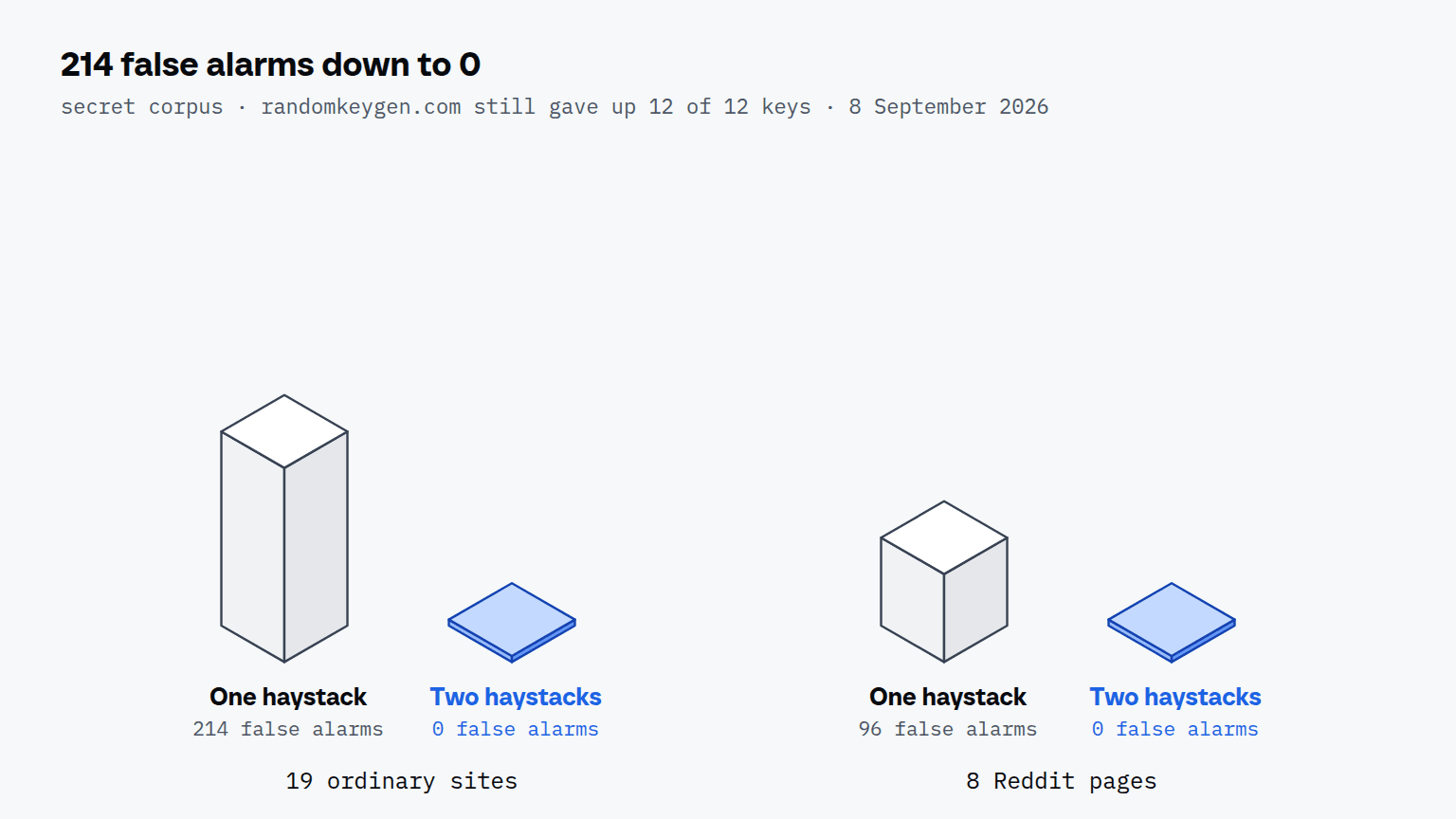
None of the 214 was a secret. They fell into five classes: class names from CSS-in-JS builds such as live-event-video-card__qUkRX3JGISlsuIEO, image paths, query parameters, origin-trial tokens in a <meta> tag and correlation IDs in inline scripts. Every one of them sits in the page source, and no visitor ever sees one.
The fix splits the page into two haystacks by what each stage knows. A format match stands on its own, since AKIA… is an AWS key wherever it appears, so the format stages still read attributes and links. The randomness stage knows nothing but randomness, so it reads only text nodes and field values, with hidden form fields excluded: Amazon's glow-validation-token, eBay's srt and npm's csrftoken are all hidden inputs holding a request token. A provider's own public prefixes, such as Stripe's pk_live_ and sk_test_, are listed one by one rather than matched by shape, because sk_live_ has exactly the same shape. On randomkeygen.com the same chain found 4 keys by format and 8 behind a copy button.
A false alarm bank can go quiet for the wrong reason, so it carries its own counter-checks. The corpus now holds 25 clean pages, and on each one 6 decoys (a 32-character hex key, a base64 key, AWS, Stripe, npm and a JWT) are planted where a person's words stand; all 150 plantings have to be found. Every run also recomputes the old rule over the wide haystack and requires it to keep firing, 801 raw findings, because the gap between 801 and 0 is the fix. Status: shipped in release 0.10.2 on 8 September 2026.
How do you see what the agent did with a secret?
You see it in the run trail, where every tool call on a profile is one step and the secret appears only as its placeholder. The filter runs on each step before it is written, so the trail you read later went through the same check as the reply the agent got. Values the randomness rule caught stand in the profile's key list marked uncertain, and one click releases a harmless one for good. How the trail and its stills are kept is the subject of recording agent runs; the fields are in the runs documentation.
What does a secret filter still not do?
A secret filter does not stop an agent that is trying, and Scalebrowser's secrets documentation says so in those words. Anything an agent may use it may also write down somewhere; what the layer removes is the need to see a value in order to use it. Three more limits are deliberate:
- Confirmation codes stay readable while the agent works, because they expire within minutes and hunting six-digit numbers would hit prices, order numbers and clock times.
- The direct DevTools path is not filtered, because it is read by your own code, which a placeholder would break.
- Files on your disk are not scanned. A
.envthat never passed through the browser is outside the layer.
If you build a filter of your own, measure it on pages that contain nothing to find before you trust it on pages that do. Ours looked correct in every unit test and still filled a profile's list on two sites; the corpus of ordinary pages, with decoys planted into it, is what showed the difference. The security of the MCP connection itself is covered in MCP security for browser agents. What a page can still probe on your local network is covered in Local Network Access in Chrome.
Run it on your own machine
Seven days to try it with your own agents on your own sites. Starting the trial needs a card.
Written by
Davide Valli
Founder, Scalebrowser
Builds Scalebrowser, the browser layer for AI agents that runs on your own machine. Measures every change a web page could observe against a real browser before it ships, and writes up the ones that turned out wrong.
All articles by Davide Valli