Computer use agent or browser agent: 2 ways to see a page
Computer use agents read screenshots, browser agents read a page map: tokens per step, precision, what each can reach, and why a site detects neither by its method.

Davide Valli · Founder, Scalebrowser
Published Oct 24, 2026 · 6 min read
Short answer
Two kinds of agent can do the same web task, and they look at the page in different ways. One takes a picture of the screen and decides where to click; the other reads a list of the page's controls and picks one by name. The choice changes what a step costs and how often a click lands where it should. It does not change what the site sees, and that part is often misread.
What is a computer use agent?
A computer use agent is an agent that operates a computer the way a person does, from screenshots, with a mouse pointer and a keyboard, and with no access to the structure behind the pixels. Anthropic's computer use tool is the current reference: it gives Claude 17 member tools, among them screenshot, left_click, type and scroll, and "Claude typically finishes a batch with screenshot so it can observe the outcome before deciding what to do next." For web applications the documentation recommends a screen of 1280 by 800 or 1366 by 768 pixels. Claude's computer use tool and a browser agent are compared in Claude computer use or a browser agent.
OpenAI's Operator brought the same loop to consumers. It launched on 23 January 2025, scored 38.1 percent on the OSWorld desktop benchmark and 58.1 percent on WebArena, and was shut down on 31 August 2025 after ChatGPT agent took over its browser control. A browser agent works one level down: it reads the page's structure, usually the accessibility tree, and addresses buttons and fields by reference instead of by position. How Gemini's computer use behaves in a browser is covered in Gemini computer use in a browser.
How do the 2 ways of seeing a page compare?
The two ways differ in input, cost per step and precision, and they do not differ in detection.
| Computer use agent | Browser agent with a page map | |
|---|---|---|
| Input | a screenshot, then a pointer and keys at coordinates | a text list of operable elements, then actions on references |
| Cost per step | fixed by the pixel count, not by the page | what changed since the last reading |
| Precision | coordinates Anthropic's own documentation calls "approximate" | the element itself, by reference |
| Detection | set by the browser and the input that reach the page | set by the browser and the input that reach the page |
Anthropic's vision documentation prices an image at one visual token per 28 by 28 pixel patch. A 1280 by 800 screenshot is 46 by 29 patches, 1,334 visual tokens, on a short page and on a long one alike. A page map costs what the page offers to operate, and after the first reading only what changed.
| Page | Page map, first reading | Page map, each further step | One 1280 by 800 screenshot |
|---|---|---|---|
| Hacker News | 4,309 | 462 | 1,334 |
| GitHub repository | 3,200 | 611 | 1,334 |
| Wikipedia article | 2,771 | 2,147 | 1,334 |
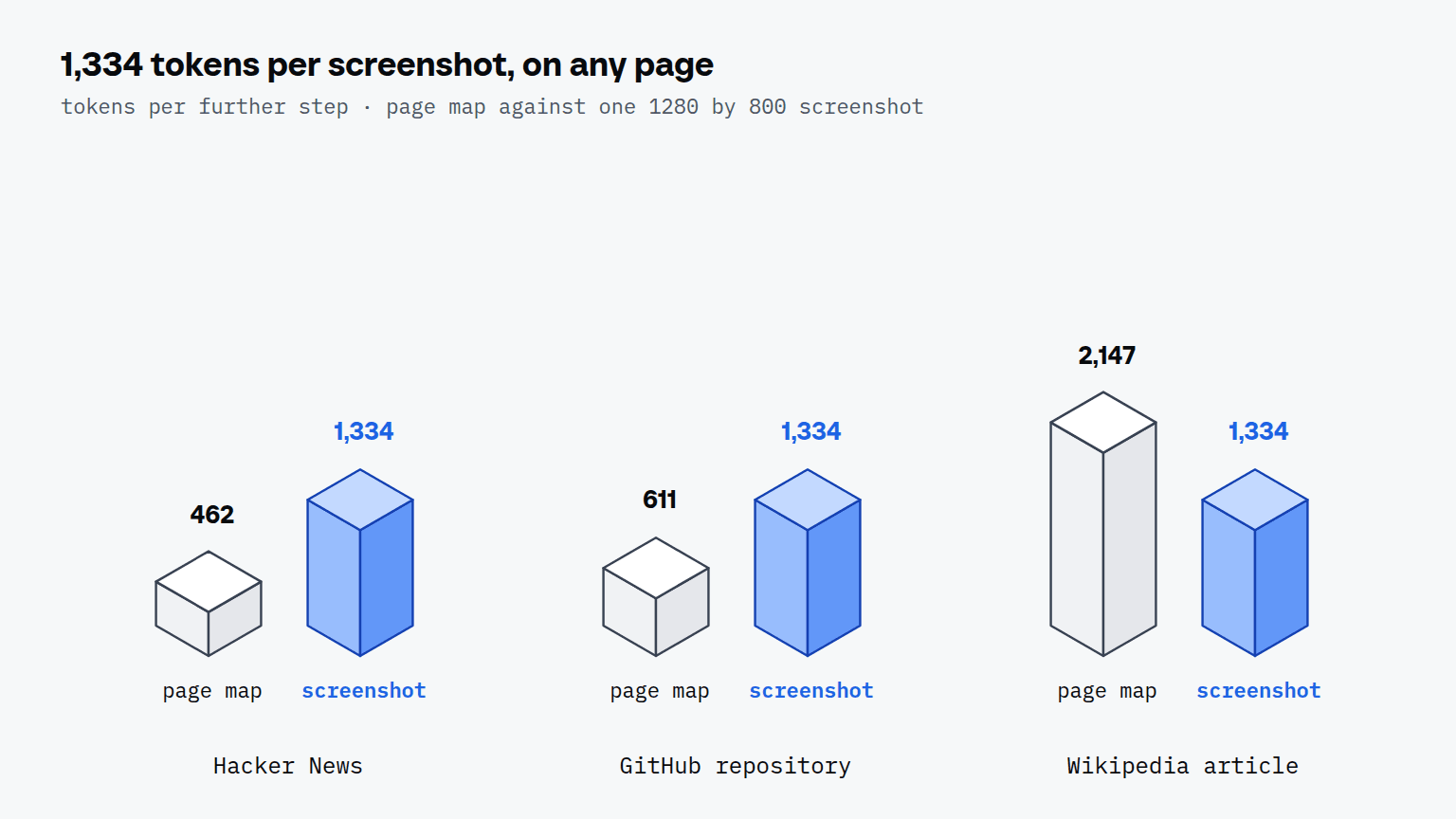
The two counters are not the same unit: the map was counted with OpenAI's cl100k_base tokenizer because Claude's text tokenizer is not public, and the screenshot in Claude's visual tokens. The order of magnitude is what the table shows. On Hacker News a map step costs about a third of a screenshot. On the Wikipedia article a map step costs more than one screenshot, but the screenshot shows one screen of an article that runs to many, and every further screen is another 1,334.
Reach goes the other way. Anthropic's browser use tool reads the page through "the accessibility tree, elements, forms, and tabs" as well as screenshots, and its documentation draws the line itself: "When a task needs a whole desktop, use the computer use tool, which works through screenshots and coordinates alone." A file dialog, a native app or a second program is out of reach for a page map.
Computer use agents are detected by the same layers as any browser automation, because a site never sees the screenshot or the page map. It sees a TLS connection, a JavaScript fingerprint, the way the browser is driven and the timing of the input events. Looking at pixels changes none of those four. What changes them is the browser the agent runs in and the path its clicks take into that browser.
Which browser does either approach run in?
Either approach runs in whatever browser the harness around the model starts, and that browser decides whether a site lets the agent in. Anthropic's reference computer use demo builds an Ubuntu 22.04 container with an Xvfb virtual display and Firefox ESR. A virtual display has no graphics card, and Kernel's bot detection documentation describes what that costs: "Software-rendered browsers produce pixel hashes that don't match any real consumer GPU, which is a strong bot signal on sites with rendering-based fingerprinting." A screenshot agent in such a container is a software-rendered Linux browser, whatever the model does with the pixels.
A browser agent reaches its browser through a tool server, and today that server is often an MCP server. The comparison of browser MCP servers measures six of them on the same pages, and the MCP server documentation shows how a page map arrives line by line. The browser underneath is a separate choice from the tool server on top, and the same questions apply to both approaches: does it run on real hardware, does it keep one identity across runs, and does its input reach the page the way a device's would. Vercel's agent-browser, set against a browser with an identity, is covered in Vercel agent-browser vs a browser with an identity.
What is a headless browser?
A headless browser is a browser that runs without a visible window, and most automation starts one by default. Kernel's documentation warns that such browsers "expose subtle differences (rendering, GPU, fonts)" and advises to "avoid headless mode". There is a second effect that has nothing to do with fingerprints: a tab a driver merely attaches to reports itself hidden and stops drawing, which is the subject of the article on what a headless browser is.


Scalebrowser gives each agent its own isolated browser with a persistent identity, on your own machine, so a run stays signed in, handles the captcha and finishes without anyone watching it.
See how Scalebrowser does itSo which should you pick?
| Task | Pick | Why |
|---|---|---|
| Stays inside web pages | a browser agent with a page map | 462 tokens per step on Hacker News, and references instead of coordinates |
| Needs a native app, a file dialog or a second program | a computer use agent | a page map ends where the page ends |
| Reads long pages once | a page map plus a text read | 5,688 tokens for a whole Wikipedia article, where one screenshot covers one screen at 1,334 |
| Works on sites with bot detection | either, in a browser with real hardware and one identity | the site sees the browser and the input, not how the agent looks at the page |
Our verdict: for work that stays in the browser, a page map was cheaper per step on two of the three pages we measured and addresses elements exactly, and a computer use agent earns its cost where the task leaves the browser. Neither choice decides whether a site lets the agent in; the browser underneath does.
Run it on your own machine
Seven days to try it with your own agents on your own sites. Starting the trial needs a card.
Written by
Davide Valli
Founder, Scalebrowser
Builds Scalebrowser, the browser layer for AI agents that runs on your own machine. Measures every change a web page could observe against a real browser before it ships, and writes up the ones that turned out wrong.
All articles by Davide Valli