Competitor monitoring: 68 changed lines, 0 price changes
How an AI agent monitors competitor prices every morning: five pricing pages read in 13 to 18 seconds, what a change alert misses and what the report says.

Elias Auer · Researcher, Scalebrowser
Published Oct 25, 2026 · 6 min read
Short answer
Picture a founder who hears about a competitor's price cut from a customer who just left. The pricing page had changed on a Tuesday and the founder looked on Friday. Nothing was hidden; nobody was reading it every morning.
What is competitor monitoring?
Competitor monitoring is reading what your competitors publish on a schedule and noticing what moved: a price, a plan, a feature, a new page. The reading is the cheap part. The expensive part is the judgement afterwards, because most changes on a page aren't changes in the offer.
Two kinds of tool do the reading. A change monitor watches a page and sends an alert when it differs from the last look. An agent opens the page, reads it like a person, and writes down what it found.
Which tools watch competitor pages?
Change monitors cost nothing to start and 14 to 15 USD a month for the first paid plan, going by the two pricing pages we read on 11 October 2026.
| Tool | What it sends | Free plan | Lowest paid plan, billed monthly |
|---|---|---|---|
| Visualping | visual, text and element change alerts, an AI summary and an important-or-not flag | 0 USD: 150 checks a month, 5 pages, every 60 minutes | 14 USD (10 USD billed yearly): 1,000 checks, 10 pages, every 15 minutes |
| Distill | change alerts by email, phone push, SMS and webhook | 0 USD: 5 monitors in the cloud, a check every 6 hours at the fastest | 15 USD: 50 monitors, every 10 minutes |
We went in expecting to write that a change monitor stops at "something changed". Visualping's page says otherwise: every plan, the free one included, comes with AI change summaries and an important-or-not flag on each change. That narrows the gap, and it moves the question to what a summary of one page can't do.
What does an agent add to a change alert?
An agent adds everything around the alert: it reads several pages as one set, compares them with its own last read and writes the lines you asked for, such as which competitor's entry price moved and by how much. A monitor is built around one page and one difference; the agent holds the five pages and your question at the same time.
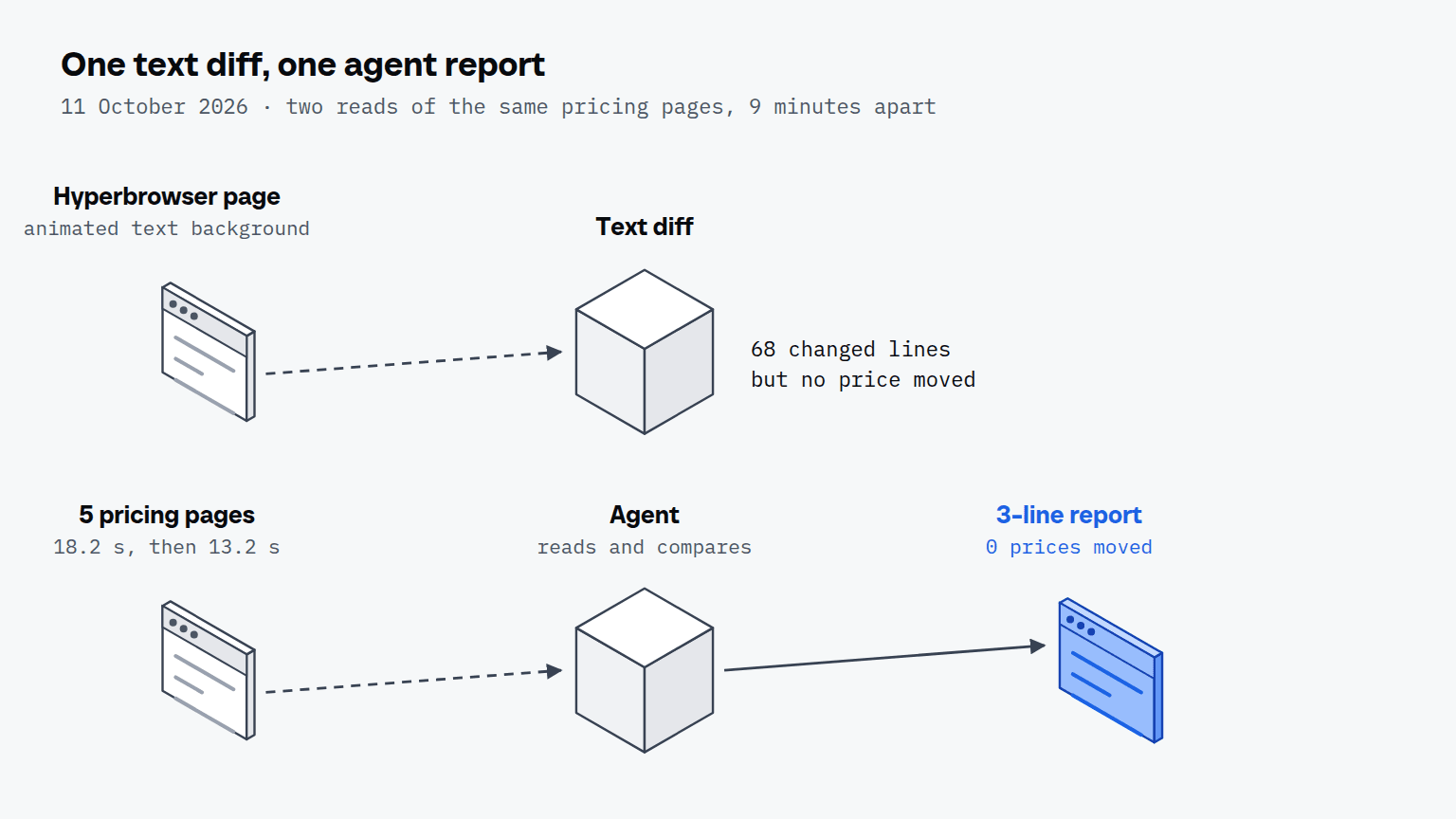
Our second round shows the noisy side of an alert. Hyperbrowser's pricing page carries an animated background made of text characters, and all 34 lines of it changed between our two reads. A raw text diff would have reported 68 changed lines on a page whose prices hadn't moved, and the agent's line for that page was one sentence: no change.
Visualping lists false alert management for this problem, so the point isn't that monitors ignore it, only that a reader who has seen the page once knows what a price looks like. That's what you get from a browser that checks every morning and a model that reads what it brings back.
How does a recorded routine run every morning?
A recorded routine runs every morning by replaying the steps of a run you did once: open the page, read it, compare. Scalebrowser's workflows set has 3 tools that record a stretch of agent work and replay it later, finding each element again on the page as it is and drawing a fresh rhythm for each profile. Something on your side still has to start the routine, a scheduled task in your agent app or a cron entry, and that choice is where agent routines in place of RPA comes in.
Once a day is the rhythm in the headline, and the free plans line up with it: Visualping's 150 checks a month over 5 pages is one check per page per day.
What does a morning report look like?
A morning report from our run is three lines, and the browser needed 13.2 seconds for the five pages it came from. We read five pricing pages twice on 11 October 2026, 9 minutes apart, without logging in, and compared the text of the two reads.
| Page | Free plan | First paid plan | Round 1 | Round 2 | Changed between rounds |
|---|---|---|---|---|---|
| Browserbase | 0 USD a month | 20 USD a month (next: 99 USD) | 1.7 s | 2.0 s | nothing |
| Steel | 0 USD a month plus usage, 30 USD of credits once | 250 USD a month | 4.2 s | 2.6 s | nothing |
| Hyperbrowser | 0 USD, 5,000 credits | 30 USD a month (next: 100 USD) | 5.8 s | 4.2 s | only an animated text background |
| Kernel | 0 USD a month plus usage, 5 USD of credits a month | 30 USD a month (next: 200 USD) | 2.4 s | 2.4 s | nothing |
| Browser Use | no plans: pay as you go, 0.02 USD an hour for a browser | none | 4.1 s | 1.7 s | nothing |
| Round total | empty | empty | 18.2 s | 13.2 s | 0 prices moved |
The round total includes the pauses between pages. The seconds are the browser's half of the work: opening each page and handing back its text. The model's half, reading five pages and writing three lines, comes on top of that. This is the report from that read:
Entry prices on 11 Oct 2026: Browserbase 20 USD a month (free plan 0), Steel 250 USD, Hyperbrowser 30 USD, Kernel 30 USD. Browser Use sells no plan, only pay as you go from 0.02 USD an hour.
Changes since the last read 9 minutes ago: none. Hyperbrowser's text moved only in its animated background.
Worth a look: Steel's first paid plan is 250 USD, more than 8 times the 30 USD of Hyperbrowser and Kernel.
The comparison with yesterday is the part a single round can't show, which is why the report says "9 minutes ago" and not "yesterday". Run the same routine tomorrow and the first line becomes the baseline for the second.


Scalebrowser gives each agent its own isolated browser with a persistent identity, on your own machine, so a run stays signed in, handles the captcha and finishes without anyone watching it.
See how Scalebrowser does itCan the agent read pages behind a login?
Yes, the agent reads a page behind a sign-in the way you do: from a profile that is signed in to your own account, it opens the page, reads the text and compares it with last time. Everything we measured for this article was public and logged out, so we have no number for the signed-in case. The sign-in side of it is covered in market research behind a sign-in.
Where does the browser run?
The browser runs on your own machine, in a profile that keeps its cookies between mornings, so a page that needs your account is still open when the routine starts. For more jobs that repeat on a schedule, see the overview of use cases and the page for repeat work.
Run it on your own machine
Seven days to try it with your own agents on your own sites. Starting the trial needs a card.
Written by
Elias Auer
Researcher, Scalebrowser
Researcher at Scalebrowser, the browser layer for AI agents that runs on your own machine. Measures what a web page can observe about a browser, compares it with a real Chrome on the same machine and publishes the numbers, including the ones that went against us.
All articles by Elias Auer