Instagram MCP: post and reply with an AI agent, no API
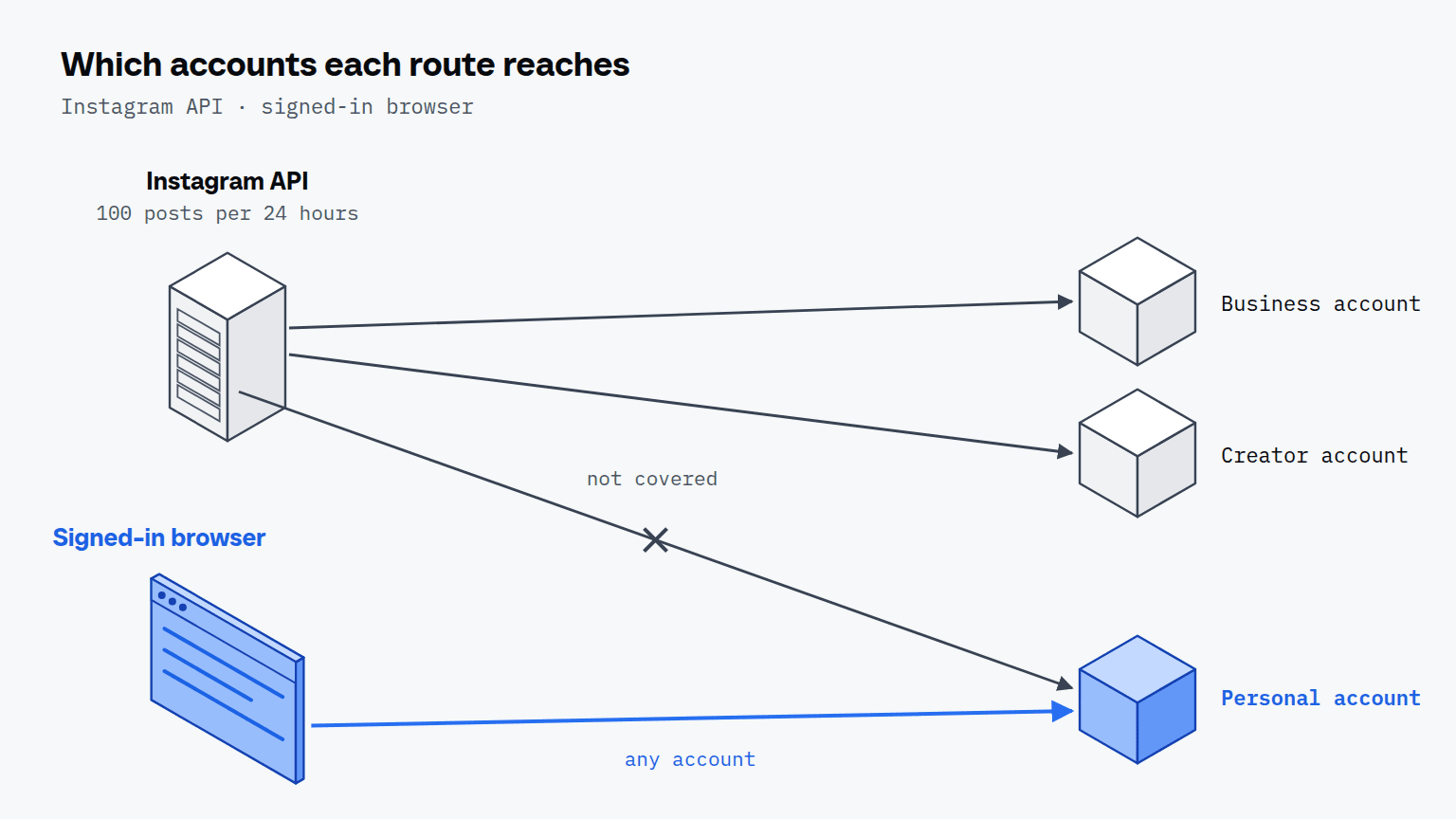
What an Instagram MCP server can do: the official API covers professional accounts only, 100 posts in 24 hours, and a signed-in browser covers any account.

Elias Auer · Researcher, Scalebrowser
Published Oct 13, 2026 · 6 min read
Short answer
A café owner has three photos from this week's baking and a pile of comments she has not answered. She wants Claude to post the photos with captions and reply to the comments, and she posts as herself, from a personal account. Whether that works depends on which kind of Instagram MCP server she picks, because the official route has a rule about accounts.
What is an Instagram MCP server?
An Instagram MCP server is a program that gives an AI app such as Claude Desktop a set of tools for working on Instagram. MCP, the Model Context Protocol, is the standard way an AI app calls tools, and the server is whatever answers on the other end. Four kinds exist, and the first three need an account Meta classes as professional.
| Kind | Account types | What it reaches | What you need |
|---|---|---|---|
| A server on Meta's Instagram API | business and creator | publishing and what the API exposes for professional accounts | a professional account and an app registered with Meta |
| A scheduler | business | posts queued for a later time | a business account |
| A direct-message tool on the official API | business and creator | message flows the API allows | a professional account and an app |
| A browser signed in as you | any account, yours or a client's you manage | what you see and do on the site | a plan; Scalebrowser Start is 19 EUR a month |
What does the Instagram API allow?
The Instagram API allows professional accounts only, and at most 100 posts published through it in 24 hours. Meta's overview of the API with Instagram Login supports business and creator accounts and documents no access for personal ones.
The publishing limit is on Meta's content publishing page: 100 API-published posts in a moving 24-hour period, with a carousel counting as one. The same page's carousel section says 50, so plan for the lower figure if you publish carousels. Personal accounts lost their last official route when Meta switched off the Basic Display API on 4 December 2024. We read all three pages on 11 October 2026. Marketplace, Meta's other big consumer surface, has no API for buyers or sellers at all, and what Meta documents for Marketplace is one page about partners.
What can an agent do on Instagram through a browser?
An agent in a browser-based MCP server does what you can do on the site, with your account's sign-in. These are prompts you could give it:
- "Post these 3 photos from my folder, with the captions in captions.txt."
- "Answer the new comments on this week's posts, short and friendly."
- "Reply to the messages from customers that ask about opening hours."
- "Read what these 5 competitors posted this week and tell me what got the most comments."
- "Export this week's numbers for each post into a table."
We have not signed in to Instagram, so those are the jobs the tools are built for, not results we measured. What we did measure is what the site shows a visitor, further down.
How does a photo get from your folder into a post?
The photo gets into a post through the page's own file picker: you put the file in a folder, the agent attaches it where you would, types the caption and presses the button. The post is made on the site, not through the API, so Meta's API limits do not govern it. We posted nothing on 11 October, so we have no minutes per post to give you. If the pictures come from a batch of 20 Midjourney images, the folder is the hand-over between the two jobs.
What does an Instagram run look like?
An Instagram run starts with a question and ends with what the page showed. We ran the reading half on 11 October 2026 on a headless Scalebrowser profile with no account: the café owner's question, "what did three accounts I admire post this week?", asked about NASA, National Geographic and SpaceX. The whole session, 25 page loads across three sites with the agent's own turns included, took about 15 minutes.
| Profile | Loads | Posts in the grid | Sign-up dialog on load | "Show more posts" |
|---|---|---|---|---|
| instagram.com/nasa | 4 | 12 on each of 3 scrolled loads | 2 of 4 | sign-up dialog, page back to top |
| instagram.com/natgeo | 3 | 12 each time | 0 of 3 | sign-up dialog ("keep watching") |
| instagram.com/spacex | 1 | 12 | 0 of 1 | not clicked |
| instagram.com/anthropicai | 1 | 0 (profile, 1,795 followers) | not shown | not applicable |
All 12 posts of a profile came into view within 2 scroll steps. Each link carried a date and a short description of the picture, such as "Photo by NASA on October 09, 2026", and no caption. On NASA's page the first row held posts from 2 to 6 October ahead of newer ones from 7 to 11 October. The first load on a fresh profile also asked about cookies, and a sign-up dialog followed once we declined the optional ones.
Below the grid, a button offered more posts. We pressed it on 2 profiles, and both times a sign-up dialog appeared, so a logged-out agent reads 12 posts per profile and no more. What a signed-in profile reads is the part we have not measured.


Scalebrowser gives each agent its own isolated browser with a persistent identity, on your own machine, so a run stays signed in, handles the captcha and finishes without anyone watching it.
See how Scalebrowser does itWhich Instagram tool fits which account?
A business account that only needs scheduling fits Meta Business Suite, and a personal account or a job no API covers fits the browser. The account type decides first, the job second.
| You have | Fits | Why |
|---|---|---|
| A business account and a weekly posting plan | Meta Business Suite | a scheduler built for that account type |
| A business account and customer messages through official flows | A direct-message tool on the API | the API covers professional accounts |
| A personal account | A signed-in browser | the API's documented access is professional accounts only |
| A job no API covers, such as reading what competitors posted | A browser | what you see is what the agent reads |
Whichever you pick, MCP servers explained covers what all of them share.
Where does the browser run?
The browser runs on your own machine, with one profile for each Instagram account, so the browser that uploads the post keeps each account's sign-in apart. For the job pages that go with this one, see the use cases overview and many identities.
Run it on your own machine
Seven days to try it with your own agents on your own sites. Starting the trial needs a card.
Written by
Elias Auer
Researcher, Scalebrowser
Researcher at Scalebrowser, the browser layer for AI agents that runs on your own machine. Measures what a web page can observe about a browser, compares it with a real Chrome on the same machine and publishes the numbers, including the ones that went against us.
All articles by Elias Auer