Midjourney API: why every one you find is unofficial
Midjourney grants an API only in rare cases. What the unofficial APIs are, how an AI agent works the Midjourney website, and what we measured on 11 October 2026.

Elias Auer · Researcher, Scalebrowser
Published Oct 13, 2026 · 6 min read
Short answer
Picture a designer who needs 20 variations of one product shot by noon: the same ceramic mug on five different tables, four images each. Typing five prompts is no trouble. Picking, opening and saving 20 files is what eats the morning, so she searches for the Midjourney API, hoping a script will do the clicking.
Does Midjourney have an API?
Midjourney has no public API, and its own help center says so. The sentence sits in the Community Guidelines: with a few rare exceptions that are explicitly granted, Midjourney does not provide an API. On 11 October 2026 we searched the help center for "API" three times and got the same single result each time, that article.
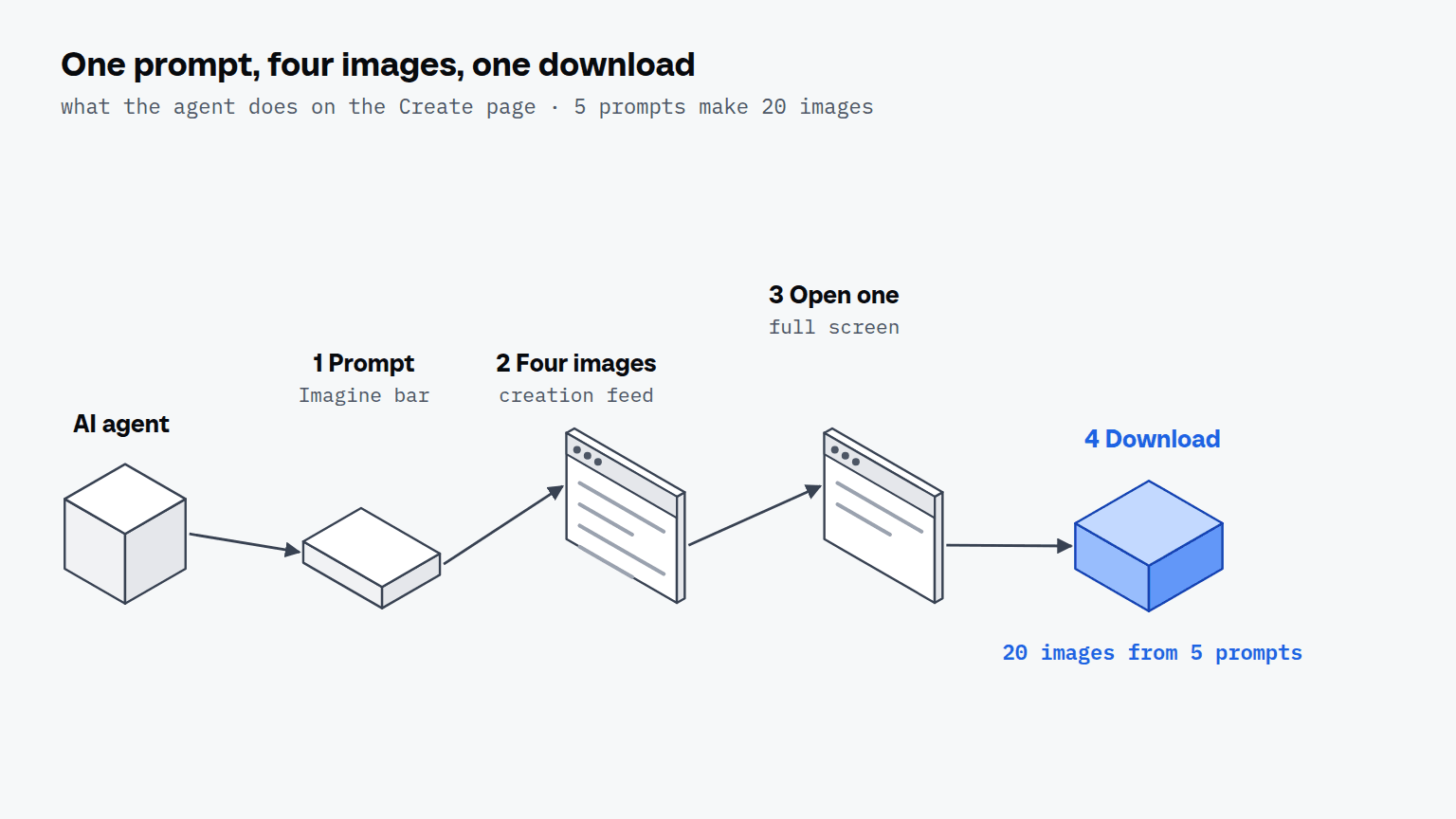
What Midjourney does provide is the website. Its Create page has an Imagine bar where you type the prompt and a feed where the images appear as they're made. By default a prompt makes four images, so the designer's 20 images are 5 prompts.
How do unofficial Midjourney APIs work?
An unofficial Midjourney API operates Midjourney as a signed-in user, either through Discord or through the website. A Discord client such as the midjourney package for Node.js asks for your Discord account token plus the server and channel where the Midjourney bot sits, and then sends the same Imagine, Upscale and Vary commands you would press as buttons. A proxy such as midjourney-proxy is a server you deploy: it offers a REST interface and, according to its README, draws through Discord and through the Midjourney website, spread over a pool of accounts.
Both kinds need a session of yours. The prompt bar on the website stays locked until you log in, as the measurement below shows, so any wrapper that submits prompts has to carry a signed-in session. The difference is where that session lives: in a token pasted into a script, or in a browser profile you can open and look at.
| Route | What you hand over | What runs it |
|---|---|---|
| Discord client (Node.js package) | your Discord account token, a server ID, a channel ID | a program you run |
| Proxy with a REST interface | the accounts it should draw with | a server you deploy |
| Agent in a signed-in browser | nothing; the profile stays signed in | the agent, on the website |
How does an agent use the Midjourney website?
An agent uses the Midjourney website the way you do, one prompt at a time, and a browser MCP for image tools is what gives it the page to work on. MCP (the Model Context Protocol) is the plug that lets an assistant such as Claude Desktop, ChatGPT or Codex call a browser as a tool. The steps below follow Midjourney's own description of the Create page:
- The agent opens the Create page in a profile that's signed in to your Midjourney account.
- It types the prompt into the Imagine bar and presses Enter.
- It waits in the creation feed while the four images arrive.
- It clicks the image you asked for, which opens full screen.
- It clicks the download icon in the toolbar at the top, and the file lands in the browser's download folder.
Variations sit one step away. The help center says that hovering an image in the feed shows shortcuts to create subtle or strong variations, and that the full-screen view carries further editing actions. Whatever the agent does there is a click on a page you could click yourself, in your account, with your plan.
Why a page map instead of screenshots?
A page map lists what a person can click as text, so the agent doesn't have to find the download icon in a picture. Agents that read screenshots do the finding with a vision model, and on a page of near-identical images that's where the wrong tile gets opened. On midjourney.com/explore the map held between 9 and 12 tile links at a time: tiles that scrolled out of reach left the map and new ones joined as the page loaded them.
What does a batch of 20 images look like?
A batch of 20 images is 5 prompts, because Midjourney makes four images for each. You tell the agent something like: here are five prompts for the mug, run them one after another, and save all four images of each into a folder called mug-v1. The agent types prompt one, waits for the feed, opens each of the four images and downloads it, and then starts on prompt two. Once the folder is full, posting it is a second job for the same browser, as in posting from a folder to Instagram.
We did not run that batch. No Midjourney account was signed in for this article, so everything we measured is the public side, in 3 runs on 11 October 2026, logged out and with nothing generated. The one timing we do have comes from the same input layer on another site that day: typing a prompt of 47 to 51 characters took 25 to 29 seconds, so five such prompts are about 2.5 minutes of typing before Midjourney's own generation time, which we haven't measured.
| Check | Result in all 3 runs |
|---|---|
| Help center search for "API" | 1 result: Community Guidelines |
| midjourney.com/explore on arrival | 9 images in the page map, a "Log in" link |
| Prompt bar | disabled, reads "Log in to start creating..." |
| After 10 scroll steps of 600 px | 60, 59 and 59 images had entered the page map, no sign-in dialog |
The explore page is open to anyone: ten scroll steps showed about 60 images and never asked for a login. The login gate is the prompt bar, and that is where your own account comes in. Music has the same shape: making songs on Suno starts with a prompt, gives two songs for each and asks for a login before you can listen.


Scalebrowser gives each agent its own isolated browser with a persistent identity, on your own machine, so a run stays signed in, handles the captcha and finishes without anyone watching it.
See how Scalebrowser does itWhere does the browser run?
The browser runs on your own machine, in a profile that stays signed in to Midjourney between runs, so a browser that keeps Midjourney open starts the next morning's batch on the Create page and not on a login form. Scalebrowser Start costs 19 EUR a month for one browser at a time on one machine, with unlimited profiles, according to its pricing page. The Midjourney account and plan stay yours.
The overview of use cases and the page on tools with no API show the same pattern on other platforms.
Run it on your own machine
Seven days to try it with your own agents on your own sites. Starting the trial needs a card.
Written by
Elias Auer
Researcher, Scalebrowser
Researcher at Scalebrowser, the browser layer for AI agents that runs on your own machine. Measures what a web page can observe about a browser, compares it with a real Chrome on the same machine and publishes the numbers, including the ones that went against us.
All articles by Elias Auer