AI agent observability: 1 still image for every browser step
How to record and audit what an AI agent did in a browser: 1 step per tool call, a still per step, stated outcomes, and proof recording leaves input timing alone.

Davide Valli · Founder, Scalebrowser
Published Oct 22, 2026 · 6 min read
Short answer
An agent reports "done", and the account it was supposed to create does not exist. The model's transcript tells you what the agent believed; it does not tell you what the page showed when it clicked. Auditing a browser agent needs a record kept outside the model, one entry per action, with a picture you can look at, and it needs that record to be invisible to the site being worked.
What is AI agent observability?
AI agent observability is the record of what an agent did, why and with what result, detailed enough to reconstruct a run after the fact without asking the agent. For a browser agent it has three parts that must stay separate: the goal the agent stated, the trail of actions the system logged by itself, and the outcome someone vouched for. A trail with no errors is not a success. An agent can click the wrong button forty times without one failure, so an outcome derived from the absence of errors reports a success that never happened.
The browser adds two requirements that general agent tracing does not have. The record has to show the page, because the page is the state the agent acted on. And the recording must not change the input the page receives, because a site that can tell when an agent is being watched has one more way to tell the agent from a person.
What does one step record?
One step records one tool call: which tool, on what, how long it took, whether it failed, and a still of the page when stills are switched on. Each step belongs to a run, one declared task on one profile, which opens with the goal and closes with an outcome.
| Field | Example | Why it is recorded | Written by |
|---|---|---|---|
| Goal of the run | "Sign up for an account on example.com" | the yardstick for everything after it | the agent, stated once |
| Tool and target | click on "Create account" | what was attempted, in the page's own words | the system, automatically |
| Duration and failure | time taken, failed or not | slow or failing steps show where a run stalled | the system, automatically |
| Still | the page after the step | what the agent actually saw | the system, when stills are on |
| Outcome | reached, partial, blocked, interrupted or unknown | whether the goal was met | an agent, a check or a person for reached and partial |
Two things are left out of a stored step on purpose: the arguments of the call and the handle that grants access to the browser. A trail kept per profile would otherwise show one agent what another one typed. Secrets follow the same rule in the other direction: they are filtered from the trail, and a value visible on the page is painted over in the still rather than the still being dropped, so the step keeps its place in the record. The stills are also how you check a report that says nothing changed, such as a morning report on competitor pricing, where the claim is that 0 of 5 prices moved. What a signed-in agent is and is not given beyond the trail is covered in AI agent security in a signed-in browser. Which actions an agent may take in a signed-in browser at all, and where those limits sit, is covered in AI agent security.
The open standard for agent traces makes the same cut. The OpenTelemetry GenAI agent span conventions, still at status "Development", name operations such as invoke_agent and execute_tool and mark the chat history attributes "Opt-In", because they are "likely to contain sensitive information including user/PII data". On the free path, Playwright's trace viewer records "a set of complete DOM snapshots for each action", before, during and after, and its retain-on-failure option keeps a trace only for tests that failed. An agent run differs from a test in one respect: a run that "passed" is exactly the one you want to audit. How Vercel's agent-browser compares with a browser that has an identity is covered in Vercel agent-browser vs a browser with an identity.
Does recording change what the page sees?
No: with the recorder built into the product, a keypress reached the page with the same timing as without recording, and a click within 0.1 milliseconds of the control. We measured it because the first version did change it. In a probe on 26 August 2026, a screen capture at 60 frames per second delayed keypresses by 2.6 to 2.8 milliseconds at the 95th percentile, against a control that varied by 0.02 to 0.08 milliseconds. At 2 frames per second the delay dropped to 0.03 milliseconds, so the recorder now slows its capture while a key or click is on its way to the page.
The throttle was written in August and, as the measuring gate found on 13 September 2026, not connected to the shipped recorder until that day: the gate had timed its own capture rather than the product's. Since then it drives the recording the product starts, and the following run is the one that counts.
| Scene | Recording | Delivery time, 95th percentile above median | Difference to control |
|---|---|---|---|
| Keys | none, control | 0.17 ms, spread 0.06 ms | empty |
| Keys | recording on, default width | 0.17 ms | 0 ms |
| Keys | recording on, 1920 pixels wide | 0.22 ms | 0.05 ms |
| Keys | counter-test, throttle off | 1.08 ms | 0.91 ms |
| Clicks | none, control | 0.41 ms, spread 0.24 ms | empty |
| Clicks | recording on, default width | 0.33 ms | 0.08 ms |
| Clicks | recording on, 1920 pixels wide | 0.31 ms | 0.1 ms |
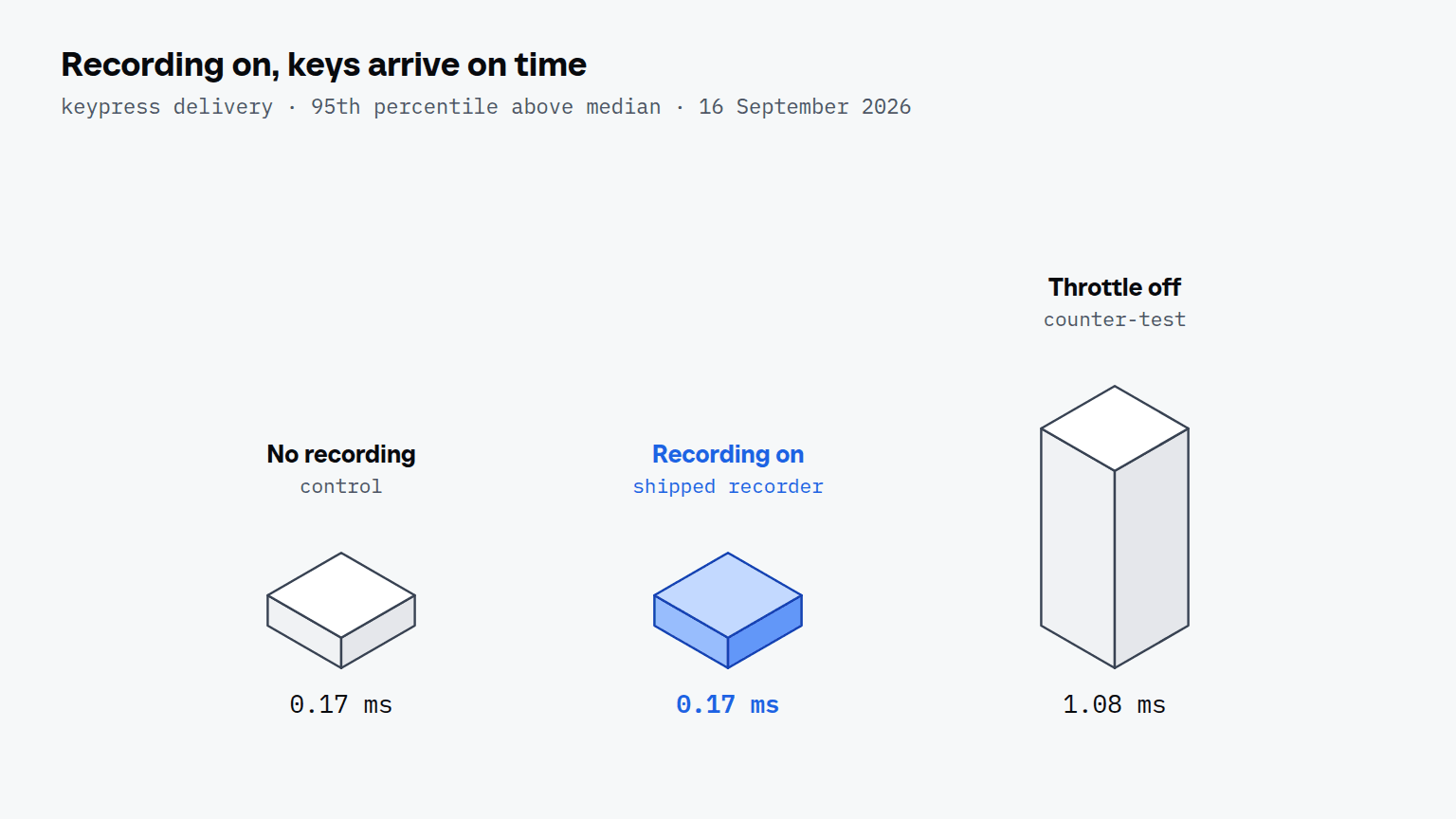
The counter-test is the row that makes the others mean something: the same bench, with the throttle removed, finds 0.91 milliseconds in the key scene. Two secondary measures, the gap between keys and the first move of a gesture, did flag differences in this run. In a second run the same night the counter-test scored better than the control on one of them, which points to noise rather than recording; that reading is ours, and it stays open until more passes settle it. Timing is one of four layers a site reads, and the guide to browsers built for AI agents walks through the other three.


Scalebrowser gives each agent its own isolated browser with a persistent identity, on your own machine, so a run stays signed in, handles the captcha and finishes without anyone watching it.
See how Scalebrowser does itCan a run become a video?
A run can become a video, because the recording keeps the real timeline of every click and keystroke along with the frames. A render turns it into a finished film with chapters the agent marked while it worked, and the cursor in the film glides between the exact places and times where the real clicks landed. The videos documentation describes the recording and rendering tools, the activity documentation the run trail and its retention of the newest 500 finished runs, and the guide to demo videos from agent runs shows what the film is used for. Adding timed captions to such a video, from the text the agent already wrote, is covered in AI subtitles for demo videos. A video with a synthetic voice may also have to say so, which is covered in C2PA for product videos.
Run it on your own machine
Seven days to try it with your own agents on your own sites. Starting the trial needs a card.
Written by
Davide Valli
Founder, Scalebrowser
Builds Scalebrowser, the browser layer for AI agents that runs on your own machine. Measures every change a web page could observe against a real browser before it ships, and writes up the ones that turned out wrong.
All articles by Davide Valli