
Random user agent: why rotating it contradicts the engine
Why a random user agent claims a browser the engine is not, what a site cross-checks it against, and how old the Chrome versions in 3 popular UA lists are.

Davide Valli · Founder, Scalebrowser
Published Nov 17, 2026 · 6 min read
Short answer
A scraper gets blocked, and the first fix most people reach for is a different user agent on every request. It feels like the obvious move: the string is the one place where a browser says what it is, and a library hands out a new one in a single line. For a plain HTTP client that sometimes helps. For a real browser engine it does the opposite, because the engine keeps telling the truth everywhere the string does not reach.
What is a random user agent?
A random user agent is a User-Agent string picked from a list for each request, each session or each browser start, so that the client claims to be a different browser each time. Four sources supply most of these strings, and we read each of them on 27 September 2026.
| Source | Where | Downloads, 30 days to 26 September 2026 | Last release | Data |
|---|---|---|---|---|
| fake-useragent | PyPI | 5,933,113 | 2.2.0, 14 April 2025 | "real world database" shipped in the package |
| user-agents | npm | 728,750 | 2.1.196, 27 September 2026 | "updated daily" |
| random-useragent | npm | 89,140 | 0.5.0, 3 September 2020 | a fixed list of named browsers |
| Random User-Agent | browser extension | 760 GitHub stars | active, last push 14 September 2026 | replaces the header, optionally on a timer |
The first three are libraries a script calls. The extension changes the string inside a person's own browser, on every start or "after a specified period of time".
Does a random user agent help avoid bot detection?
No, a random user agent does not help a real browser engine avoid bot detection, because the string then describes a browser the engine is not. The Random User-Agent extension says so in its own README: "Faking your user agent might make you more fingerprintable, not less. There are ways other than User-Agent sniffing to determine what browser you're using." The lists make the gap wider, because most of their Chrome entries are older than any Chrome a person is running. We extracted the Chrome desktop entries from each library's shipped data and compared their versions with what Google's version history service served to Windows stable: Chrome 153 and 154, with 155 at a 0.5 percent rollout.
| Library | Chrome desktop entries | Newest Chrome in the list | Claiming Chrome 151 or older | With a full, pre-reduction version |
|---|---|---|---|---|
| fake-useragent 2.2.0 | 1,353 | 136 | 100 percent, by weight | 23 |
| user-agents 2.1.196 | 3,918 | 155 | 88.5 percent, by weight; 72.4 percent on Chrome 145 alone | 9 |
| random-useragent 0.5.0 | 101 | 62 | all 101 | all 101 |
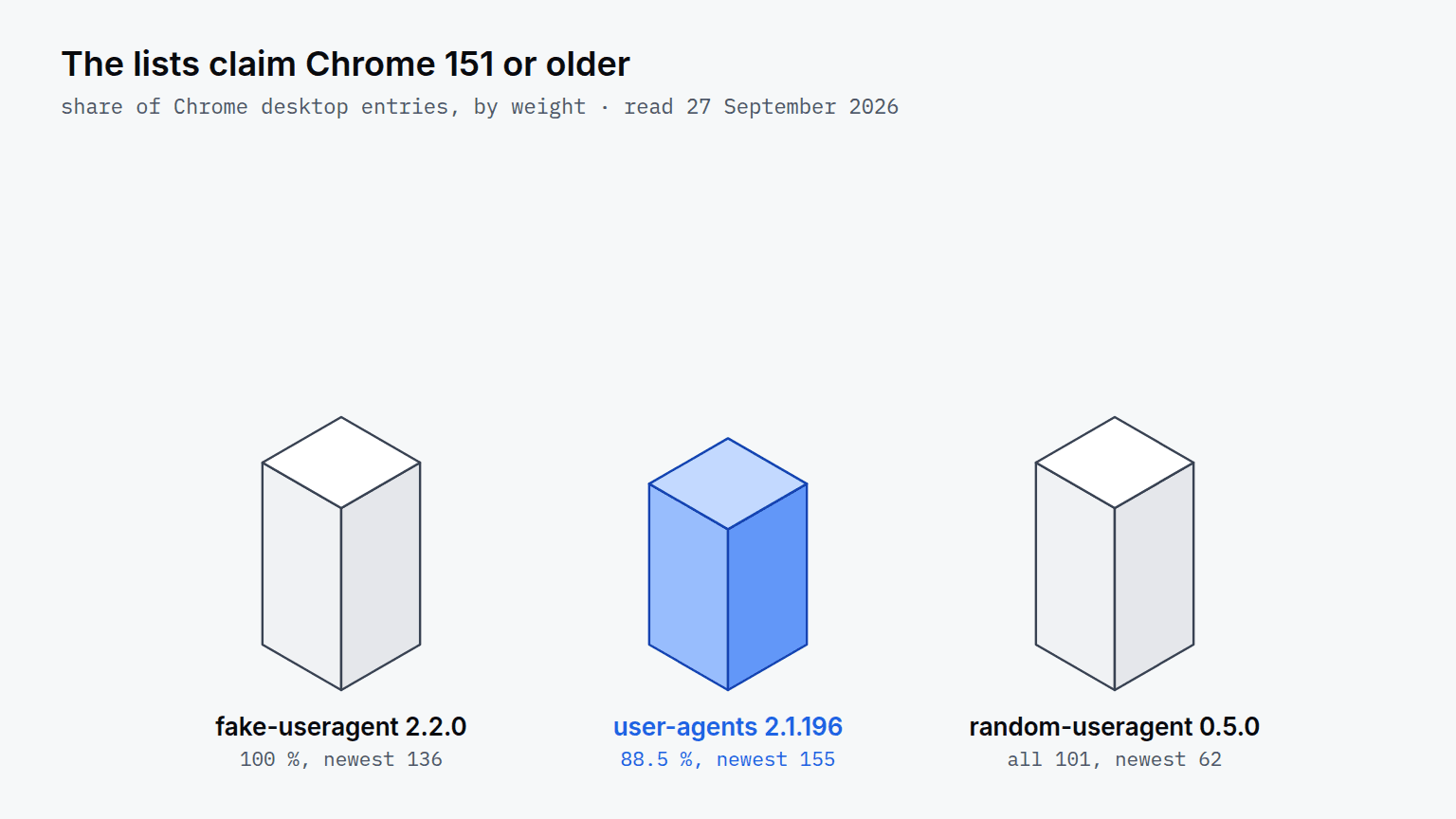
user-agents is the only list with current versions in it, and its weights still put nine in ten Chrome picks on a version at least two behind the stable channel. fake-useragent, downloaded about six million times a month, has no Chrome newer than 136. A browser that runs Chrome 154 and announces Chrome 136 contradicts itself in the first request it sends.
Which claims can a site cross-check?
A site can cross-check the user agent against four surfaces that come from the engine, not from the string:
- The
Sec-CH-UAheader. MDN's client hints guide listsSec-CH-UA,Sec-CH-UA-MobileandSec-CH-UA-Platformas low entropy hints that "may be sent by default on every client request", and the first one carries the brand and the major version. navigator.userAgentData. The same brands and version are available to the page's script, and the full version list on request.- The format of the string itself. Chrome has sent a reduced user agent for years, and a string in the old format is not one Chrome produces (next section).
- The TLS handshake. It is read before any script runs, it comes from the engine's own network stack, and no user agent setting reaches it.
A header rewrite changes the one line of text and leaves the other four where they were. These are the claims a site cross-checks, and a string that disagrees with all four is easier to flag than the engine's honest version would have been. The checker Pixelscan and its "Masking detected" verdict are covered in Pixelscan and 'Masking detected'.
Why does a full Chrome version number stand out?
A full Chrome version number stands out because desktop Chrome stopped sending one in its user agent in 2022. The Chromium project's user agent reduction page describes the phases: Chrome 101 froze the minor, build and patch numbers to "0.0.0", and Chrome 107 unified the platform token, which completed the reduction on desktop. The full version moved into the client hints, "available by request". On 25 August 2026 we read the user agent of three setups with the same script:
| Setup | User agent carried |
|---|---|
| Playwright, headless, its bundled Chromium 141 | HeadlessChrome/141.0.7390.37 |
| Playwright, headless, installed Chrome 141 | HeadlessChrome/141.0.0.0 |
| real Chrome 151 on Windows | Chrome/151.0.0.0 |
Every Chrome desktop entry in random-useragent carries a full version, from Chrome 4 to Chrome 62, and so does the bundled Chromium of the first row.
Why is rotating the user agent a bot signal?
Rotating the user agent is a bot signal because it makes one visitor look like several browsers while everything else about that visitor stays the same. The cookie, the IP address, the TLS handshake, the screen and the graphics card still describe one machine, and a site that stores the user agent next to its own cookie sees that machine switch browsers between two page loads. A person's Chrome changes its version only when it updates. According to Google's version history data, Chrome 153, 154 and 155 reached the Windows stable channel on 26 August, 9 September and 23 September 2026, and each install moved at its next restart, not per request.
Rotation also resets nothing that matters. The address still carries its own reputation, and the TLS handshake still comes from the engine.

Scalebrowser runs real browser profiles on your own PC: your AI agent drives them over MCP and signs in without ever seeing a password.
Download freeWhat should an agent's browser report instead?
An agent's browser should report the engine's own version, on every surface, and move to a new one only when the engine itself updates. The version then agrees with the client hints, the reduced string format and the TLS handshake by construction, because all of them come from the same build. The version also has to stay current: on 10 September 2026 our newest engine was Chrome 151 while real Chrome on the same machine was already 153, which put a fleet in the thin tail of the version distribution. Our engine has moved on since: Chrome 154 has shipped to customers since 20 September 2026.
Scalebrowser rewrites a profile's browser version to the engine's own at every launch, because a reported version that differs from the engine contradicts the client hints and the TLS handshake the engine itself produces. The engine page describes how profiles follow the pinned engine build at their next start, in both directions, the same way a Chrome update applies at the next start of that install. A profile created months ago therefore reports the version it runs, not the version it was born with.