
Puppeteer MCP server: archived since 29 May 2025, 7 tools
The Puppeteer MCP server read in September 2026: its 7 tools, why it is archived yet still downloaded, the evaluate risk, and the servers that replaced it.

Davide Valli · Founder, Scalebrowser
Published Nov 18, 2026 · 6 min read
Short answer
Many MCP setup guides from early 2025 still start with one line, npx -y @modelcontextprotocol/server-puppeteer, and npm still serves it. The server behind it has not changed since May 2025, and the repository that holds it now describes itself as "reference MCP servers that are no longer maintained". We read the archived code, the npm registry and the successors on 27 September 2026 and set them next to what our token bench measured for the servers that replaced it.
What is the Puppeteer MCP server?
The Puppeteer MCP server is the reference Model Context Protocol server that the MCP project put on npm in November 2024 to let a model drive Chrome through Puppeteer. It starts a browser on your machine and gives the model 7 tools, each addressed by a CSS selector rather than by an element the model has seen.
| Tool | Input | What it does |
|---|---|---|
puppeteer_navigate | url, optional launchOptions, allowDangerous | opens an address; new launch options restart the browser |
puppeteer_screenshot | name, optional selector, width, height, encoded | captures the page or one element, 800 by 600 pixels by default |
puppeteer_click | selector | clicks the element the selector matches |
puppeteer_hover | selector | moves the pointer over it |
puppeteer_fill | selector, value | writes a value into an input field |
puppeteer_select | selector, value | picks an option in a select element |
puppeteer_evaluate | script | runs JavaScript in the page |
Two resources come with the tools: the browser console as console://logs and each screenshot as screenshot://<name>. The Docker image runs headless Chromium, while the npx version opens a visible window.
Is the Puppeteer MCP server still maintained?
No, the Puppeteer MCP server is not maintained: its code moved to the servers-archived repository, which "was archived by the owner on May 29, 2025" and is read-only. The npm registry marks the package as deprecated with "Package no longer supported". It still gets downloaded in large numbers, mostly through configuration files written before the archive.
| Server | Status | Latest release or push | npm downloads, 30 days | GitHub stars |
|---|---|---|---|---|
| @modelcontextprotocol/server-puppeteer | archived, deprecated on npm | 2025.5.12, 12 May 2025 | 121,549 | no own repository |
| chrome-devtools-mcp | maintained | pushed 27 September 2026 | 8,111,441 | 52,654 |
| @playwright/mcp | maintained | pushed 25 September 2026 | 26,308,197 | 37,612 |
| puppeteer-mcp-server, a community project | not archived | pushed 14 March 2025 | 9,751 | 483 |
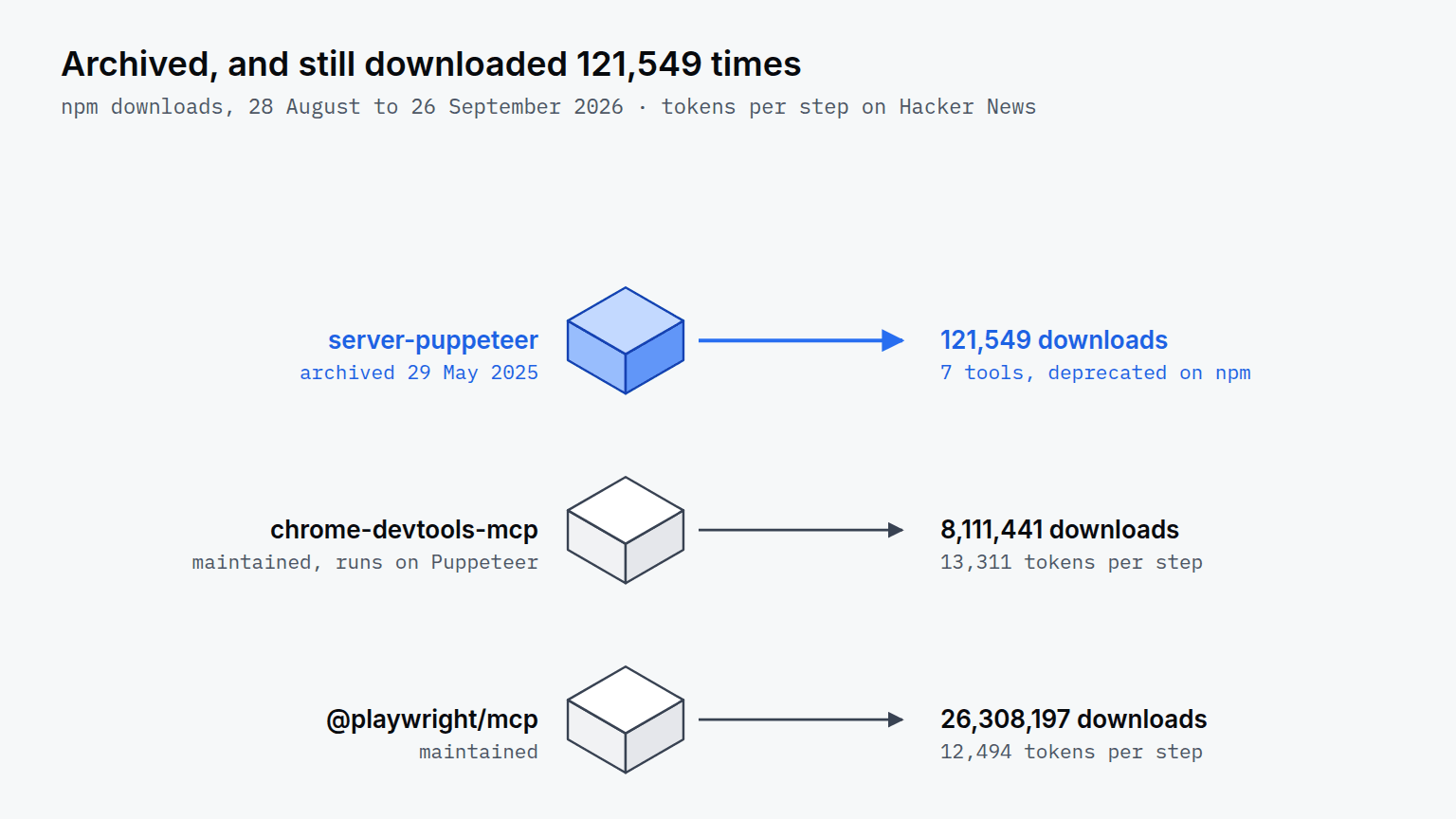
The archived server gets about 1 download for every 67 of Chrome DevTools MCP and every 216 of Playwright MCP. Nobody fixes a bug in it any more, and a new Chrome that breaks one of its calls stays broken.
What can the Puppeteer MCP server do for an AI agent?
The Puppeteer MCP server lets an agent open pages, click, fill fields, take screenshots and run scripts, and it leaves the agent to find every selector on its own. There is no tool that lists what is on the page. An agent sees the page through a screenshot or by running puppeteer_evaluate to read the DOM, and both paths are expensive: a screenshot has to be read by a vision model, and a DOM dump grows with the page.
The launch settings sit in the model's hands too. puppeteer_navigate accepts launchOptions from the tool call, and the README states that tool arguments are one of the two ways to set them, next to an environment variable. Its switch against dangerous options such as --no-sandbox or --disable-web-security is allowDangerous, which is itself an argument of the same call.
What does puppeteer_evaluate hand to the model?
puppeteer_evaluate hands the model a JavaScript console in whatever page is open, signed-in sessions included. Its input is one string, "JavaScript code to execute", with no allowlist. A script can read form values, cookies that are not marked HttpOnly and the text of any page the browser holds. The README adds its own caution: the server "can access local files and local/internal IP addresses since it runs a browser on your machine". An agent that reads a page written by somebody else can be steered into calling that tool with a script the page suggested.
Which servers replaced the Puppeteer MCP server?
Two maintained servers replaced it for most users, and both find elements from a structured snapshot of the page instead of a selector the model has to guess. Chrome DevTools MCP comes from the Chrome DevTools team and "uses puppeteer to automate actions in Chrome", so it is the direct successor in code. Playwright MCP from Microsoft "uses Playwright's accessibility tree, not pixel-based input". Among the browser MCP servers today, they differ most in what one step costs an agent.
| Server | Tools served | Tool list, tokens per request | Next step on Hacker News, tokens |
|---|---|---|---|
| Chrome DevTools MCP 1.9.0 | 29 | 4,849 | 13,311 |
| Playwright MCP 0.0.80 | 24 | 3,162 | 12,494 |
| Scalebrowser desktop app | 65 | 12,559 | 462 |
| Puppeteer MCP, archived | 7 | not measured | not measured |
A step here is one action plus what the agent needs to act next. Chrome DevTools MCP and Playwright MCP answer each step with a whole snapshot again, so every follow-up pays for the page again. A server that answers with only what changed pays for the page once. The Puppeteer MCP server has the shortest tool list of the four, but it has no snapshot tool to measure at all, so its step cost depends on how the agent chooses to read the page.
So which should you pick?
Our verdict: nothing speaks for starting new work on the archived server. Chrome DevTools MCP is the natural move for anyone who picked it for Puppeteer, and the second question is how many steps your agent runs, because that is where the servers part by a factor of 27 or more.
| Situation | Pick | Why |
|---|---|---|
| An old configuration that still calls server-puppeteer | replace it | archived since 29 May 2025, no fixes for new Chrome releases |
| Debugging a page you are building | Chrome DevTools MCP | Puppeteer underneath, plus traces, network and console |
| Short test sessions on small pages | Playwright MCP | accessibility snapshot per answer, most downloaded |
| Code that must keep Puppeteer | Puppeteer itself, without MCP | the library is maintained, only the MCP server is not |
| Long agent sessions on signed-in accounts | a server that answers with the difference and runs no model-written script | 462 tokens per step, no evaluate tool |

Scalebrowser runs real browser profiles on your own PC: your AI agent drives them over MCP and signs in without ever seeing a password.
Download freeIf you are moving existing Puppeteer or Playwright code rather than an MCP setup, the Playwright migration guide shows how a script's browser becomes a profile that keeps its logins, and the MCP server page lists what Scalebrowser's server refuses to hand an agent, JavaScript among it. Replacing a recorded macro with a browser agent is covered in AI RPA with a browser agent.