Suno API: behind a sign-in, so how do agents make songs?
Suno shows an API sign-in page and no public docs. What unofficial wrappers do, and how an AI agent makes songs on the Suno website, measured on 11 October 2026.

Elias Auer · Researcher, Scalebrowser
Published Oct 13, 2026 · 6 min read
Short answer
Picture a video editor who needs 10 background tracks for a series by Friday: calm, no vocals, about two minutes each. Writing the ten prompts is quick. Listening to the takes, choosing and saving them is the part that stretches into the evening, so he searches for the Suno API and hopes for a script.
Does Suno have an API?
Suno has announced a developer API and shows a sign-in page for it, but publishes no documentation. The address platform.suno.com opens on "Make music with the Suno API", described as songs, covers and mashups from a single prompt behind a simple REST API, with sign-in by Google or an emailed code to manage an API account. We loaded it three times on 11 October 2026, and the /docs address went to the same login page.
Suno's chief product officer said in July that the company was exploring a developer API and would start with a curated group of partners, Music Business Worldwide reported on 2 July 2026. The terms of service, effective 3 September 2026, never use the word API. So whoever has no partner access today makes songs on the website, by hand or through an agent.
What do unofficial Suno API wrappers do?
An unofficial Suno API drives the Suno website with your own session and puts a REST interface in front of it. The best known is suno-api on GitHub, with 3,255 stars on 11 October 2026 and a last change on 6 March 2026. Its README tells you to copy the Cookie header that your signed-in browser sends to suno.com, hand it to a small server as SUNO_COOKIE, and add a key for a paid captcha-solving service, because Suno keeps asking for captchas. The server then starts a browser of its own and exposes calls such as /api/generate.
Two things follow for you. The wrapper holds your session cookie, which works like a copy of your login, and it runs wherever you deploy it. The README also says the official API is "not yet available", which was true in March and is out of date today.
| Route | What you hand over | What runs it |
|---|---|---|
| Suno Platform API | a sign-in at platform.suno.com; what comes after it, we did not see | Suno |
| Wrapper such as suno-api | your session cookie and a captcha-service key | a server you deploy |
| Agent in a signed-in browser | nothing; the profile stays signed in | the agent, on the website |
How does an agent make a song on Suno?
An agent makes a song on Suno the way you do, one prompt at a time, and the Suno website through MCP is how it gets there. MCP (the Model Context Protocol) is the plug that lets an assistant such as Claude Desktop, ChatGPT or Codex call a browser as a tool. The first four steps are what the site showed us logged out, and the fifth rests on Suno's help center:
- The agent opens suno.com in a profile that's signed in to your Suno account. The prompt box reads "Chat to make music".
- It types the prompt, for example "calm lo-fi piano for a podcast intro, no vocals". An Advanced button sits beside the box, which we did not open.
- It presses Create. Every prompt came back as two songs in each of our runs, shown as two cards under "Your songs are ready".
- It opens a song and presses Play to listen. On a public song the playbar ran at once, 0:14 of 2:32 when we read it.
- It saves the takes you chose. Suno's help center lists 20 download credits a month on Pro and 60 on Premier.
Why not let a vision model click through it?
A vision model reads the screen as pixels, and a page map reads it as text, which is cheaper to get right on a page full of cards. Claude's computer use is the screenshot way: it looks, decides where to click, and looks again. On suno.com/explore one text read returned all 40 songs with title, creator, plays, likes and comments, 1,885 characters in total, so the agent compares tracks without opening any of them.
What does a batch of 10 tracks look like?
A batch of 10 tracks is 10 prompts and 20 songs, because each prompt makes two. You tell the agent something like: here are ten prompts for the series, run them one after another and save both takes of each into a folder called series-bgm. The agent types prompt one, presses Create, waits for the two songs, listens to them, saves them and moves on to prompt two. If the tracks go under short clips, uploading the clips is a second job for the same browser, as in uploading clips to TikTok.
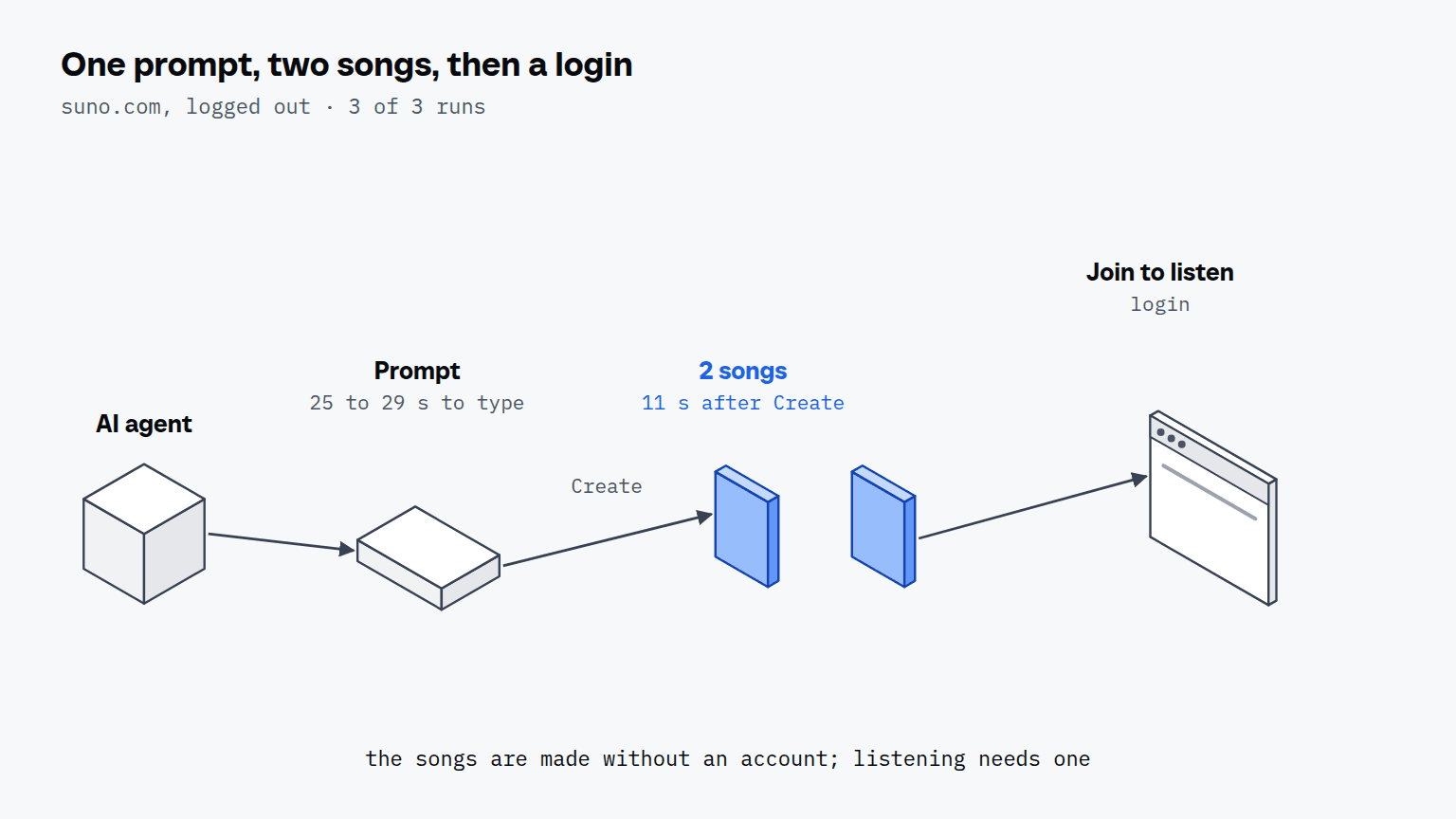
We did not run that batch. No Suno account was signed in for this article, so everything below is the public side, in 3 runs on 11 October 2026. The typing alone is a number we can give: a prompt of 47 to 51 characters took 25 to 29 seconds to type, so ten prompts are about 5 minutes. From Create to the finished songs, the one run we timed took 11 seconds, and generation time with an account is something we haven't measured.
| Check | Result |
|---|---|
| suno.com/terms, search for "API" | 1 hit in 3 of 3 runs, inside the word "scraping"; 0 uses of the word |
| platform.suno.com and /docs | login page "Make music with the Suno API" in 3 of 3 loads |
| suno.com/explore | 40 songs in 4 rows and 10 genre playlists, 2 runs |
| Play on a public song | playing, 0:14 of 2:32 at the read, 1 run |
| Prompt typed on the home page, Create pressed, no login | 3 of 3: "Your songs are ready", 2 songs, button "Join Suno for free to listen" |
| Time from Create to the two songs | 11 seconds, 1 run |
Logged out, the site makes the songs and asks you to join before you can listen. That's the gate an account opens, and a signed-in profile is how an agent gets past it the way you would. One planning number comes from Suno's own plan cards, read the same day: the free plan lists no monthly song downloads, Pro lists 20 and Premier 60. Ten tracks with both takes saved are 20 songs, and the help center doesn't say how a download is counted, so a first batch should save only the takes you need.


Scalebrowser gives each agent its own isolated browser with a persistent identity, on your own machine, so a run stays signed in, handles the captcha and finishes without anyone watching it.
See how Scalebrowser does itWhat about Midjourney?
Midjourney works the same way for images, with four images per prompt where Suno gives two songs. The Midjourney version of this starts from a help center that says Midjourney provides no API apart from a few exceptions it grants explicitly, and it ends with the same kind of run: a prompt, a feed, a download.
Where does the browser run?
The browser runs on your own machine, in a profile that stays signed in to Suno between runs, so a browser that keeps Suno open starts the next batch on the prompt box and not on a login form. Scalebrowser Start costs 19 EUR a month for one browser at a time on one machine, with unlimited profiles, according to its pricing page. The Suno account and plan stay yours.
The overview of use cases and the page on tools with no API show the same pattern on other platforms.
Run it on your own machine
Seven days to try it with your own agents on your own sites. Starting the trial needs a card.
Written by
Elias Auer
Researcher, Scalebrowser
Researcher at Scalebrowser, the browser layer for AI agents that runs on your own machine. Measures what a web page can observe about a browser, compares it with a real Chrome on the same machine and publishes the numbers, including the ones that went against us.
All articles by Elias Auer