TikTok MCP: let an AI agent upload and answer comments
What a TikTok MCP server can do: API posts stay private until an audit and an unaudited app serves 5 users a day, while a signed-in browser posts like you.

Elias Auer · Researcher, Scalebrowser
Published Oct 20, 2026 · 6 min read
Short answer
You edit 3 clips a day, and an hour of the day goes on uploading them: pick the file, type the caption, add the tags, choose who may see it, do it again. Then you read the comments and answer the ones that matter. An agent could do both, and TikTok's official route for the first half comes with a condition you should know about before you build on it.
What is a TikTok MCP server?
A TikTok MCP server is a program that gives an AI app such as Claude Desktop a set of tools for working on TikTok. MCP, the Model Context Protocol, is the standard way an AI app calls tools, and the server is whatever answers on the other end. Three kinds exist, and each needs something different from you.
| Kind | What it does | What it needs |
|---|---|---|
| A server on TikTok's Content Posting API | posts videos from an app you built | an app registered with TikTok, and an audit before posts can be public |
| A browser signed in to your account | uploads, answers comments, reads what you see | your account and a plan; Scalebrowser Start is 19 EUR a month |
| A browser logged out | reads public creator pages | nothing: no account |
What does the TikTok API allow?
The TikTok API posts privately until TikTok audits the client, and an unaudited client can let at most 5 users post in 24 hours. TikTok's Content Posting API guide restricts every post from an unaudited client to private viewing, and its content sharing guidelines set the 5 users.
| Limit | Value | Where TikTok states it |
|---|---|---|
| Visibility before an audit | private only | Content Posting API guide |
| Users an unaudited client can serve | 5 in 24 hours | content sharing guidelines |
| Posts per creator | around 15 a day, varying by creator, shared by every client | content sharing guidelines |
| Direct Post requests | 6 a minute per user access token | Direct Post reference |
We read the three pages on 11 October 2026. The 15 a day is TikTok's own cap on the creator, so it holds for a browser as well.
What can an agent do on TikTok through a browser?
An agent in a browser MCP for TikTok does what you can do on the site, with your account's sign-in. These are prompts you could give it:
- "Upload these 3 clips from my folder with the captions and tags in notes.txt."
- "Answer the new comments under yesterday's video, short and in my voice."
- "Read the comments under the top video of this competitor and tell me what people ask."
- "Note which sounds show up most among the last 30 videos in my niche."
We have not signed in to TikTok, so the first two are the jobs the tools are built for, not results we measured. The last two use only what a visitor sees: a video's link on a creator page carried its caption, the creator and the sound's name. Doing that on a schedule for several competitors is the job in competitor monitoring with an agent, measured there on five pricing pages.
What happens at TikTok's rotating puzzle?
In 3 logged-out loads on 11 October 2026 no puzzle of any kind appeared, and we opened no sign-in and no upload. A puzzle at sign-in or at an upload would sit on the signed-in side, which this run did not reach. What a rotation puzzle asks of an agent is in TikTok's rotating puzzle, where on a demo widget on 14 August 2026 our agent tried 11 of 24 positions and every one was refused; that was a demo, not TikTok's own.
What does an upload run look like?
An upload run is clips in, posts out, and a short report at the end. We ran the reading half on 11 October 2026 on a headless Scalebrowser profile with no account, for the creator who wants to see how three big accounts present their videos: NASA, National Geographic and Duolingo. The whole session, 25 page loads across three sites with the agent's own turns included, took about 15 minutes.
| Creator page | Videos seen | Sign-in dialog | Puzzle |
|---|---|---|---|
| tiktok.com/@nasa | 8 at load, at least 17, 30 and 37 after steps 1 to 3, 46 after step 4 | at step 3, with a close button; the list kept growing after we closed it | none |
| tiktok.com/@natgeo | at least 17, 30 and 45 after steps 1 to 3 | none in 3 steps | none |
| tiktok.com/@duolingo | 8 at load, not scrolled | none at load | none |
A scroll step moved the page about 1,000 pixels at most. The sign-in dialog offered a QR code, a phone number or email address, Facebook, Google and Apple, and closing it cost one click. Counts are distinct videos we could name from their links, so they are floors, not totals.
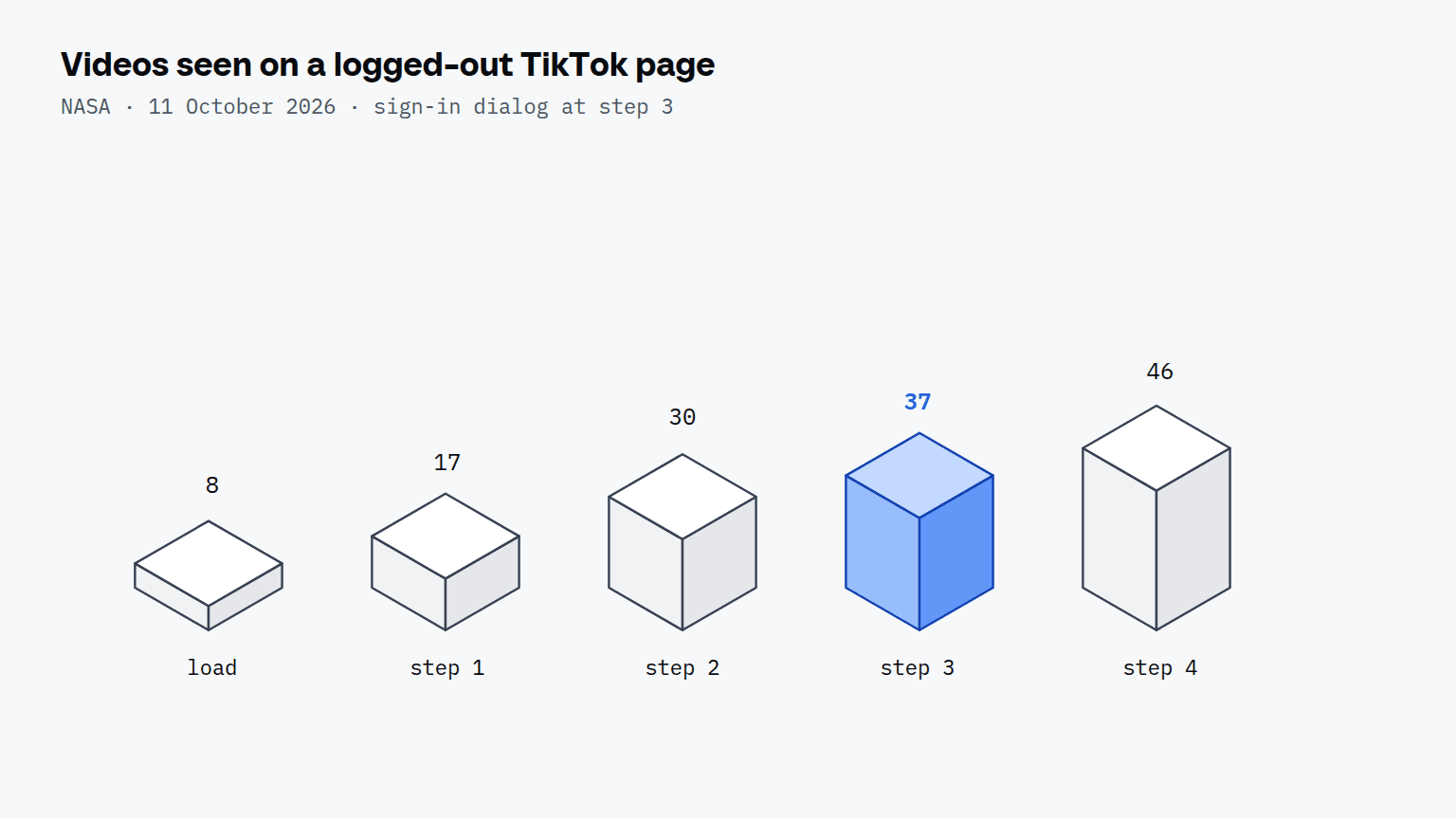
So a logged-out agent reads a long list on TikTok, where on Instagram it reads 12 posts and stops. That is enough to find a competitor's top video and to note its sounds. Comments and uploads were not part of this run.


Scalebrowser gives each agent its own isolated browser with a persistent identity, on your own machine, so a run stays signed in, handles the captcha and finishes without anyone watching it.
See how Scalebrowser does itHow does TikTok compare with Instagram for agents?
TikTok's API posts privately until an audit and Instagram's serves professional accounts only, and both leave the browser as the route that works with the account you already have.
| TikTok | ||
|---|---|---|
| Official route | Content Posting API, private until audit | Instagram API, professional accounts only |
| Posting cap | around 15 a day per creator | 100 API posts per 24 hours, 50 by the page's carousel section |
| Where it falls short | an unaudited client serves 5 users in 24 hours | personal accounts have no documented API access |
| Logged out on 11 October 2026 | at least 37 videos and a list that kept growing | 12 posts, then a sign-up dialog |
The longer account of the Instagram side is in the Instagram route for agents. A server on TikTok's API needs the audit before its posts reach anyone, and for a personal account the practical choice is the signed-in browser.
Where does the browser run?
The browser runs on your own machine, with one profile for each TikTok account, so the browser that uploads to TikTok keeps each account's sign-in apart. For the job pages that go with this one, see the use cases overview and repeat work.
Run it on your own machine
Seven days to try it with your own agents on your own sites. Starting the trial needs a card.
Written by
Elias Auer
Researcher, Scalebrowser
Researcher at Scalebrowser, the browser layer for AI agents that runs on your own machine. Measures what a web page can observe about a browser, compares it with a real Chrome on the same machine and publishes the numbers, including the ones that went against us.
All articles by Elias Auer